
Blog
How to Automate Lead Capture from Website Forms to CRM Using AI
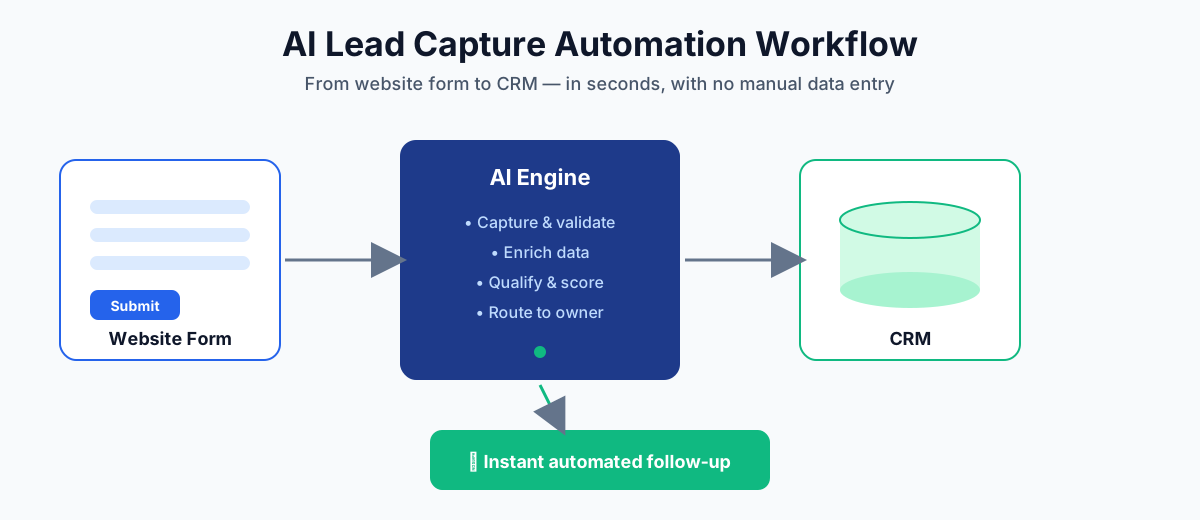
AI lead capture automation is the use of artificial intelligence to instantly collect, validate, enrich, and route information from your website forms into your CRM — with no one manually copying and pasting data. Instead of a sales rep noticing a new enquiry hours later, the lead is captured, qualified, and followed up within seconds of the visitor clicking submit.
If your business depends on website forms to generate enquiries, what happens after the click decides how many of those leads become customers. In this guide you’ll learn exactly how to automate lead capture from website forms to your CRM using AI — how it works, the tools involved, a step-by-step setup, and the best practices that make it reliable.
What Is AI Lead Capture Automation?
AI lead capture automation is a workflow that connects your website forms to your CRM through an intelligent layer that reads every submission, cleans and enriches it, scores how likely the lead is to convert, creates the record in your CRM, and triggers an immediate response. It removes the slow, error-prone manual step of a human re-typing form data into a sales system.
Traditional automation simply moves data from A to B. AI adds judgement: it can detect spam and fake submissions, fill in missing company or job-title details, interpret the intent behind a message, and decide which salesperson or sequence a lead should go to. The result is a faster, cleaner, and smarter pipeline.
Why Manual Lead Capture Costs You Sales
Speed is everything with inbound leads. Research published in Harvard Business Review found that companies which contact a new lead within an hour are far more likely to qualify it than those that wait — and every additional hour of delay sharply reduces the odds of a meaningful conversation. When leads sit in an inbox waiting for manual entry, most of that advantage is lost.
Manual lead handling creates four expensive problems:
- Slow response. Leads go cold while they wait for someone to check the inbox and update the CRM.
- Human error. Mistyped emails and missing fields corrupt your data and break follow-up.
- No prioritization. A high-value enterprise enquiry looks identical to a low-intent one until someone reviews it.
- Lost leads. Submissions get buried, duplicated, or never make it into the CRM at all.
How AI Lead Capture Automation Works
Once set up, AI lead capture automation runs as five automated steps that fire the moment a form is submitted — replacing the manual copy-paste into your CRM entirely.
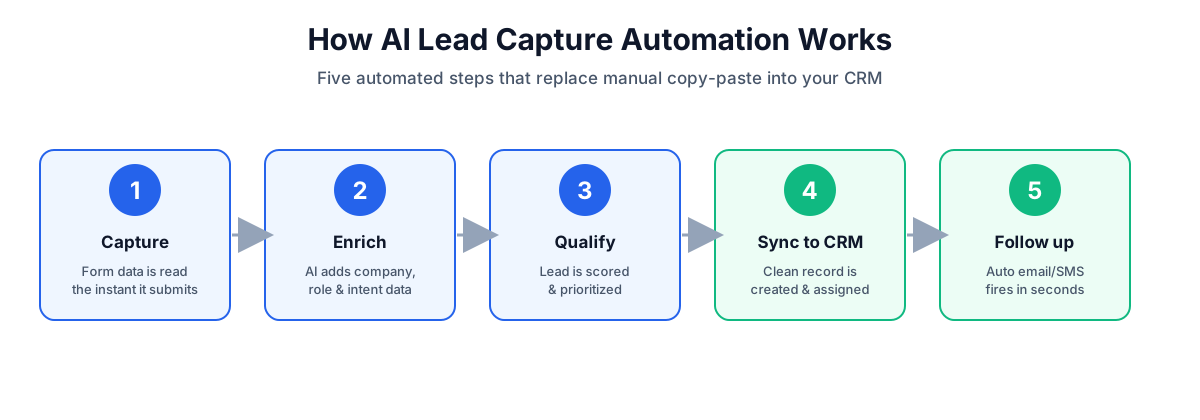
- Capture. The AI reads the form data the instant it is submitted, including hidden fields like the page URL and campaign source.
- Enrich. It appends missing context — company name, size, role, and intent signals — from the email and other available data.
- Qualify. The lead is scored against your ideal-customer criteria and flagged as hot, warm, or cold.
- Sync to CRM. A clean, de-duplicated record is created and assigned to the right owner or pipeline stage.
- Follow up. An automated, personalized email or SMS goes out in seconds, and the rep is notified.
How to Automate Lead Capture From Website Forms to Your CRM
Here is the practical, step-by-step process for building AI lead capture automation for your own site.
1. Map your lead data and CRM fields
List every field your forms collect and match each one to a field in your CRM (name, email, phone, company, message, source). Clean mapping up front prevents messy records later.
2. Standardize your website forms
Use a consistent form tool across the site and add hidden fields to capture the page, campaign, and referrer. Consistency makes automation far easier to maintain.
3. Connect an automation and AI layer
Link your form to an automation platform such as Zapier or Make, or to a custom AI agent. This layer is where capture, enrichment, and scoring happen before data reaches the CRM. For complex routing, a purpose-built AI agent gives you the most control.
4. Add AI enrichment and qualification
Configure the AI to validate the email, enrich the record, interpret the message intent, and assign a lead score. This is the difference between a basic data transfer and true AI automation.
5. Sync to your CRM with de-duplication
Push the finished record into your CRM, checking for existing contacts so you update rather than duplicate. A well-configured AI CRM keeps your database clean automatically.
6. Trigger instant, personalized follow-up
Fire an immediate acknowledgement to the lead and notify the assigned rep. Pair this with AI marketing automation to nurture leads that are not yet sales-ready.
7. Test, measure, and refine
Submit test leads, confirm every field lands correctly, and monitor speed-to-lead, data quality, and conversion rates. Refine your scoring rules over time.
Key Features to Look For
| Feature | Why it matters |
|---|---|
| Real-time processing | Captures and acts on leads in seconds, not hours |
| Data enrichment | Fills in company, role, and intent for better targeting |
| Lead scoring | Prioritizes high-value leads automatically |
| Spam & bot filtering | Keeps junk submissions out of your CRM |
| De-duplication | Prevents duplicate and conflicting records |
| Two-way CRM sync | Keeps your website and CRM data consistent |
Benefits of AI Lead Capture Automation
- Faster response times that capture leads while intent is highest.
- Higher conversion rates from instant, personalized follow-up.
- Cleaner CRM data with no manual typos or duplicates.
- More productive sales teams freed from data entry.
- Better prioritization so reps focus on the best opportunities first.
- Scalability to handle hundreds of leads without extra headcount.
Best Practices for AI Lead Capture Automation
- Keep forms short — ask only for what you need, and let AI enrich the rest.
- Always send an instant confirmation so the lead knows they were heard.
- Define clear lead-scoring rules and review them regularly.
- Respect privacy and consent — stay compliant with GDPR and similar rules.
- Keep a human in the loop for high-value or complex enquiries.
How IQ Birds Helps You Automate Lead Capture
At IQ Birds, we design end-to-end AI lead capture automation that connects your website forms to your CRM and turns every submission into a qualified, followed-up opportunity. From AI CRM development and AI automation services to AI chatbots and AI integrations, we build systems that capture leads in seconds and scale with your business.
Ready to stop losing leads to slow, manual processes? Get in touch with our team to map out your AI lead capture workflow.
Key Takeaways
- AI lead capture automation moves leads from website forms to your CRM instantly, with no manual entry.
- It works in five steps: capture, enrich, qualify, sync, and follow up.
- Speed-to-lead is the biggest driver of conversion — seconds beat hours.
- AI adds enrichment, scoring, and spam filtering that basic automation cannot.
- Done well, it means cleaner data, faster follow-up, and more closed deals.
Frequently Asked Questions
What is AI lead capture automation?
AI lead capture automation is the use of artificial intelligence to automatically collect, validate, enrich, score, and route leads from website forms into a CRM, then trigger instant follow-up — all without manual data entry.
Which forms and CRMs does it work with?
It works with virtually any website form (Contact Form 7, Gravity Forms, native block forms, and more) and any major CRM such as HubSpot, Salesforce, Zoho, or Pipedrive, connected through an automation or AI layer.
Do I need to write code to set it up?
Not always. Simple workflows can be built with no-code tools like Zapier or Make. More advanced enrichment, scoring, and routing usually benefit from a custom AI agent built by a specialist team.
How fast can leads reach my CRM?
With real-time automation, a lead can be captured, enriched, scored, and synced to your CRM — with an automated follow-up sent — within a few seconds of the form being submitted.
Is AI lead capture automation secure and compliant?
Yes, when set up correctly. Use reputable platforms, encrypt data in transit, capture proper consent, and follow regulations like GDPR. A good implementation builds compliance into the workflow from the start.