
AI Automation
Business Processes You Should Never Automate with AI
AI automation strategy should never begin with the question, “What can we automate?” A better first question is, “Which decisions should still belong to people?” That difference matters because some business processes are repetitive, low risk, and perfect for automation, while others involve judgment, trust, ethics, legal exposure, or customer relationships. When companies automate the wrong work too quickly, they may save time in the short term and create bigger problems later.
The smartest businesses do not avoid AI. Instead, they use AI with boundaries. They automate routine steps, speed up research, summarize information, route tasks, and prepare recommendations. However, they keep human review in places where context, accountability, fairness, or empathy matters. This balanced approach helps teams move faster without handing sensitive decisions to a system that may not understand the full situation.
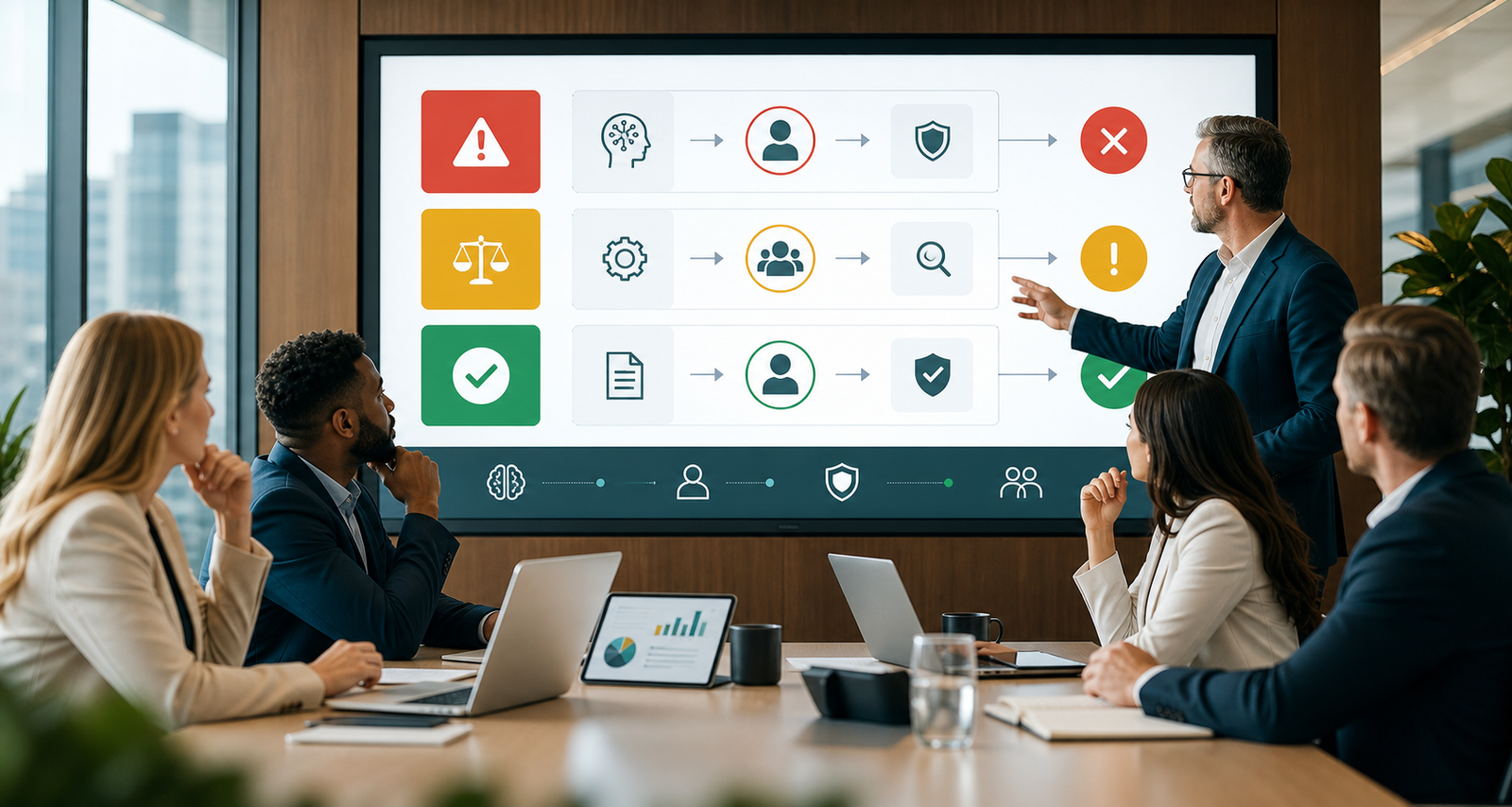
Why Some Processes Should Not Be Fully Automated
Automation works best when the task is predictable, rules-based, measurable, and easy to reverse. For example, sending a reminder, tagging a lead source, extracting fields from a form, or routing a ticket can usually be automated safely. In contrast, decisions that affect someone’s money, job, health, legal rights, safety, or trust need stronger guardrails.
AI can make confident mistakes. It can also miss context, reflect biased data, misread tone, or recommend an action that looks efficient but harms the customer experience. Therefore, sensitive processes should use AI as support, not as the final authority. The goal is not to slow the business down. The goal is to make sure speed does not outrun responsibility.
Legal and Compliance Decisions
Legal and compliance work should never be fully automated with AI. A system can help review documents, summarize clauses, flag missing information, or prepare a checklist. However, final legal judgment needs qualified human review. Contracts, regulatory filings, employment decisions, privacy requests, and compliance responses often depend on details that AI may not understand correctly.
This is especially important when a mistake could create financial penalties or legal exposure. For instance, AI may identify a risky contract clause, but a legal professional should decide whether the risk is acceptable. Similarly, AI may draft a privacy response, but a trained person should confirm that the answer follows the law and company policy.
Hiring, Firing, and Employee Evaluation
AI can support HR teams by organizing applications, summarizing resumes, scheduling interviews, and tracking training records. Still, hiring, firing, promotion, discipline, and performance evaluation should not be fully automated. These decisions affect careers and livelihoods. Because of that, they require fairness, context, and explainable reasoning.
Another risk is bias. If historical hiring data includes unfair patterns, an AI model may repeat those patterns. Even when the system appears neutral, it may overvalue certain words, schools, locations, or work histories. Human review helps teams question the recommendation, consider missing context, and keep the process accountable.
Customer Complaints and Sensitive Support Cases
AI support tools can answer common questions, summarize tickets, detect urgency, and suggest replies. Those use cases can save a lot of time. However, serious complaints, refund disputes, cancellation threats, safety concerns, discrimination claims, and emotional customer situations should not be handled by AI alone.
Customers can tell when a company hides behind automation during a difficult moment. As a result, fully automated responses may damage trust even if the answer is technically correct. A better AI automation strategy is to let AI prepare context for the support team, then have a trained person respond with judgment and empathy.
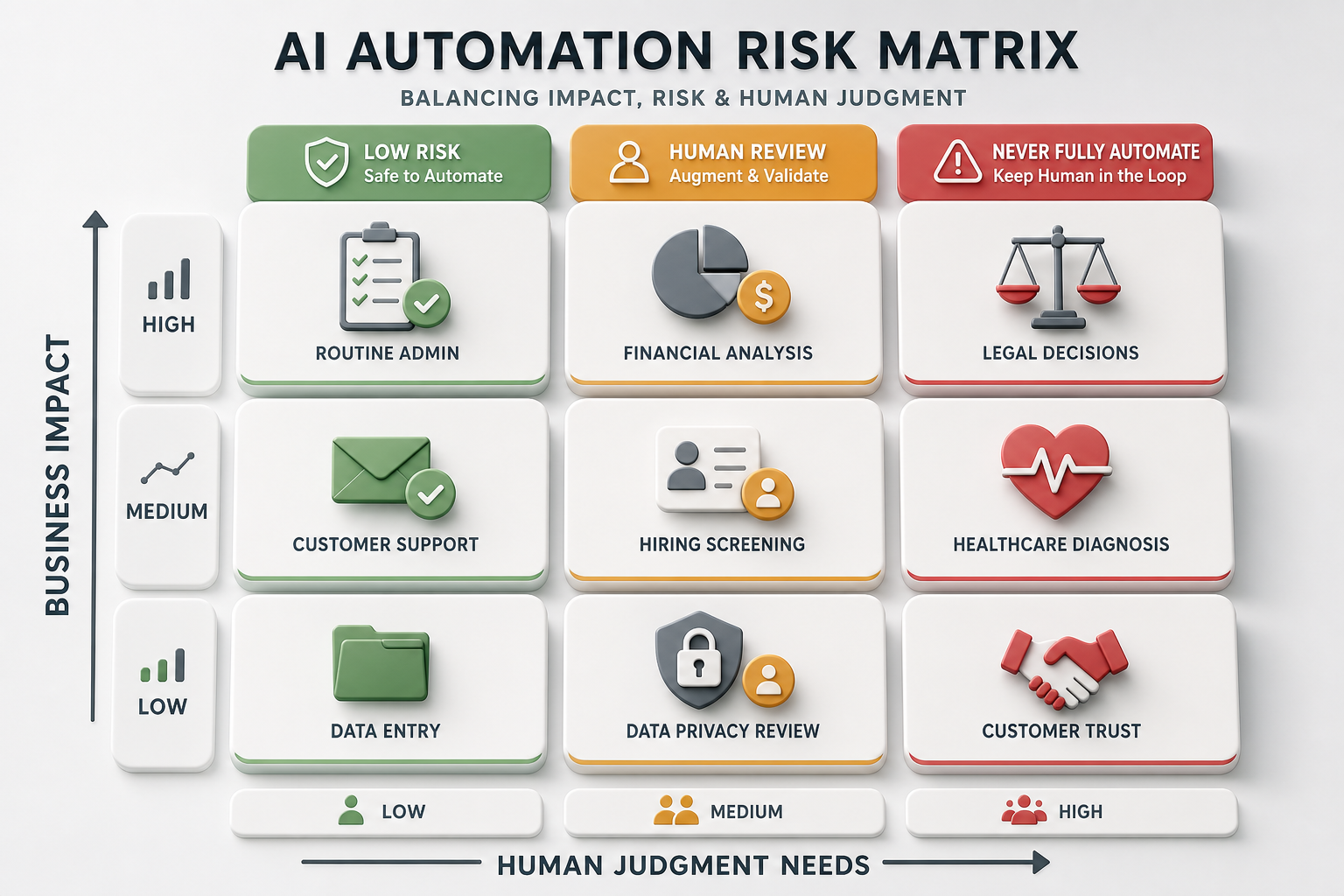
Financial Approvals and High-Value Transactions
Finance teams can safely use AI to categorize expenses, extract invoice data, detect duplicates, forecast cash flow, and flag unusual activity. Yet final approval for high-value payments, credit decisions, refunds, write-offs, pricing exceptions, and budget changes should include human review. These decisions can affect cash flow, customer relationships, and fraud risk.
AI can help identify risk faster than manual review. Nevertheless, the approval should remain with someone who understands the business context. For example, an unusual payment may be fraud, or it may be a legitimate urgent vendor payment. A responsible workflow lets AI flag the issue, collect the evidence, and send it to the right decision-maker.
Medical, Safety, and High-Stakes Advice
Businesses in healthcare, wellness, insurance, transportation, manufacturing, and field services should be very careful with AI automation. AI can support triage, summarize records, identify missing forms, or route requests. However, medical advice, safety decisions, diagnosis, emergency response, and risk-critical instructions should not be fully automated.
The reason is simple: the cost of being wrong is too high. In these situations, AI should assist qualified professionals rather than replace them. Additionally, the workflow should include audit trails, escalation paths, and clear disclaimers where appropriate.
Brand Voice, Crisis Communication, and Public Statements
AI can draft social posts, emails, press statements, and announcements. It can also summarize public feedback and suggest message angles. Even so, crisis communication and public statements should not be published automatically. Brand reputation depends on timing, tone, accuracy, and accountability.
A fully automated statement can sound cold, defensive, or inaccurate. Moreover, it may miss legal or cultural context. The safer approach is to use AI for drafts and research, then require approval from leadership, legal, or communications teams before anything goes public.
Fully Automated AI vs Human-in-the-Loop AI
| Process type | Fully automated AI | Human-in-the-loop AI |
|---|---|---|
| Routine admin | Works well for reminders, tagging, filing, and simple routing | Usually needed only for exceptions or unclear records |
| Legal or compliance decisions | Too risky because errors can create liability | AI prepares summaries while experts make final decisions |
| Hiring and employee reviews | Can repeat bias or miss context | AI organizes information while people evaluate fairly |
| Customer complaints | May feel cold or escalate frustration | AI summarizes history while humans respond with empathy |
| Financial approvals | May approve or block transactions without enough context | AI flags risk while authorized staff approve actions |
This table does not argue against automation. Instead, it shows where automation should stop and human judgment should begin. A strong AI automation strategy uses AI to remove friction, not accountability. Therefore, the safest design often combines speed from AI with approval from people.

How to Decide What Should Not Be Automated
Start by rating each process against five questions. First, could the decision harm a customer, employee, vendor, or patient? Next, does the decision involve legal, financial, or safety risk? Then ask whether the data is complete and reliable. After that, consider whether the decision can be explained clearly. Finally, decide whether the action can be reversed if AI gets it wrong.
If the answer raises concern, do not fully automate the process. Instead, automate the supporting steps. AI can gather information, draft options, score risk, prepare summaries, and route the item to a person. This gives the business efficiency while keeping accountability in the right place.
Helpful Internal and External Resources
Businesses that want safer automation can begin with workflow mapping and risk review. IQBIRDS AI Automation Services help teams identify which processes are safe to automate and which need approval steps. The AI Integration Services page explains how systems can be connected without losing control. Teams can also review AI CRM Development or AI Agent Development when planning more advanced AI workflows.
External guidance also supports a careful approach. The NIST AI Risk Management Framework focuses on managing AI risks across design and use. Microsoft’s responsible AI principles highlight fairness, reliability, privacy, transparency, and accountability. In addition, IBM’s AI governance guidance explains why policies, oversight, and monitoring matter for AI systems.
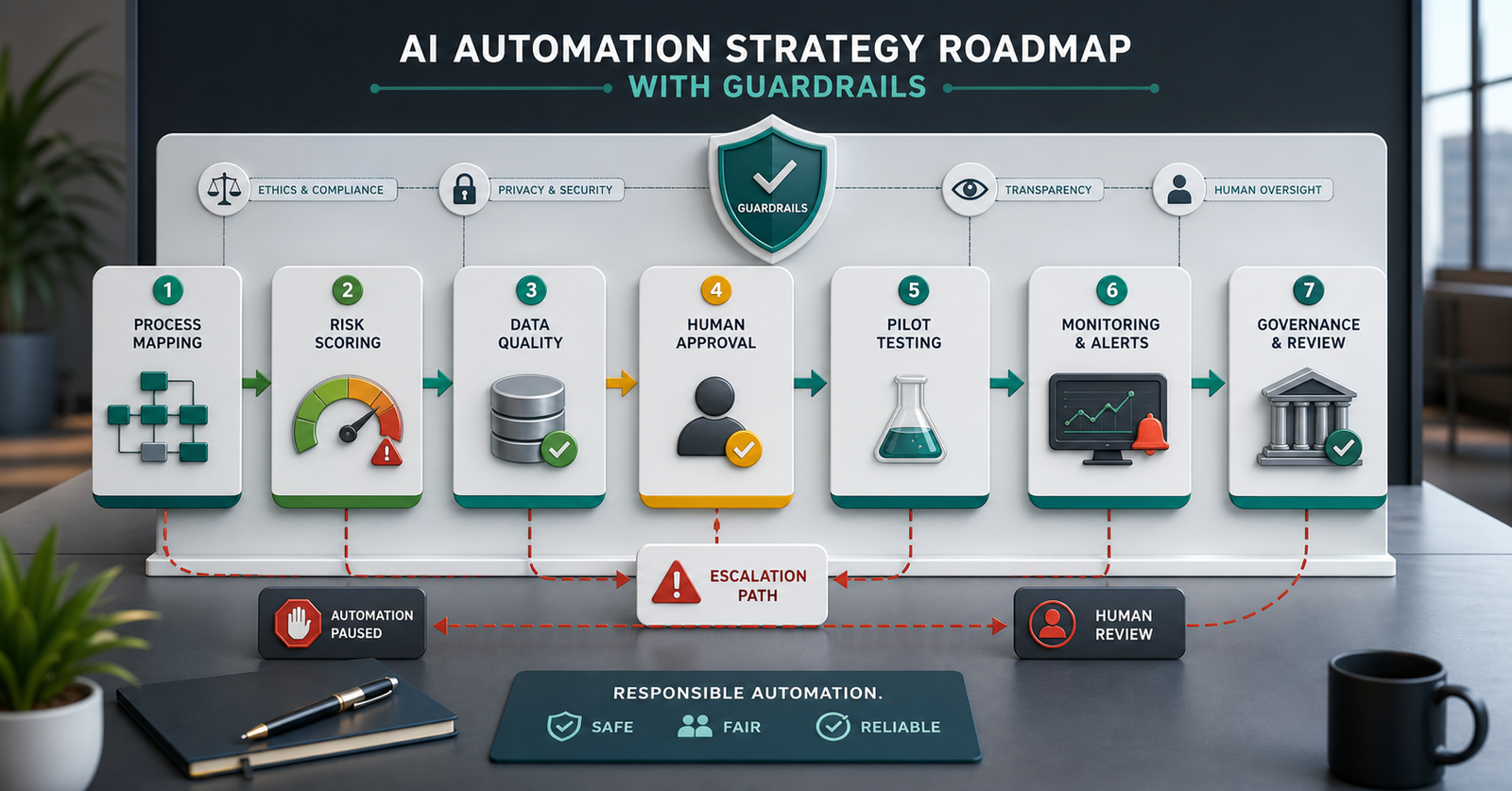
Step-by-Step AI Automation Strategy With Guardrails
Step 1: Map the process from start to finish. Document the trigger, inputs, decisions, handoffs, systems, owners, and outcomes. This makes hidden risk easier to see before automation begins.
Step 2: Separate tasks from decisions. A task may be safe to automate, while the final decision may need human review. For example, AI can summarize a refund request, but a manager may approve the refund.
Step 3: Score the risk. Rate the process based on legal exposure, financial impact, customer trust, safety, data sensitivity, bias risk, and reversibility. High-risk processes should include human approval.
Step 4: Check data quality. AI should not make or recommend decisions from messy, incomplete, or outdated records. Clean data improves accuracy and reduces false confidence.
Step 5: Add human approval and escalation paths. Decide who reviews the output, when the workflow pauses, and what happens when confidence is low or the case is unusual.
Step 6: Pilot with real examples. Test the workflow on actual cases before rolling it out. Compare AI suggestions with human decisions and look closely at errors.
Step 7: Monitor and improve. Track accuracy, overrides, complaints, time saved, escalations, and business impact. Over time, adjust the workflow as data, regulations, and customer expectations change.
Key Benefits of Knowing What Not to Automate
- Lower legal, financial, and reputational risk
- Better customer trust during sensitive interactions
- More responsible use of AI across departments
- Clearer approval paths for high-impact decisions
- Fewer automation failures caused by poor data or missing context
- Stronger employee confidence in AI-supported workflows
These benefits make automation more sustainable. When employees know where AI is allowed to act and where human review is required, they can use the system with more confidence. Likewise, customers are more likely to trust automation when important decisions still feel accountable.
Common Mistakes to Avoid
One common mistake is automating before mapping the process. Without a clear workflow map, teams may automate confusion. Another mistake is treating AI confidence as the same thing as truth. A confident answer can still be wrong, incomplete, or biased.
Some companies also remove human review too early. They may test a workflow on easy cases, then assume it is ready for complex situations. Finally, teams may measure only time saved while ignoring complaints, errors, overrides, or trust. A responsible AI automation strategy measures both efficiency and risk.
How IQBIRDS Helps Your Business
IQBIRDS helps businesses build AI automation strategies that are practical, useful, and responsible. First, the team maps your workflows and identifies which parts are repetitive, rules-based, and safe to automate. Next, sensitive decisions are separated from simple tasks. Then approval steps, integrations, monitoring, and escalation rules are added where they matter.
This approach helps your business move faster without losing control. IQBIRDS can support CRM automation, AI integration, lead management, customer journey automation, reporting dashboards, and human approval workflows. If you are unsure which processes should be automated first, the Contact us page is a good place to start the conversation.
Final Thoughts
AI automation can create real business value, but it should not be used everywhere without limits. The most effective companies automate the work that is repetitive and low risk while protecting decisions that require judgment, empathy, ethics, or accountability. In other words, the best automation strategy is not the most aggressive one. It is the one that makes the business faster and safer at the same time.
Frequently Asked Questions
What business processes should never be fully automated with AI?
Legal decisions, hiring and firing decisions, high-value financial approvals, medical or safety advice, sensitive customer complaints, and crisis communication should not be fully automated with AI.
What is an AI automation strategy?
An AI automation strategy is a plan for choosing which workflows AI should automate, which tasks need human review, what tools should connect, and how results will be measured.
Does human-in-the-loop automation slow teams down?
Not usually. AI can still prepare summaries, gather data, score risk, and route work quickly. Human review is added only where the decision is sensitive, unclear, or high impact.
Can AI help with legal or HR work?
Yes, AI can help summarize documents, organize records, draft checklists, and surface risks. However, qualified people should make final legal, compliance, hiring, firing, or disciplinary decisions.
How do I know if a workflow is safe to automate?
A workflow is safer to automate when it is repetitive, rules-based, low risk, easy to monitor, and easy to reverse. If it affects rights, money, safety, trust, or employment, add human review.
What is the biggest mistake in AI automation?
The biggest mistake is automating a broken or unclear process. Before adding AI, map the workflow, clean the data, define success, and decide where human approval is required.
How can IQBIRDS help my business?
IQBIRDS can map your workflows, identify safe automation opportunities, build AI integrations, add human approval steps, improve CRM automation, and measure automation results.