
AI Automation
How AI Automation Improves Customer Retention
Customer retention is usually won or lost before a cancellation request appears. A customer may stop logging in, ignore renewal emails, ask the same support question twice, or reduce order volume weeks before the account finally leaves. AI customer retention helps businesses notice those early signals and respond while there is still time to rebuild value.
For growing companies, that timing matters. Acquiring a new customer costs more than keeping an existing one, yet many teams still manage retention with delayed reports, manual follow-ups, and scattered customer notes. Therefore, AI automation gives customer success, sales, support, and operations teams a more connected way to protect revenue.

What AI Customer Retention Means
AI customer retention is the use of artificial intelligence, automation, and connected customer data to keep customers engaged for longer. It does not mean replacing every human relationship with software. Instead, it gives teams better timing, better context, and better next steps.
A practical AI customer retention system can watch customer behavior, CRM history, support tickets, product usage, billing events, feedback, and renewal dates. Then, it can identify which accounts need attention, suggest the best action, trigger personalized messages, and notify the right person when human outreach is needed.
In simple terms, AI turns retention from a reactive process into a proactive workflow. Before automation, a team might notice churn risk after a customer complains. With AI, the team can see patterns earlier and act with more relevance.
Why Customers Leave Before Teams Notice
Most customers do not disappear in one sudden moment. First, they become less engaged. Next, they stop seeing clear value. After that, they compare alternatives or delay the next purchase. Finally, they leave, downgrade, or simply stop responding.
The problem is that these warning signs often live in different systems. Support knows the customer is frustrated. Sales knows the renewal is coming. Finance sees a late payment. Marketing sees lower email engagement. However, nobody has the full picture at the right time.
AI automation improves customer retention because it connects those signals. As a result, teams no longer depend only on memory, spreadsheets, or end-of-month reports. They can respond based on current customer behavior and clear priority.
Signals AI Can Use to Find Churn Risk
Retention automation works best when it studies several signals together. A single missed login may not mean much. However, a missed login, a support complaint, a lower usage trend, and an upcoming renewal can point to a real risk.
Useful churn signals include reduced product usage, fewer repeat purchases, lower email engagement, unresolved tickets, negative survey responses, late payments, declining meeting attendance, contract inactivity, and changes in decision-makers. In addition, AI can compare each account against normal behavior for similar customers.
This context is important because not every customer behaves the same way. For example, a monthly buyer and a seasonal buyer should not be scored using the same pattern. A smart AI customer retention workflow learns from customer segments so alerts are more useful and less noisy.
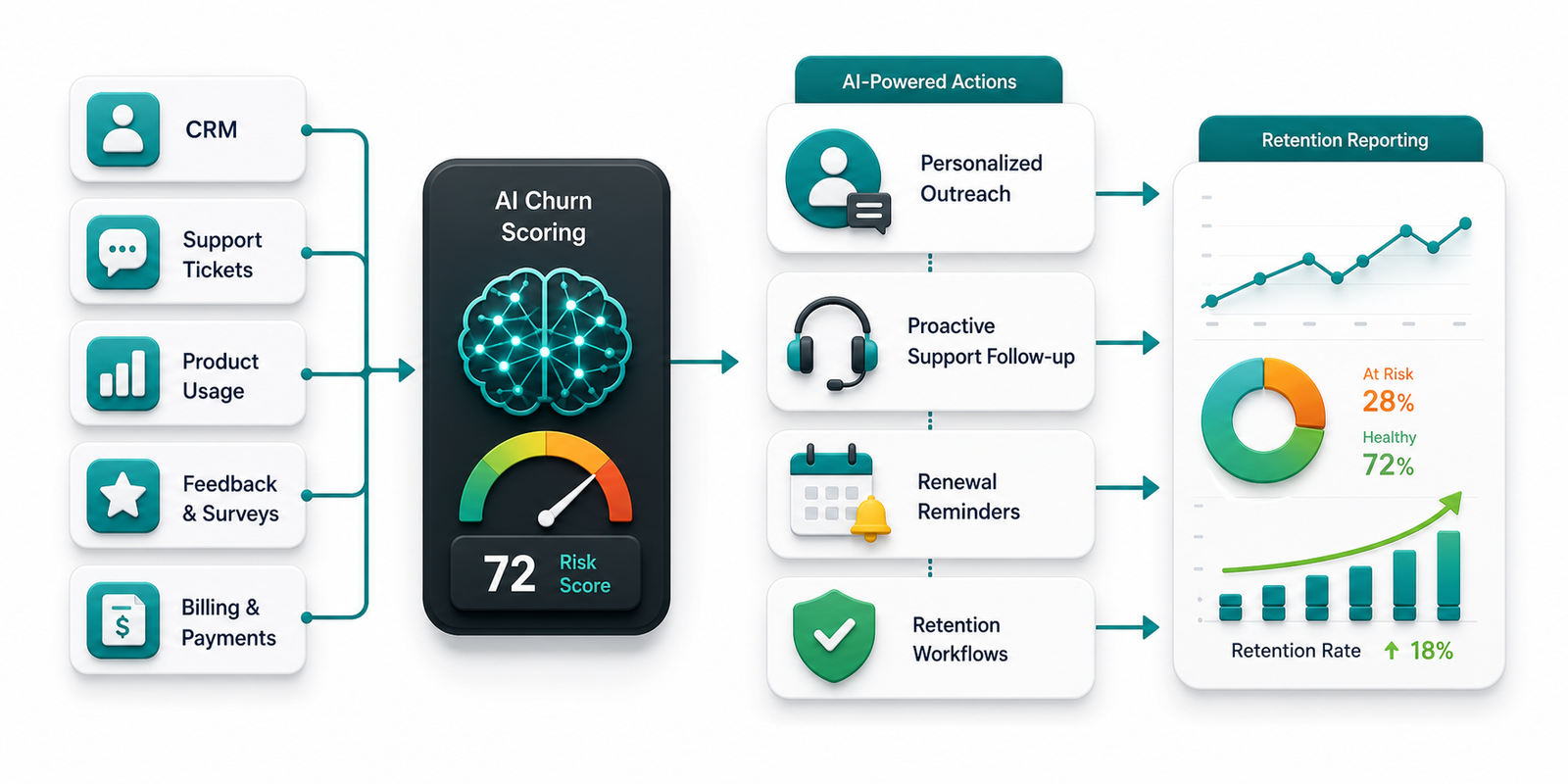
How AI Automation Improves Customer Retention
AI improves retention by helping businesses take the right action sooner. Instead of waiting for a customer to complain, the system can identify an account that needs help and trigger a useful next step. That next step might be a check-in email, a support follow-up, a renewal reminder, a training offer, or an internal task for a customer success manager.
Personalization is another major advantage. Because AI can read customer history and segment behavior, outreach can reflect what the customer actually needs. For example, a customer who has not used a core feature may receive a helpful tutorial. Meanwhile, a customer with unresolved support tickets may be routed to a specialist before a renewal conversation begins.
AI customer retention also improves internal coordination. When customer data is connected, each team can see the same risk level and recommended action. Therefore, sales is not pushing an upsell while support is still handling a serious complaint.
Finally, automation gives leaders better visibility. Instead of asking whether retention activity happened, executives can review churn-risk trends, save-rate performance, renewal health, response times, and campaign outcomes. That visibility makes retention easier to manage as the business grows.
Manual Retention vs AI Customer Retention
Manual customer retention can work when a company is small and each account is easy to remember. However, it becomes harder as customer volume, product complexity, and service channels grow. AI customer retention adds structure without removing the human judgment that strong relationships still need.
| Retention Area | Manual Approach | AI Automation Approach |
|---|---|---|
| Churn detection | Teams notice problems after complaints or missed renewals. | AI flags risk earlier using behavior, CRM, support, and billing signals. |
| Follow-up timing | Outreach depends on reminders, calendars, or individual habits. | Automated workflows trigger timely messages and tasks based on customer activity. |
| Personalization | Messages are often generic because context is scattered. | AI tailors outreach by segment, history, product use, and current need. |
| Renewal management | Renewals are handled near the deadline. | Teams receive early alerts, health scores, and suggested actions before renewal risk rises. |
| Reporting | Managers review lagging reports after churn has already happened. | Dashboards show active risk, retention trends, and workflow performance. |
The goal is not to make retention robotic. Instead, automation removes delays and blind spots. Then, customer-facing teams can spend more time on conversations that actually protect the relationship.

Where AI Customer Retention Creates Value
AI retention workflows create value in several parts of a business. Customer success teams can prioritize accounts that need attention. Support teams can identify recurring issues that may cause churn. Sales teams can enter renewal conversations with better context. Marketing teams can send lifecycle messages that match customer behavior.
For service businesses, AI can watch appointment patterns, service frequency, complaints, and missed follow-ups. Agencies can use it to track client engagement, deliverable approvals, meeting attendance, and satisfaction signals. SaaS companies can monitor product usage, feature adoption, onboarding progress, and renewal risk. In each case, the same principle applies: connect signals, find risk early, and act with relevance.
Because retention affects revenue, these workflows can also improve forecasting. If leaders know which accounts are healthy, at risk, or ready for expansion, they can plan capacity and cash flow with more confidence.
Helpful Internal and External Resources
If your business is building retention workflows, start with the systems that already hold customer data. IQBIRDS supports that foundation through AI automation services, AI CRM development, and AI integration services. In addition, lifecycle campaigns can connect with AI marketing automation when customer behavior should trigger personalized emails or follow-ups.
For broader context, Salesforce explains why retention depends on customer value and engagement in its customer retention resources. HubSpot also shares practical retention ideas in its customer retention guide. Meanwhile, IBM discusses how AI supports service experiences in its overview of AI customer service, and Microsoft shows how connected customer data can support insights through Dynamics 365 Customer Insights.
Step-by-Step Guide to Build AI Customer Retention Workflows
Step 1: Audit Your Customer Data
Begin by listing where customer information lives. Common sources include CRM records, support tickets, invoices, email platforms, product usage tools, call notes, survey responses, and spreadsheets. Then, check whether the data is accurate enough to support automation.
Step 2: Define Your Churn Signals
Choose the signals that usually appear before a customer leaves. For example, you might track fewer logins, slower replies, repeated complaints, late payments, low satisfaction scores, or declining order frequency. Also, separate weak signals from strong signals so the workflow does not overreact.
Step 3: Segment Customers by Behavior
Different customers need different rules. New customers may need onboarding help, while long-term customers may need renewal value reminders. Therefore, segmenting customers by plan, service type, purchase frequency, lifecycle stage, or account size makes AI customer retention more accurate.
Step 4: Design the Right Follow-Up Actions
After you define the signals, decide what should happen next. Some situations can trigger automated emails. Other situations should create a CRM task, send a Slack alert, or assign a support specialist. The best workflow uses automation for speed and people for judgment.
Step 5: Connect CRM, Support, Billing, and Marketing
Retention improves when systems share context. Connect your CRM with support, billing, email, forms, and analytics tools. As a result, the workflow can see the customer journey instead of a narrow slice of it.
Step 6: Add Human Review for Sensitive Accounts
Automation should not handle every situation alone. High-value accounts, angry customers, contract issues, and complex support cases should include a human review step. This protects the relationship and keeps the experience professional.
Step 7: Measure Retention Performance
Once the workflow is live, review churn rate, renewal rate, repeat purchase rate, customer lifetime value, response time, support resolution time, and save-rate performance. Then, improve the rules based on real outcomes.
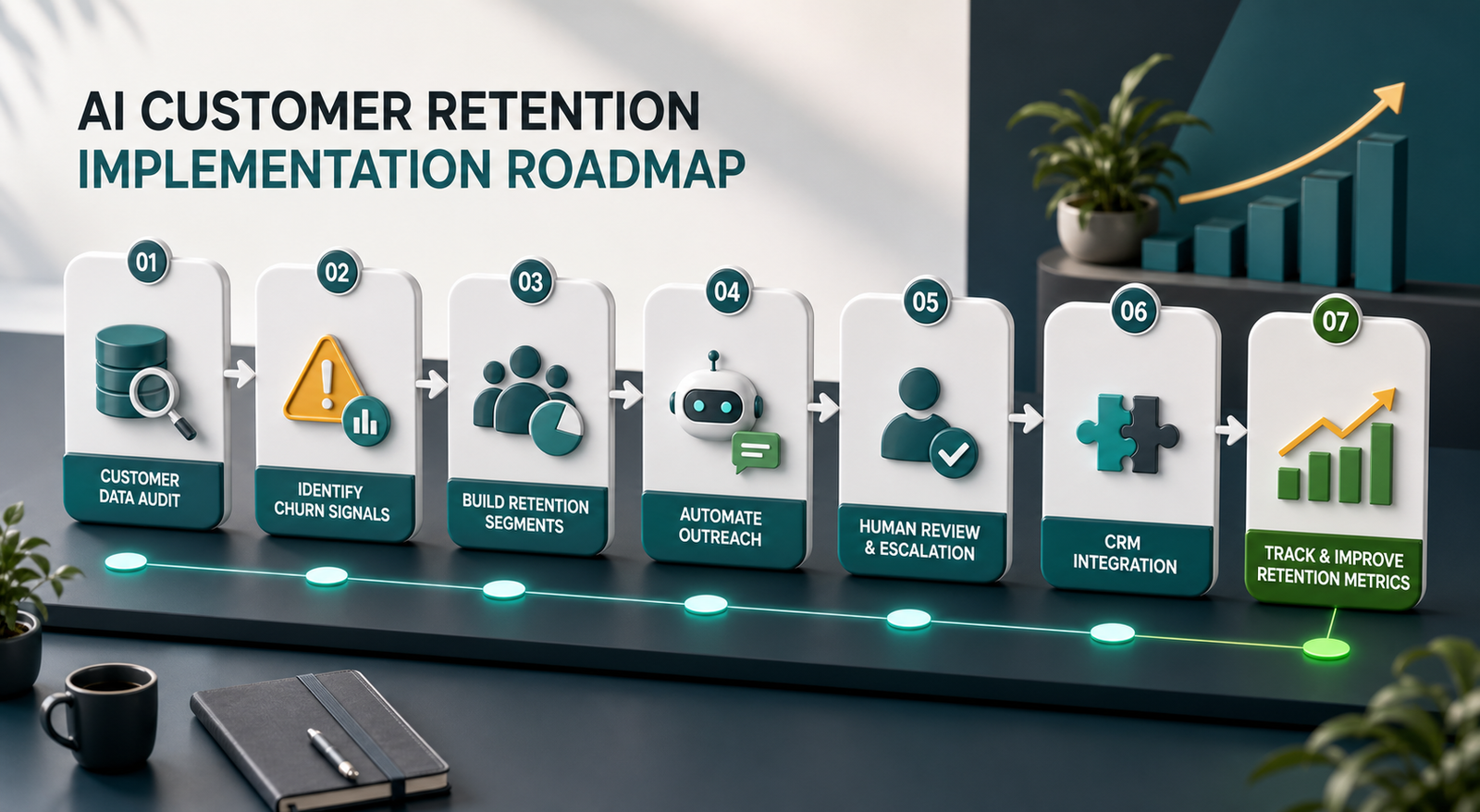
Key Benefits of AI Customer Retention
The first benefit is earlier risk detection. Because AI can monitor many signals at once, teams can act before a customer has fully disengaged. This gives the business more time to solve problems and rebuild trust.
The second benefit is better personalization. Customers are more likely to respond when outreach reflects their real situation. For example, a reminder about an unused feature is more helpful than a generic newsletter.
The third benefit is consistent follow-up. Busy teams often miss small retention tasks because urgent work takes over. However, automation can create reminders, route tasks, and send timely messages without relying on memory.
The fourth benefit is improved team alignment. When customer health scores and churn alerts are shared inside the CRM, everyone works from the same context. Consequently, support, sales, and marketing can coordinate instead of sending mixed messages.
The fifth benefit is measurable improvement. AI customer retention workflows make it easier to see which actions are reducing churn, increasing renewals, or improving repeat purchases.
Common Mistakes to Avoid
One common mistake is automating outreach before fixing messy data. If customer records are incomplete, duplicated, or outdated, AI will make poor recommendations. Clean data is not exciting, but it is the foundation for useful automation.
Another mistake is using one churn score for every customer. Different segments behave differently, so the same rule may be helpful for one group and misleading for another. Instead, build scoring around lifecycle stage, customer type, and value.
Teams also make mistakes when they send too many automated messages. Retention should feel helpful, not desperate. Therefore, set frequency limits and use human review when the situation is sensitive.
A fourth mistake is measuring only churn after the fact. Churn rate matters, but leading indicators matter too. Track engagement, response time, issue resolution, renewal health, and customer sentiment so the workflow can improve earlier.
Finally, do not treat AI as a replacement for service quality. If the product, delivery, or support experience is weak, automation will only expose the issue faster. Customer retention still depends on real value.
How IQBIRDS Helps Your Business
IQBIRDS helps businesses build AI customer retention systems that connect data, automate follow-ups, and support stronger customer relationships. The work usually starts by reviewing your current CRM, support process, lead and customer data, and renewal workflow.
After that, IQBIRDS can design churn-risk scoring, customer health dashboards, automated reminders, personalized email workflows, support escalation rules, and CRM integrations. In addition, the team can connect AI tools with platforms your business already uses, so retention becomes part of daily operations instead of a separate manual process.
This approach is especially useful for growing businesses that already have customers but need a better way to protect revenue. With the right workflow, your team can see who needs attention, why they need it, and what action should happen next.
What to Measure After Launch
After launching an AI retention workflow, measure both business outcomes and workflow activity. Business outcomes include churn rate, repeat purchase rate, renewal rate, expansion revenue, customer lifetime value, and net revenue retention. Workflow activity includes alerts created, tasks completed, messages sent, response time, and saved accounts.
Also, compare automated recommendations with real results. If high-risk customers are not actually leaving, your scoring model may need adjustment. If low-risk customers are canceling, the workflow may be missing an important signal. Over time, this feedback makes AI customer retention more accurate.
Final Thoughts
AI automation improves customer retention by helping businesses notice risk earlier, personalize follow-up, coordinate teams, and measure what works. It gives people better information at the exact moment when action matters.
For growing businesses, the best place to start is not a complicated AI project. Start with the customer data you already have, define the signals that matter, and automate the next best action. Then, improve the workflow as your team learns from real customer behavior.
Frequently Asked Questions
What is AI customer retention?
AI customer retention uses artificial intelligence and automation to identify churn risk, personalize customer follow-up, and help teams keep customers engaged for longer.
How does AI know when a customer might leave?
AI can review signals such as reduced usage, unresolved support tickets, late payments, lower engagement, negative feedback, and renewal timing. When several signals appear together, the system can flag the account for action.
Can small businesses use AI customer retention?
Yes. Small businesses can start with simple workflows, such as CRM reminders, customer health scores, feedback follow-ups, and personalized re-engagement emails.
Does AI replace customer success teams?
No. AI helps customer success teams prioritize work and respond faster. However, human conversations are still important for complex, emotional, or high-value customer situations.
What tools are needed for AI retention automation?
Most businesses need a CRM, customer data sources, automation tools, and clear retention rules. Depending on the business, support, billing, email, analytics, and product usage platforms may also connect to the workflow.
How long does it take to see results?
Many businesses can see early improvements within a few months if they start with clear churn signals and practical follow-up actions. Larger workflows may take longer because data cleanup and integrations add complexity.
How can IQBIRDS help my business?
IQBIRDS can design and implement AI customer retention workflows, connect your CRM and customer data, create churn-risk dashboards, automate follow-ups, and help your team measure retention performance.