
AI Automation
How to Automate Google Sheets, CRM, and Email Workflows with AI
Google Sheets CRM email automation is one of the simplest ways to remove repetitive admin work from your sales and marketing process. If your team is copying leads from a form into a spreadsheet, updating a CRM by hand, and sending the same follow-up emails again and again, automation can save hours every week.
The goal is not to replace your team with complicated software. The goal is to help your business respond faster, keep better records, and make sure no good lead slips through the cracks.
In this guide, we will explain how to automate Google Sheets, CRM, and email workflows with AI in simple language. You will learn what to automate first, which tools to consider, how to build a practical workflow, and how IQBIRDS can help you turn messy manual processes into clean business systems.
Table of Contents
- What Google Sheets CRM email automation means
- Why businesses are automating these workflows
- Manual process vs AI automation
- Practical workflow examples
- Tools you can use
- Step-by-step implementation guide
- Key benefits
- Common mistakes to avoid
- How IQBIRDS helps your business
- FAQs
What Google Sheets CRM Email Automation Means
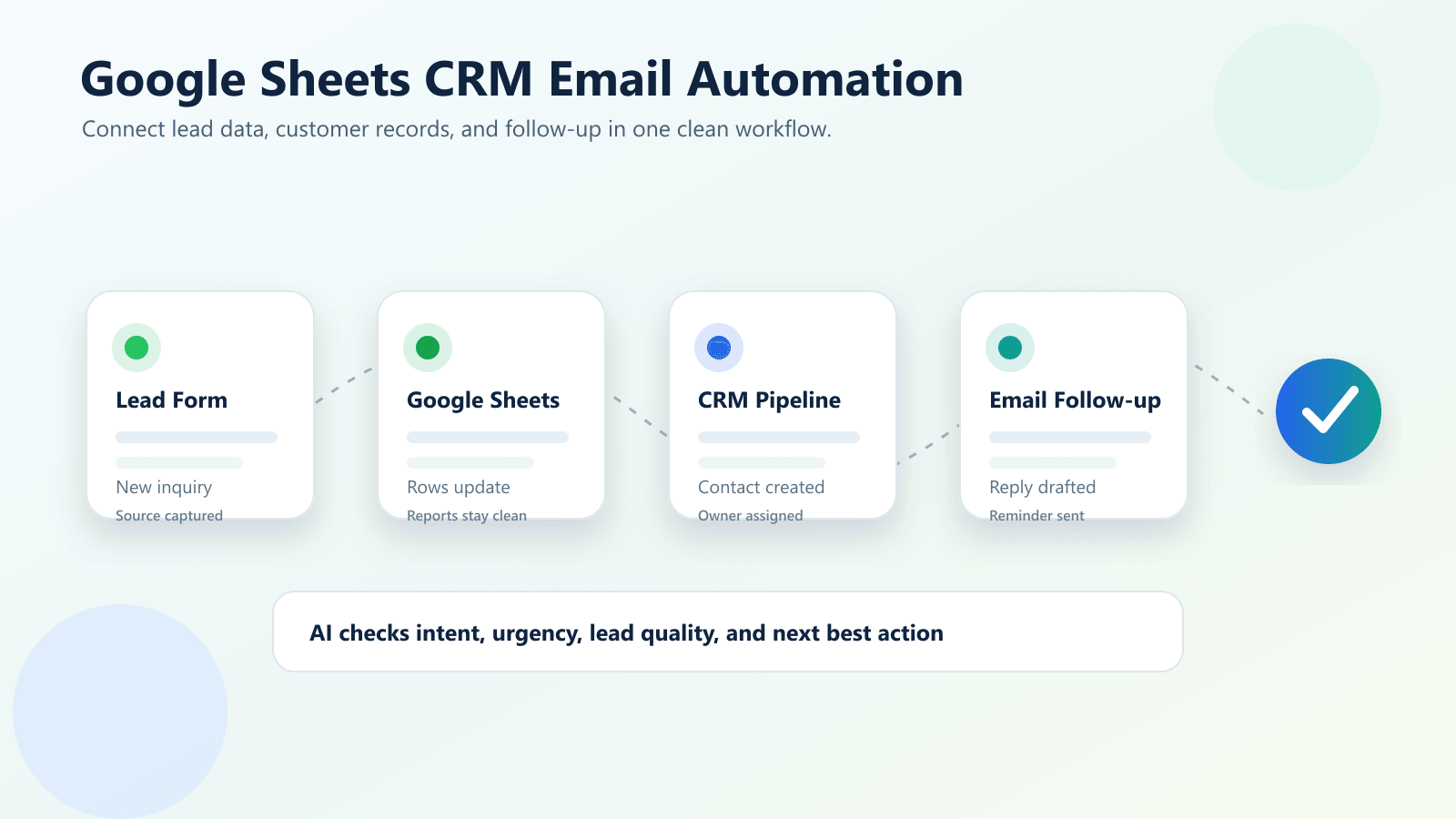
Google Sheets CRM email automation means connecting three important parts of your business workflow:
- Google Sheets for lead lists, reports, quick updates, imports, and shared tracking.
- Your CRM for customer records, deal stages, tasks, notes, and sales activity.
- Email tools for welcome messages, follow-ups, reminders, newsletters, and sales outreach.
AI workflow automation adds a smarter layer on top. Instead of only moving data from one app to another, AI can help classify leads, summarize messages, write draft replies, detect urgency, and recommend the next action.
For example, a new lead fills out a website form. The automation adds the lead to Google Sheets, creates a contact in your CRM, scores the inquiry based on budget and service need, sends a friendly confirmation email, and alerts your sales team if the lead looks urgent.
That is business process automation in a practical form. It is not flashy. It is useful.
Why Small Businesses Are Automating These Workflows
Small business owners, agencies, startups, and sales teams often run into the same problem: leads arrive from many places, but the process after that is inconsistent.
One lead comes from a website form. Another comes from Facebook. Another arrives by email. Someone adds a row to a spreadsheet. Someone else forgets to update the CRM. A follow-up gets delayed because the team is busy. After a few weeks, nobody knows which leads were contacted, which ones are hot, and which ones need another message.
AI business automation helps fix this by creating a repeatable system. Every lead follows the same basic path. Every important field gets captured. Every qualified contact receives a timely response. Your team still makes the important decisions, but the busywork happens in the background.
A practical example
A marketing agency may receive 30 leads per week. Without automation, the team manually checks each inquiry, copies data into a CRM, sends a first email, assigns the lead to a salesperson, and updates a sheet for reporting. With AI CRM integration, the same process can happen in minutes. The team only steps in when the lead needs personal attention.
This does not only save time. It improves consistency, which is often where revenue is lost.
Manual Process vs AI Automation
| Feature | Manual Process | AI Automation |
|---|---|---|
| Speed | Depends on team availability | Runs instantly when triggered |
| Accuracy | Easy to make copy-paste errors | Uses consistent rules and validation |
| Lead Response | Can be delayed or forgotten | Sends quick confirmations and alerts |
| CRM Updates | Manual data entry | Creates or updates records automatically |
| Email Follow-Up | Repeated messages written by hand | Uses templates, personalization, and AI drafts |
| Scalability | Limited by staff time | Handles higher volume with the same process |
| Cost | Higher labor cost over time | Lower admin cost after setup |
The table shows the main difference clearly. Manual work can be fine when you have very few leads, but it becomes harder to manage as your business grows. AI automation gives you a repeatable process, which means your team can spend more time selling, serving customers, and improving campaigns.
The best approach is not to automate everything at once. Start with the steps that are repeated often, easy to define, and expensive when missed.
Practical Workflow Examples
1. New lead capture and routing
When someone submits a form, automation can add the lead to Google Sheets, create a CRM contact, assign a sales owner, and send a first email. AI can read the message and classify it as sales, support, partnership, or low-priority.
Benefit: Your team responds faster and routes leads to the right person without manual sorting.
2. Automated lead management and scoring
AI can review form answers, industry, company size, message intent, location, budget, and service need. Then it can apply a simple score such as hot, warm, cold, or not qualified.
Best practice: Keep lead scoring simple at first. A score your team understands is better than a complicated model nobody trusts.
3. Email workflow automation for follow-ups
Email marketing automation can send welcome messages, consultation reminders, quote follow-ups, nurture emails, and re-engagement campaigns. AI can help personalize the draft, but your business should still use approved templates and brand guidelines.
Practical example: If a lead requests pricing but does not book a call within 48 hours, the workflow sends a helpful follow-up with a booking link and a short answer to the most common pricing question.
4. Google Sheets reporting for managers
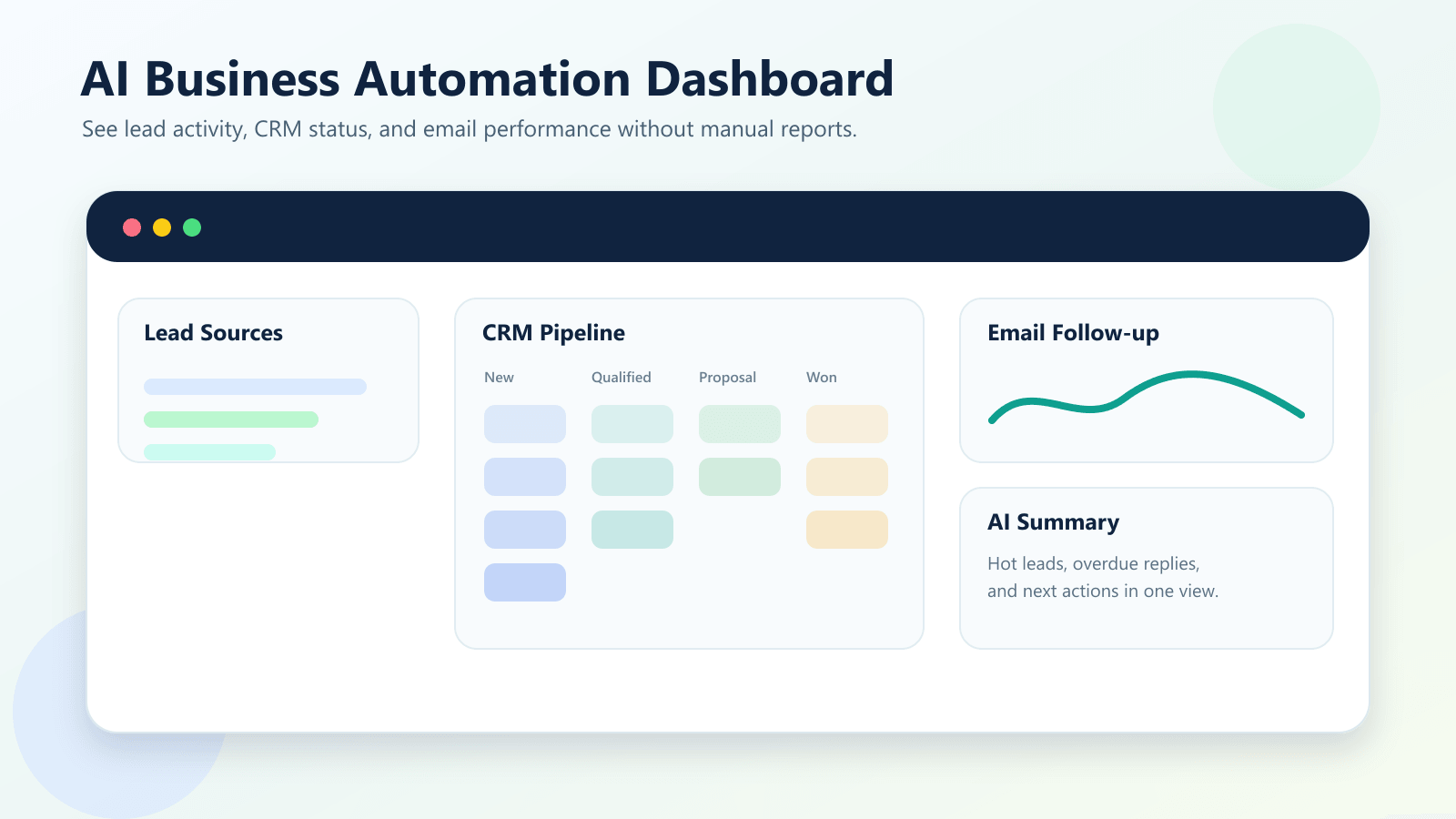
Google Sheets automation is useful for live reports. You can sync CRM data to a sheet, calculate weekly lead totals, track response times, and show campaign source performance.
This is helpful for business owners who want a quick view without logging into several tools.
Tools You Can Use for Google Sheets, CRM, and Email Automation
There are several ways to build this kind of workflow. The best choice depends on your budget, your tools, and how complex your process is.
Google Workspace and Apps Script
Google Workspace automation can be built with Google Sheets, Gmail, Forms, and Apps Script. This is useful when your team already works inside Google tools and needs custom rules, notifications, or spreadsheet actions.
For a beginner-friendly setup, you can start with no-code connectors. For more custom logic, Apps Script can help automate tasks inside Google Workspace.
CRM workflows
Many CRM systems include built-in workflow automation. This is usually the best place to automate deal stages, sales tasks, contact owners, reminders, and pipeline rules.
If your CRM is the main source of customer truth, avoid building every rule in a spreadsheet. Use the CRM for customer activity and use Sheets for reporting or temporary imports.
Zapier vs Make automation
Zapier and Make are popular no-code workflow automation platforms. Zapier is often easier for simple app-to-app connections. Make is often strong for visual, multi-step workflows with branching logic. Both can be helpful for connecting Google Sheets, CRMs, email platforms, calendars, forms, and messaging tools.
The best tool is the one your team can maintain. A simple workflow that runs reliably is more valuable than a complex workflow nobody understands.
Step-by-Step Guide: How to Build Your First AI Workflow
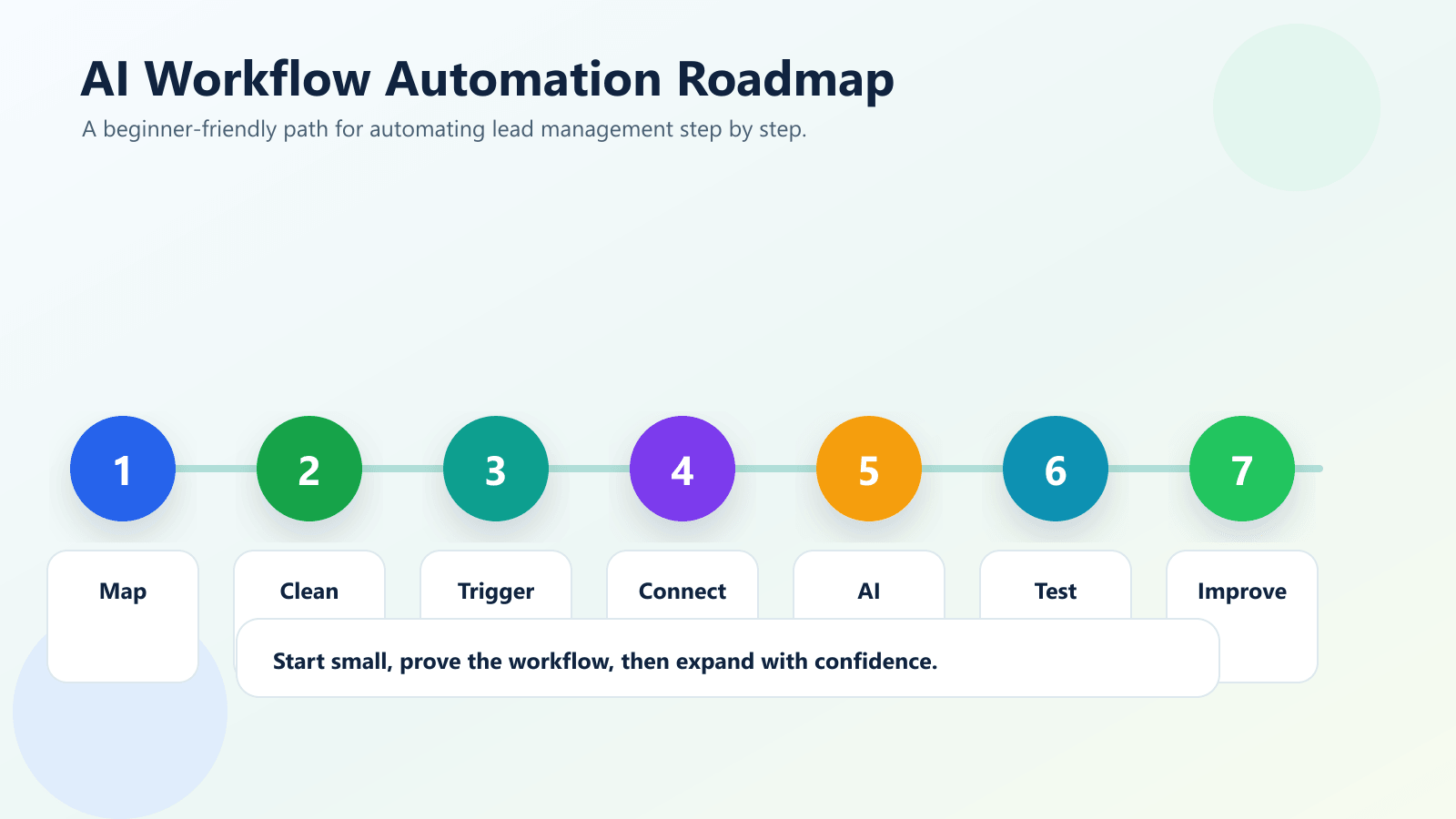
Step 1: Map the current manual process
Write down what happens from the moment a lead arrives to the moment the lead becomes a customer or is marked closed. Include every manual step: copying data, sending emails, assigning owners, adding notes, updating spreadsheets, and creating reminders.
Step 2: Choose your source of truth
Decide where the main customer record should live. For most growing businesses, the CRM should be the source of truth. Google Sheets can support reporting, imports, exports, and shared tracking, but it should not replace your CRM forever.
Step 3: Clean your fields
Automation depends on clean data. Standardize fields such as name, email, phone, company, lead source, service interest, budget, status, owner, and next action. If each tool uses different field names, your workflow becomes harder to maintain.
Step 4: Build one trigger
Start with one trigger, such as a new website form submission or a new row in Google Sheets. Then decide what should happen next. For example: create CRM contact, add deal, send confirmation email, notify sales team, and update the sheet.
Step 5: Add AI only where it helps
Use AI for tasks that benefit from interpretation, writing, or classification. Good examples include summarizing a message, identifying urgency, drafting a custom reply, or suggesting a lead score. Do not use AI for every step just because it is available.
Step 6: Test with real examples
Before turning the workflow on, test it with real lead examples. Check the CRM record, spreadsheet row, email content, task assignment, and notifications. Make sure the workflow handles missing fields and duplicate contacts.
Step 7: Monitor and improve
Automation is not a one-time setup. Review results every week at first. Look for failed steps, wrong lead scores, duplicate records, and emails that need better wording. Small improvements make the system more useful over time.
Key Benefits of AI Workflow Automation
- Faster lead response: New inquiries can receive an instant confirmation and internal alert.
- Less manual data entry: Leads move from forms, Sheets, and email into your CRM automatically.
- Better follow-up consistency: Your team does not need to remember every reminder manually.
- Cleaner reporting: Managers can see lead sources, response times, and pipeline updates more clearly.
- Improved sales focus: Sales teams spend more time speaking with qualified leads and less time updating records.
- Scalable operations: Your process can handle more leads without becoming chaotic.
- Better customer experience: Prospects receive timely, relevant communication from the start.
If you want to explore related automation ideas, read AI Automation for Small Businesses: 10 Practical Use Cases and How to Use AI to Reduce Manual Admin Work in Your Business.
Common Mistakes to Avoid
Automating a broken process
If your manual process is unclear, automation will only make the confusion faster. Fix the process first. Decide who owns each step, what fields matter, and what should happen when a lead is qualified or unqualified.
Using Google Sheets as a permanent CRM
Google Sheets is flexible, but it is not always the best long-term CRM. It does not naturally manage pipeline history, user permissions, task queues, communication timelines, and deal reporting in the same way a CRM does.
Sending AI emails without review
AI can draft helpful messages, but businesses should use guardrails. Keep approved templates, use brand tone rules, and add human review for high-value leads, complaints, contracts, or sensitive topics.
Ignoring duplicates
Duplicate contacts can damage trust and reporting. Your workflow should check for existing emails or phone numbers before creating new CRM records.
Building too much too soon
Start with one workflow that matters. A simple lead capture and follow-up workflow can produce more value than a huge system that takes months to launch.
For more on CRM decisions, you may also like CRM Automation vs Manual Lead Management: Which Is Better? and How AI Can Help Local Businesses Respond to Leads Faster.
How IQBIRDS Helps Your Business
IQBIRDS helps businesses turn disconnected tools into practical AI automation systems. Instead of forcing your team to jump between Google Sheets, CRM software, email platforms, and task tools, IQBIRDS designs workflows that match how your business actually operates.
That can include lead capture automation, CRM automation, Google Workspace automation, AI CRM integration, automated lead management, email workflow automation, reporting dashboards, and custom business process automation.
The focus is simple: reduce manual work, improve response speed, and build systems your team can understand. Good automation should feel like a reliable assistant in the background, not another complicated project your team has to babysit.
Internal Linking Opportunities
- AI Automation for Small Businesses: 10 Practical Use Cases
- CRM Automation vs Manual Lead Management: Which Is Better?
- How AI Can Help Local Businesses Respond to Leads Faster
- How to Use AI to Reduce Manual Admin Work in Your Business
External References
- Google Apps Script Overview
- HubSpot Workflows Documentation
- Zapier: How It Works
- Make Help: Scenarios
FAQs
What is Google Sheets CRM email automation?
Google Sheets CRM email automation connects spreadsheet data, customer records, and email follow-ups so lead updates can move automatically instead of being copied by hand.
Can small businesses use AI workflow automation without coding?
Yes. Many small businesses can start with no-code automation tools, CRM workflows, email platforms, and simple AI steps for lead scoring, summaries, routing, and follow-up messages.
Is Google Sheets good enough for lead management?
Google Sheets can work well for early-stage lead tracking, simple reporting, and shared lists. As volume grows, it is usually better to connect Sheets to a CRM so the CRM becomes the main customer record.
What can AI do inside a CRM workflow?
AI can summarize lead notes, classify inquiries, score urgency, draft follow-up emails, route contacts to the right person, and flag missing information.
Should I use Zapier, Make, Apps Script, or CRM automation?
It depends on the workflow. Zapier is often simple for common app connections, Make is strong for visual multi-step scenarios, Apps Script is useful inside Google Workspace, and CRM automation is best when the workflow belongs inside the sales process.
How do I avoid mistakes in email workflow automation?
Start with drafts, test every branch, add approval steps for sensitive emails, keep your contact data clean, and monitor results before scaling the workflow.
How can IQBIRDS help my business?
IQBIRDS helps businesses design AI automation systems that connect tools like Google Sheets, CRM platforms, and email workflows so teams can respond faster, reduce manual admin work, and manage leads with more consistency.
Conclusion
Google Sheets CRM email automation can make a big difference for small businesses, agencies, sales teams, and startups. By connecting your spreadsheets, CRM, and email workflows with AI, you can respond faster, reduce manual work, and create a more reliable lead management process.
The smartest way to start is simple. Map your current process, clean your data, choose one workflow, test it carefully, and improve it over time. Once the first workflow is working well, you can expand into more advanced AI business automation.
Ready to Automate Your Business Workflow?
If your team is still copying leads between Google Sheets, CRM software, and email tools by hand, IQBIRDS can help you build a cleaner system. Contact IQBIRDS to plan an AI workflow automation setup that fits your business, your tools, and your growth goals.
Need AI Automation?
Discover how IQBirds helps businesses automate workflows and build custom digital products.