
AI Automation
How to Choose What to Automate First: A Scoring Framework
Deciding what to automate first is one of the most critical decisions a growing company faces in 2026. While artificial intelligence and modern workflow tools promise immense time savings, attempting to automate every department at once inevitably leads to fragmented tools, bloated software subscriptions, and frustrated teams. Knowing what to automate first prevents operational gridlock and ensures that your initial automation projects deliver rapid, measurable return on investment.
Most business leaders do not suffer from a shortage of ideas. Instead, they suffer from prioritization fatigue. The sales team wants automated lead enrichment, customer support demands ticket triage, finance asks for invoice extraction, and marketing pushes for automated content syndication. When leadership tries to satisfy everyone simultaneously or picks projects based on the loudest voice in the room, failure rates skyrocket.
A systematic scoring framework removes guesswork from your automation strategy. By scoring candidate workflows against objective business criteria—such as business impact, process rule clarity, technical readiness, operational risk, and team adoption velocity—you can pinpoint exactly what to automate first. This guide provides an actionable scoring framework, a 2×2 prioritization matrix, practical examples, and an execution roadmap to kickstart your automation journey with confidence.
What to Automate First: Understanding the Prioritization Challenge
Understanding what to automate first requires separating high-volume, routine tasks from high-stakes, subjective decisions. When organizations begin their digital transformation journey, they often make the mistake of choosing either the most trivial task (which generates negligible business value) or the most complex initiative (which stalls for months due to edge cases and messy data).
Every business workflow consists of three primary layers: input ingestion, decision logic, and output execution. In traditional manual workflows, human employees bridge the gaps between these layers by copying data, reading documents, forwarding emails, and verifying approvals. As transaction volume scales, these manual bridges become severe bottlenecks that slow down customer response times and increase operational error rates.
However, automating an inefficient or undocumented process only accelerates confusion. If a workflow lacks clear standard operating procedures, automated triggers will simply distribute errors faster across your tech stack. That is why determining what to automate first is fundamentally a process mapping exercise before it is a technology deployment.
Why Traditional “First Come, First Served” Automation Fails
Many organizations approach automation without an overarching governance framework. Instead of evaluating workflows holistically, they greenlight projects on a first-come, first-served basis or allow individual departments to purchase point solutions. This ad-hoc approach creates four major organizational risks:
First, it fosters “shadow IT” and tool fragmentation. When marketing builds Zapier connections without IT oversight and customer service installs isolated AI chatbots, data becomes siloed. Customer records in the CRM no longer match ticketing histories, creating disconnected customer experiences and security vulnerabilities.
Second, it causes teams to chase trending technology rather than business value. Leaders frequently ask how they can deploy generative AI or autonomous agents before establishing foundational data hygiene. Implementing advanced AI on top of unorganized spreadsheets or broken APIs leads to hallucinated outputs and costly re-engineering.
Third, ad-hoc automation ignores operational risk. Certain business processes involve regulatory compliance, employee relations, or high-value client negotiations where a false positive or automated mistake can cause severe legal or financial damage. Without objective risk scoring, teams risk automating sensitive workflows prematurely.
Finally, poorly chosen initial projects damage team morale. When an initial automation pilot breaks repeatedly or forces staff to spend extra hours fixing automated errors, employees develop deep skepticism toward future digital transformation initiatives. Starting with the right quick win creates enthusiasm and operational buy-in across the company.
The 5-Pillar Automation Scoring Framework
To eliminate subjective bias and establish clear prioritization, evaluate every candidate workflow across five core pillars. Score each pillar on a scale from 1 (poor fit) to 10 (ideal fit), and apply weighted scoring to determine your overall Automation Priority Score (APS).
1. Business Impact & Time Savings (Weight: 25%)
Business impact measures the tangible return on investment the automation will unlock. Evaluate how many weekly hours employees spend on the task, the frequency of execution, and the direct financial benefit of speeding up the process.
Workflows that occur dozens of times each day—such as incoming lead qualification, appointment booking, or payment reconciliation—yield compounding dividends when automated. High-scoring candidates directly accelerate revenue, reduce cycle times, or eliminate substantial labor overhead.
2. Process Standardization & Rule Clarity (Weight: 20%)
Automation thrives on deterministic rules and structured inputs. Ask whether the workflow follows a documented standard operating procedure with clear “if-this-then-that” logic, or whether each instance requires subjective human intuition.
If a task requires interpreting complex context without guidelines, it will require heavy engineering and human intervention. A workflow with standardized triggers, fixed data fields, and predictable outputs earns a top score in this category.
3. Technical Feasibility & Integration Readiness (Weight: 20%)
Technical feasibility evaluates whether the software applications involved offer stable, documented APIs and accessible data endpoints. A workflow that connects modern cloud platforms like HubSpot, Stripe, WordPress, and Slack is straightforward to automate.
Conversely, workflows reliant on legacy on-premise software without API access, desktop-only software, or unscannable handwritten paperwork require complex optical character recognition and custom bridges, significantly raising the implementation barrier.
4. Operational Risk & Governance (Weight: 20%)
Risk scoring measures the consequences of an automated error or system downtime. Low-risk workflows include internal Slack notifications, draft message preparation, or data tagging, where a minor error causes no customer harm.
High-risk workflows include issuing credit card refunds, modifying legally binding contracts, or altering sensitive medical or financial records. Workflows with contained risk and straightforward human-in-the-loop fallback mechanisms score highest for early automation.
5. Team Readiness & Adoption Velocity (Weight: 15%)
Even the most sophisticated automation will fail if front-line teams refuse to adopt it. Evaluate how enthusiastically the department welcomes automation and how willing team members are to transition into supervisory roles.
Teams burdened by burnout from repetitive data entry are typically eager adopters. When employees actively champion the project and understand how it frees them for higher-value responsibilities, adoption velocity is fast and friction-free.
The 2×2 Prioritization Matrix: Mapping What to Automate First
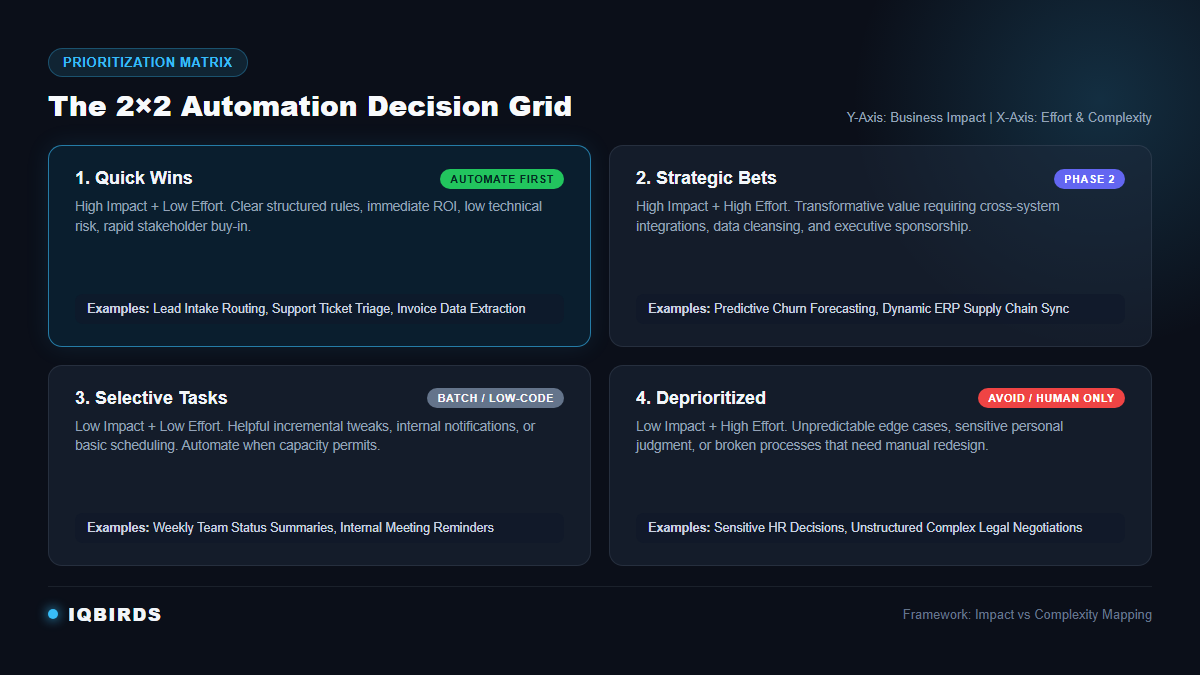
Once you calculate the composite scores for your candidate workflows, map them onto a 2×2 matrix comparing Business Impact (Y-Axis) against Implementation Complexity (X-Axis). This divides all opportunities into four distinct strategic quadrants:
Quadrant 1: Quick Wins (High Impact, Low Complexity) — Automate First
This quadrant represents the ultimate answer to what to automate first. Quick wins possess high frequency, clear rules, modern API connections, and immediate labor savings. Completing these workflows typically takes two to four weeks and delivers undeniable ROI that proves the value of automation to company executives and staff.
Quadrant 2: Strategic Initiatives (High Impact, High Complexity) — Phase 2
Strategic initiatives deliver transformative enterprise value, such as predictive inventory management, dynamic pricing engines, or end-to-end ERP synchronizations. However, they require extensive data cleaning, multi-department coordination, and deeper custom development. Schedule these for Phase 2 after your team has established automation competence.
Quadrant 3: Selective Tasks (Low Impact, Low Complexity) — Batch or Delegate
Selective tasks include minor administrative conveniences, such as automated calendar reminders, weekly team status digests, or social media resharing. While easy to build with low-code tools, they move the needle very little. Build them only when operational capacity allows, or empower departmental power users to configure them independently.
Quadrant 4: Deprioritized (Low Impact, High Complexity) — Avoid Completely
This quadrant contains the “money pits” of automation: bespoke edge cases, heavily negotiated exceptions, and undocumented personal preferences. Automating these workflows requires disproportionate engineering hours while saving virtually zero meaningful time. Keep these workflows entirely manual or redesign them before considering automation.
Manual Process Selection vs. Systematic Scoring Framework
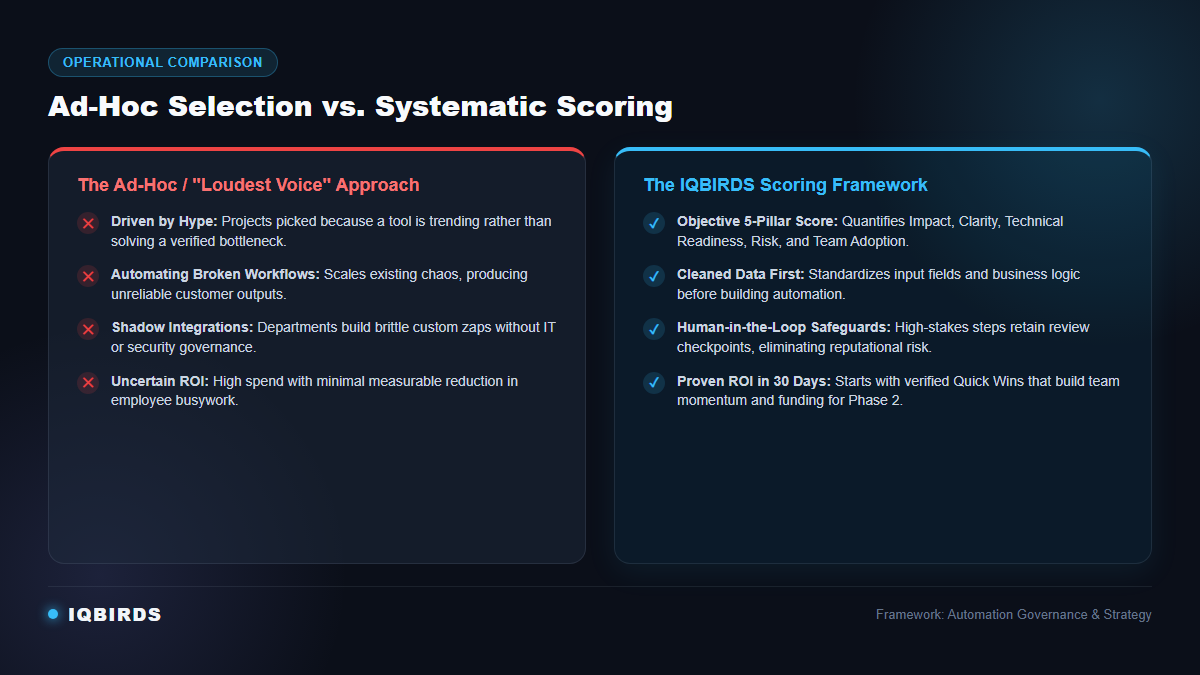
Comparing an ad-hoc approach to a structured scoring framework demonstrates why data-driven prioritization consistently yields superior business outcomes:
| Evaluation Dimension | Ad-Hoc / Intuition Approach | Systematic Scoring Framework |
|---|---|---|
| Selection Basis | Loudest stakeholder demand or trending AI hype | Weighted multi-pillar score (Impact, Clarity, Tech, Risk, Adoption) |
| ROI Predictability | Unclear; often fails to show measurable cost savings | Quantified hours saved and revenue acceleration mapped prior to build |
| Risk Management | Reactive; vulnerabilities discovered after live failures occur | Proactive risk gating with human-in-the-loop checkpoints |
| Integration Health | Brittle point-to-point zaps and shadow software stacks | Governed API connections aligned with company IT architecture |
| Team Adoption | High employee skepticism and fear of software errors | High enthusiasm; employees participate in workflow design and review |
| Time to Value | Months lost in pilot paralysis and re-engineering | Production-ready quick win deployed within 30 days |
7 Real-World Examples: Applying the Scoring Framework
To see the scoring methodology in practice, examine how seven typical business workflows score across our five evaluation pillars (ranked on a 10-point scale):
1. Inbound Lead Intake & Instant CRM Routing (Score: 9.2 / 10 — Quick Win)
When a prospect fills out an inquiry form, an automated pipeline verifies email validity, enriches company data via Clearbit or Apollo, scores lead intent, creates the CRM record, and assigns the deal to the appropriate account executive within 60 seconds.
Verdict: High impact, deterministic rules, standard APIs, minimal risk. This is almost universally the #1 workflow companies should automate first.
2. Customer Support Ticket Triage & Auto-Categorization (Score: 8.9 / 10 — Quick Win)
An AI model parses incoming customer support inquiries, tags the ticket topic (billing, bug report, feature request), detects urgency sentiment, and routes the ticket to the specialized agent team with recommended response snippets attached.
Verdict: Substantial labor savings, clean API integration into Zendesk or Freshdesk, low risk since human agents review and send final replies.
3. Accounts Payable Invoice Extraction & Reconciliation (Score: 8.3 / 10 — Quick Win)
Incoming PDF vendor invoices sent to billing inboxes are automatically read using optical character recognition, extracted into structured fields (line items, invoice total, tax ID), and matched against purchase orders in QuickBooks or Xero for accounting approval.
Verdict: High repetitive volume, clear math rules, and high time savings, with human sign-off on payment release.
4. E-Commerce Abandoned Cart Follow-Up Sequence (Score: 8.0 / 10 — Quick Win)
When an online customer adds items to their shopping cart but leaves before completing checkout, automated triggers send personalized multi-channel reminders and incentives via email and SMS based on product categories and customer lifetime value.
Verdict: Direct revenue recovery with zero manual labor overhead once configured.
5. Predictive Multi-Warehouse Inventory Reordering (Score: 6.2 / 10 — Strategic Initiative)
Analyzing historical sales patterns, seasonal trends, and supplier lead times across multiple regional fulfillment centers to automatically generate purchase orders and transfer inventory.
Verdict: Extremely high impact, but requires high integration complexity, extensive data cleanup, and supplier API coordination. Best reserved for Phase 2.
6. Annual Employee Performance Reviews (Score: 2.6 / 10 — Do Not Automate)
Attempting to automate subjective employee evaluations, promotion decisions, or compensation adjustments using algorithmic scoring.
Verdict: High legal exposure, nuanced emotional context, and heavy employee resistance. Keep strictly human-led.
7. High-Value Custom Contract Negotiations (Score: 3.0 / 10 — Human-Led Only)
Negotiating custom enterprise master service agreements, non-standard indemnity clauses, and tailored commercial terms.
Verdict: Each contract is unique, requiring deep legal judgment, commercial strategy, and risk assessment that automation cannot safely handle.
Helpful Resources for Planning Business Automation
Developing an enterprise automation strategy requires both technical expertise and rigorous operational governance. The following resources provide valuable guidance for structuring your digital operations:
To implement proven automation architectures, explore IQBIRDS professional AI automation services and full-scale AI integration services to connect your legacy software with modern AI endpoints. For customer-facing acceleration, review our specialized capabilities in AI CRM development and data-driven AI marketing automation.
For independent governance and technical standards, review the NIST AI Risk Management Framework, which outlines critical guidelines for trustworthy, accountable automated systems. Additionally, study Harvard Business Review’s guidance on knowledge work automation for managing organizational change, and consult Gartner’s research on process prioritization and Microsoft’s automation planning framework for structured architecture principles.
Step-by-Step Guide to Roll Out Your First Automation
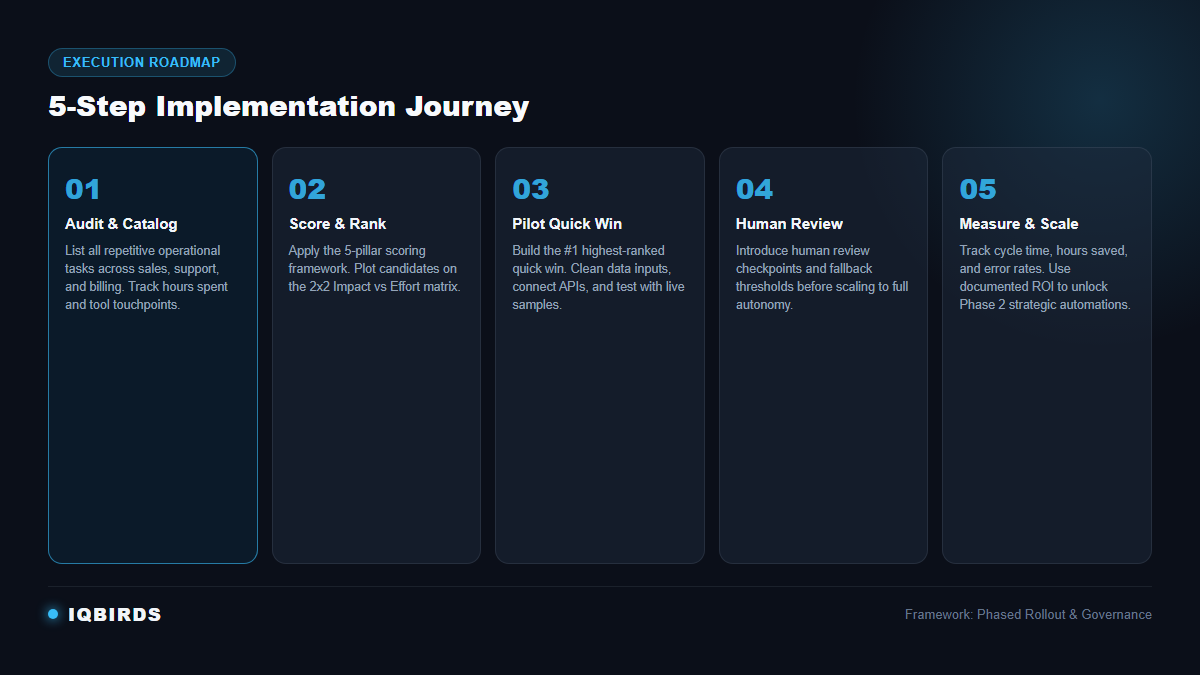
Once you have identified your top-scoring workflow, execute the rollout following a disciplined five-step roadmap:
Step 1: Audit and Catalog Repetitive Workflows
Conduct a cross-departmental audit with your team leaders. Have employees track their daily time over two weeks to identify tasks that consume more than five hours weekly, require copy-pasting between browser tabs, or involve repetitive email notifications.
Step 2: Score and Rank Candidates on the Matrix
Run each cataloged process through the 5-pillar scoring framework. Plot the results on the 2×2 prioritization matrix and select the single highest-scoring Quick Win. Do not attempt to build three automations simultaneously; focus all resources on launching one undeniable success.
Step 3: Standardize the Process and Clean the Data
Document the step-by-step logic of the chosen process before touching any automation software. Standardize all data fields, establish required inputs, and clean existing records in your database or CRM. Standardized inputs guarantee reliable automated outputs.
Step 4: Build a Controlled Pilot with Human Review
Develop the automation in a sandbox environment using secure API integrations. Crucially, configure the initial version to run in “human-in-the-loop” mode: have the automation draft the record, email, or invoice, but require a human team member to review and approve the action before it goes live.
Step 5: Measure Results, Refine, and Scale to Phase 2
Run the pilot for 30 days and measure performance against your baseline metrics. Once error rates drop below your acceptable threshold, remove the manual approval bottlenecks on standard cases while keeping exception alerts active. Use the documented ROI to fund your next automation initiative.
Key Benefits of Following a Scoring Framework
Adopting a structured framework transforms automation from an unpredictable IT expense into a reliable growth engine. Organizations that score workflows systematically enjoy several distinct advantages:
First, it protects company capital. By eliminating low-impact, high-complexity projects early, you prevent expensive developer engagements that fail to move the business needle. Every dollar spent directly correlates to documented time savings or revenue acceleration.
Second, it builds sustainable organizational momentum. When frontline employees see their most tedious, frustrating daily tasks successfully eliminated in 30 days, their attitude shifts from fear of AI to active partnership. Staff members begin bringing new high-value workflow ideas to leadership.
Third, it provides executive transparency. Business owners and department heads can clearly see why specific projects are selected and why others are deferred. This eliminates political friction between departments and establishes clear operational accountability.
Common Mistakes When Deciding What to Automate First
Even well-intentioned teams fall into predictable traps during their initial automation initiatives. Avoid these four common missteps:
Automating a broken process is the most frequent blunder. Automation accelerates whatever exists; if your underlying customer intake process has confusing form fields or inconsistent qualification criteria, automating it will only overwhelm your team with bad leads. Always refine and simplify the process manually before automating.
Another critical mistake is failing to design for exceptions. No workflow runs smoothly 100% of the time. If an API times out, a customer submits a corrupt attachment, or an unexpected character appears in a phone number, your automation must have graceful error routing rather than crashing silently.
Many organizations also forget to assign an operational owner. Every automated workflow requires a designated team member responsible for monitoring execution logs, checking data consistency, and updating logic when third-party software updates its interface.
How IQBIRDS Helps Your Business Prioritize and Automate
Navigating the transition from manual operations to intelligent automation requires both deep technical architecture and practical business strategy. That is where IQBIRDS serves as your dedicated operational partner.
Our automation specialists conduct comprehensive operational audits across your sales, customer support, and administrative workflows. We apply rigorous quantitative scoring to identify your highest-ROI quick wins, map your business data models, and eliminate operational bottlenecks before writing a single line of code.
From custom API integrations and CRM synchronizations to sophisticated AI workflow logic with built-in human verification safeguards, IQBIRDS designs reliable, enterprise-grade systems tailored to your unique business goals. We ensure your automations are secure, maintainable, and built to scale alongside your company growth.
What to Measure After Launch (Key Performance Indicators)
To demonstrate the concrete value of your newly deployed automation, track these four core metrics continuously after launch:
1. Cycle Time & Lead Response Speed: Measure the time elapsed from the initial event trigger to final task completion. For inbound leads, reducing response time from four hours to under two minutes typically increases sales conversion rates by 25% to 40%.
2. Direct Labor Hours Saved: Calculate the exact weekly hours employees previously dedicated to manual data entry, copying, and reporting that have been redirected toward strategic client work.
3. Error and Exception Rates: Track the percentage of records that execute without manual intervention versus those that trigger exception notifications. Healthy automations achieve a 95%+ touchless execution rate on standardized inputs.
4. Return on Investment (ROI): Compare the total cost of design, software licenses, and deployment against the annualized labor cost savings and recovered revenue. A well-chosen quick win should achieve full payback within 60 to 90 days.
Final Thoughts
Determining what to automate first is not about adopting every cutting-edge tool on the market. It is about understanding your business operations deeply enough to apply automation where it generates immediate clarity, speed, and profitability.
By relying on a structured scoring framework—prioritizing high business impact, structured rules, accessible APIs, controlled risk, and enthusiastic team adoption—you protect your budget and establish a repeatable foundation for digital transformation. Start with one verified quick win, demonstrate measurable ROI, and systematically build the autonomous workflows that will power your business throughout 2026 and beyond.
Frequently Asked Questions
What is the single best workflow to automate first?
For most growing businesses, inbound lead capture, enrichment, and CRM routing is the ideal first automation. It combines standardized inputs with high business frequency, modern API connections, and immediate revenue impact without putting customer relationships at risk.
How long should it take to launch an initial automation project?
A well-selected initial quick win should take between two to four weeks from initial workflow mapping to live production deployment. If a proposed project estimates three to six months of development before delivering initial value, it is too complex for an initial pilot and should be divided into smaller milestones.
Can small businesses with limited budgets benefit from this scoring framework?
Yes. In fact, small businesses benefit even more from a scoring framework because they have tighter operational margins and cannot afford failed IT experiments. Scoring workflows ensures that lean teams focus their limited resources exclusively on automations that deliver immediate labor relief.
How do you handle exceptions and automated errors?
Every professional automation architecture must include automated exception routing. When incoming data fails validation checks or an API endpoint errors, the workflow should route the record to a dedicated review queue with an alert to a human manager, ensuring no transaction is lost.
Does automating workflows replace human employees?
No. Effective workflow automation eliminates tedious, repetitive administrative tasks—such as copying spreadsheet rows, reformatting documents, and sending repetitive status notifications—allowing employees to dedicate their talents to strategic planning, client relationships, creative problem solving, and higher-value work.
How can IQBIRDS help my business?
IQBIRDS can audit your operational processes, apply our proprietary scoring framework to identify your most valuable quick wins, design custom API and AI integrations, build human-in-the-loop review safeguards, and provide continuous monitoring and optimization to ensure sustained operational ROI.