
AI Automation
How Small Businesses Can Automate Data Entry Using AI (2026 Guide)
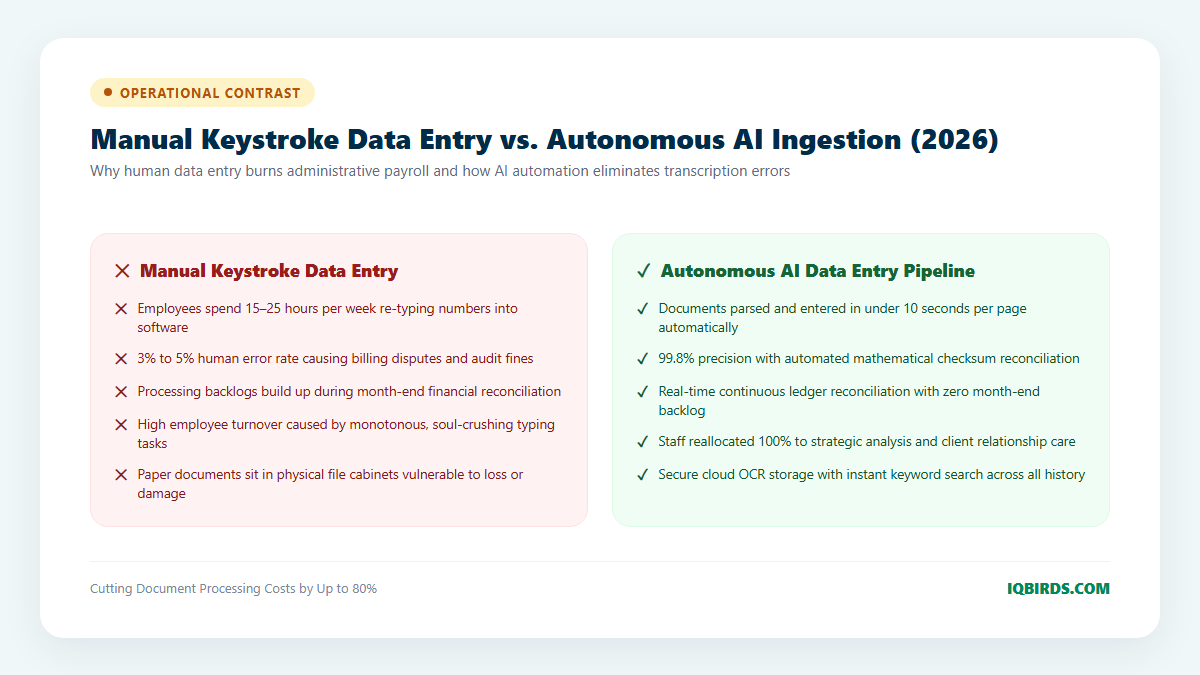
Manual data entry is one of the most insidious drains on small business profitability. Across accounting, logistics, healthcare, and professional services, administrative employees spend an average of 15 to 25 hours every week manually transcribing numbers from paper receipts, PDF supplier invoices, bills of lading, and web forms into spreadsheets and accounting software. Beyond the staggering payroll cost, human data entry produces a baseline error rate of 3% to 5%—leading to delayed invoice reconciliations, costly billing disputes, and compliance headaches. In 2026, leading businesses have permanently solved this bottleneck through ai automation for small business data entry.
Thanks to recent breakthroughs in multimodal vision language models and intelligent document processing (IDP), artificial intelligence can now read, interpret, validate, and synchronize unstructured documents in under 10 seconds per page with 99.8%+ accuracy. In this comprehensive guide, we unpack the exact technology stack, validation guardrails, and implementation roadmap small businesses need to eradicate manual typing and automate document ingestion completely.

Why Legacy OCR Failed and How 2026 Vision AI Changed the Game
Small business owners who experimented with optical character recognition (OCR) tools in the past often came away deeply frustrated. Legacy OCR relied on rigid, coordinate-based “zonal templates.” If a vendor shifted their invoice layout by two inches, or if a supplier submitted an invoice with a slightly different table structure, the legacy system failed completely—requiring costly manual template re-engineering.
Modern multimodal language models (such as GPT-4o, Claude 3.5 Sonnet, and specialized document parsing networks) do not rely on rigid coordinates. Instead, they understand semantic document hierarchy just like a human accountant. They effortlessly locate line items, descriptions, tax rates, vendor addresses, and payment terms regardless of fonts, layouts, or table formatting—even extracting clean data from crumpled paper receipts or low-resolution smartphone photographs.
By pairing vision models with dedicated AI automation services, small businesses deploy end-to-end extraction pipelines that require zero ongoing template maintenance.
The 4 Pillars of Small Business Data Entry Automation
Deploying a production-grade automated data entry system requires balancing extraction speed with rigorous data verification. Here are the four foundational pillars of modern document ingestion:
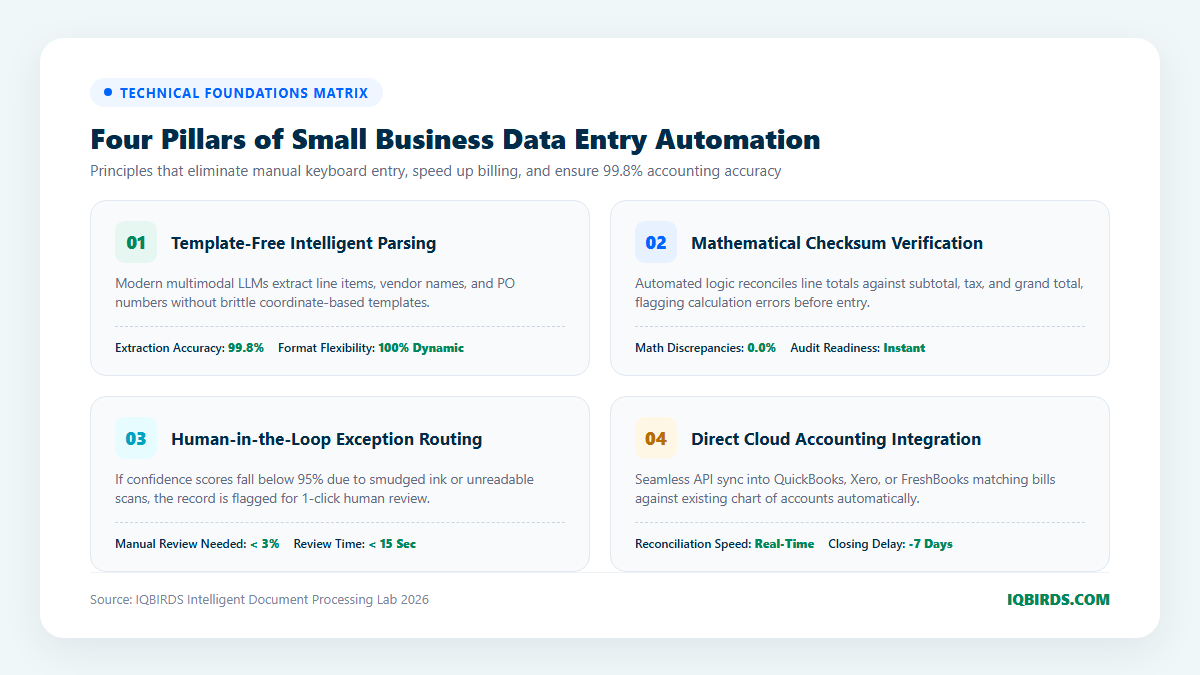
1. Template-Free Multi-Modal Parsing
Modern systems ingest documents from multiple simultaneous channels: dedicated email inboxes (e.g., invoices@yourcompany.com), cloud folders (Google Drive, Dropbox), mobile camera uploads, or webhook APIs. Once received, the vision engine converts the document into structured JSON data conforming strictly to your predefined business schema: vendor name, invoice date, due date, individual line-item quantities, unit prices, tax amounts, and payment details.
2. Mathematical Checksum & Consistency Verification
To eliminate transcription errors, the automation pipeline executes deterministic mathematical validation checks before any data enters your accounting software:
- Sum of line-item totals must match the stated subtotal.
- Subtotal plus sales tax and shipping must equal the final grand total.
- Vendor tax IDs and bank details are validated against your existing approved vendor database.
If the math does not balance perfectly to the penny, the record is flagged immediately, preventing corrupted entries from entering your general ledger.
3. Human-in-the-Loop Exception Handling
No automated system achieves 100% perfection across every real-world edge case. When an unreadable or smudged document produces a confidence score below 95%, the system routes the record to a lightweight human review queue.
Rather than manually typing the entire document, an administrative staff member receives a Slack alert with a side-by-side preview showing the original PDF highlighted against the extracted fields. With a single click, the human confirms or edits the ambiguous field, taking less than 15 seconds before the record continues its automated journey.
4. Direct Cloud Accounting & ERP Synchronization
Once validated, the structured data is pushed directly into cloud accounting platforms (QuickBooks Online, Xero, FreshBooks, or NetSuite) via secure REST APIs through system integration pipelines. Bills are automatically mapped to the appropriate chart of accounts and matched against open purchase orders, accelerating month-end book closing by up to seven business days.
Manual Keystroke Entry vs. Autonomous AI Data Pipelines
Compare the operational and financial impact of manual data transcription versus deploying an autonomous AI ingestion engine:
7-Step Roadmap to Automate Small Business Data Entry
Deploying an AI document extraction workflow requires structured methodology to guarantee data security and accounting compliance. Follow this 7-step engineering blueprint:
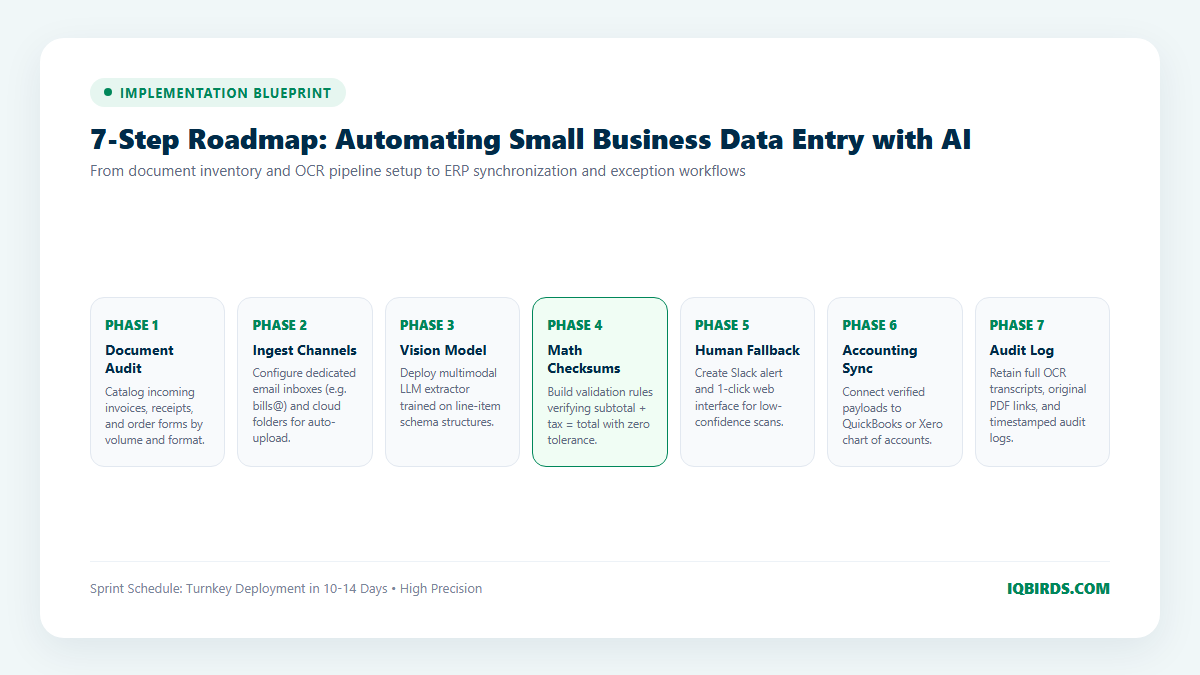
Step 1: Document Volume & Format Inventory
Audit the types of documents entering your business: vendor bills, bills of lading, employee expense receipts, purchase orders, or customer onboarding PDFs. Identify the top 5 document categories that consume the most manual hours.
Step 2: Automated Ingestion Channel Setup
Create automated intake channels. Set up a dedicated mailbox (such as ap@yourcompany.com) with email parsing rules that automatically forward incoming PDF attachments to your document extraction API. Connect cloud folders for batch scanner uploads.
Step 3: Vision LLM Schema Definition & Prompt Engineering
Define strict JSON output schemas matching your accounting software fields: InvoiceNumber, VendorName, InvoiceDate, LineItems (Description, Qty, UnitPrice, Total), TaxAmount, and GrandTotal. Construct multimodal prompts instructing the vision model to extract data strictly into typed schemas.
Step 4: Checksum Validation & Business Rules
Build validation logic that verifies calculated totals against extracted sums. Add business rules, such as verifying that vendor payment terms match master vendor agreements and flagging duplicate invoice numbers.
Step 5: Human-in-the-Loop Review Dashboard
Configure automated escalation alerts in Slack or Microsoft Teams when a document produces a low confidence score or math mismatch. Provide staff with a 1-click web interface to review and approve flagged items in seconds.
Step 6: Accounting Software API Synchronization
Connect validated payloads to QuickBooks Online, Xero, or your custom AI CRM. Configure automated categorization rules that map vendor expenses to the correct general ledger accounts.
Step 7: Compliance Logging & Continuous Tuning
Archive original PDF files alongside their full OCR extraction metadata in secure cloud storage. Maintain complete audit logs for tax compliance and review system performance monthly to fine-tune accuracy.
Connecting Data Entry to Core Business Automations
Automating document entry creates a powerful ripple effect across your entire business. When supplier invoices are processed in real time, inventory counts update automatically, customer project costs are calculated dynamically, and management gains instant visibility into cash-flow health through integrated marketing automation and workflow automation engines.
Frequently Asked Questions
Can AI data entry handle handwritten documents and receipts?
Yes. Modern multimodal vision models excel at reading legible handwriting, stamped notes, and thermal paper receipts that previously caused legacy OCR engines to fail.
Is financial data secure when processed through AI models?
Yes, when utilizing enterprise API endpoints with Zero Data Retention (ZDR) agreements. Commercial API providers (such as OpenAI and Anthropic) guarantee that data processed through their APIs is encrypted in transit and never utilized for model training.
What happens if an invoice has a complex multi-page table?
Modern vision LLMs handle multi-page documents seamlessly, stitching continuous tables across page breaks and preserving line-item associations accurately.
How can IQBIRDS help my company automate data entry?
At IQBIRDS, we build turnkey intelligent document processing pipelines through our specialized AI automation services and system integration solutions. We eliminate manual keyboard entry, design custom validation guardrails, and connect extraction workflows directly to QuickBooks, Xero, and CRM platforms. Schedule a consultation with IQBIRDS today to audit your document processing workflows and eliminate manual data entry.