
AI Automation
How to Automate Customer Follow-Ups Using Existing CRM and Email Tools
When small and mid-sized businesses decide to fix their sales follow-up process, the default reaction is often to purchase yet another SaaS software subscription. Founders Google “best follow-up software” and immediately add a $200/month tool to their tech stack. However, adding more disconnected software rarely solves the root problem—it introduces data fragmentation, requires complex third-party zaps, and forces busy sales reps to log into multiple dashboards every day. In 2026, the smartest revenue leaders take a different approach: they automate customer follow-ups using existing crm and email tools they already pay for.
Most modern CRMs—including HubSpot, Zoho CRM, Salesforce, Pipedrive, and ActiveCampaign—already include sophisticated workflow engines, sequence tools, deal-stage triggers, and native Gmail/Outlook integrations. By configuring these native capabilities properly, organizations eliminate pipeline drop-offs and accelerate deal cycles without spending an additional dollar on monthly software overhead. In this tactical guide, we unpack how to transform your current CRM into an automated follow-up engine.

Why Your Current Tech Stack Is Already Capable of Advanced Follow-Up
Many businesses utilize less than 25% of the features available in their active CRM plan. The primary reason customer follow-ups are dropped is not missing software capabilities; it is the lack of structured operational design. When deal stages lack automated triggers, sales reps are forced to remember to manually send follow-up emails days after a pitch.
By connecting your existing CRM via professional AI CRM development solutions, you can activate native automation mechanisms:
- Deal-Stage Automation: Dragging a deal into “Proposal Sent” automatically triggers an email check-in sequence scheduled across Day 2, Day 5, and Day 8.
- Direct Inbox SMTP Sending: Native sequences send through the rep’s authenticated Google Workspace or Microsoft 365 inbox. Unlike third-party marketing bulk blasts, these emails land in the recipient’s primary inbox and look 100% human and personalized.
- Instant Unenrollment on Reply: Built-in CRM tracking detects incoming replies or calendar bookings instantly, removing the prospect from future follow-up steps automatically to prevent awkward communication overlaps.
With this architecture, your sales team stays focused inside their familiar CRM interface, driving 100% internal adoption.
The 4 Pillars of Lean Follow-Up Automation
Building high-converting follow-up workflows inside your existing tools requires focusing on four foundational operational pillars:
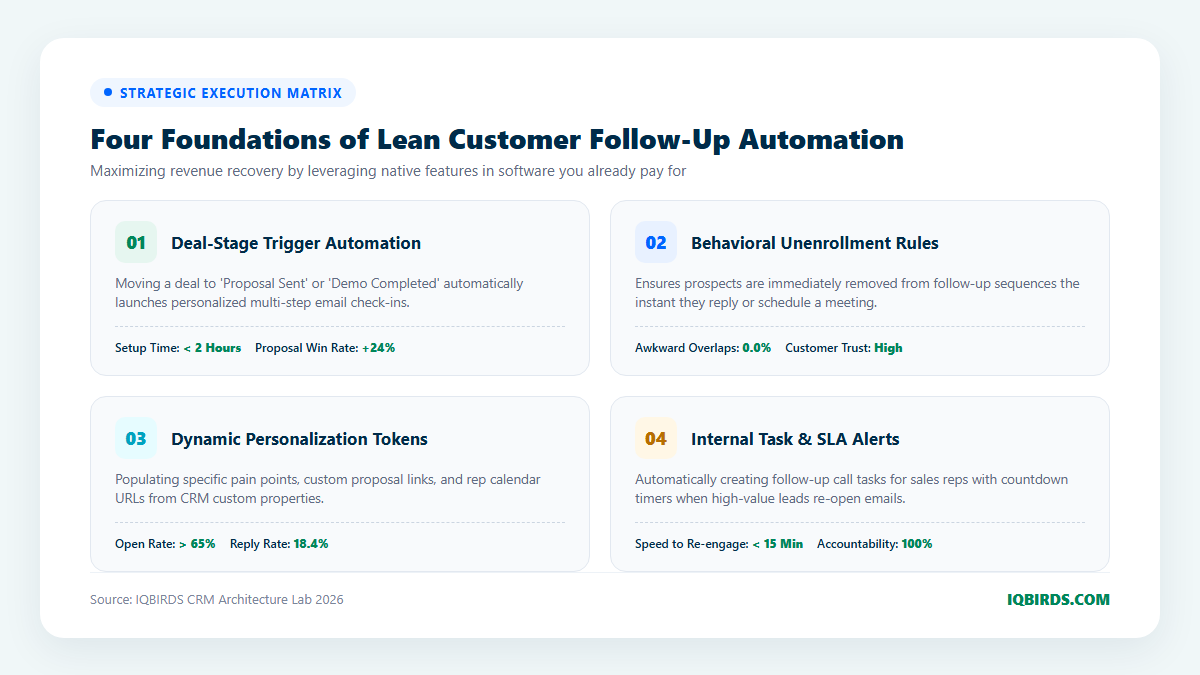
1. Deal-Stage Trigger Automation
In a properly configured CRM, deal stages function as automated triggers. The moment a sales representative updates an opportunity status—such as “Demo Completed” or “Contract Pending”—the CRM initiates a tailored follow-up workflow. This eliminates manual human scheduling and ensures consistent prospect communication regardless of how busy the sales rep becomes.
2. Strict Behavioral Unenrollment Rules
Nothing damages brand credibility faster than sending an automated “Just following up on my previous note” email an hour after a prospect has already replied to schedule a call. Modern CRMs include native unenrollment triggers: sequences immediately halt when a prospect replies, books a meeting via your scheduling link, or when a deal status changes to “Closed-Won” or “Closed-Lost.”
3. Dynamic Personalization Tokens
Automated emails must never sound like mass generic marketing blasts. Utilize custom contact and deal properties inside your CRM: {{Contact.FirstName}}, {{Deal.PrimaryChallenge}}, {{Deal.CustomProposalURL}}, and {{Owner.CalendarLink}}. When populated dynamically, every follow-up message reads as an individualized, high-touch consultation note authored by the assigned account executive.
4. Internal Task & SLA Escalation Alerts
Automation should empower your sales team, not replace human judgment. When high-value prospects open an email multiple times or click a proposal link, configure automated CRM workflow rules that create a high-priority “Call Lead” task for the sales rep with a 15-minute SLA timer—alerting the rep via Slack or mobile notification while the lead is actively reviewing your offer.
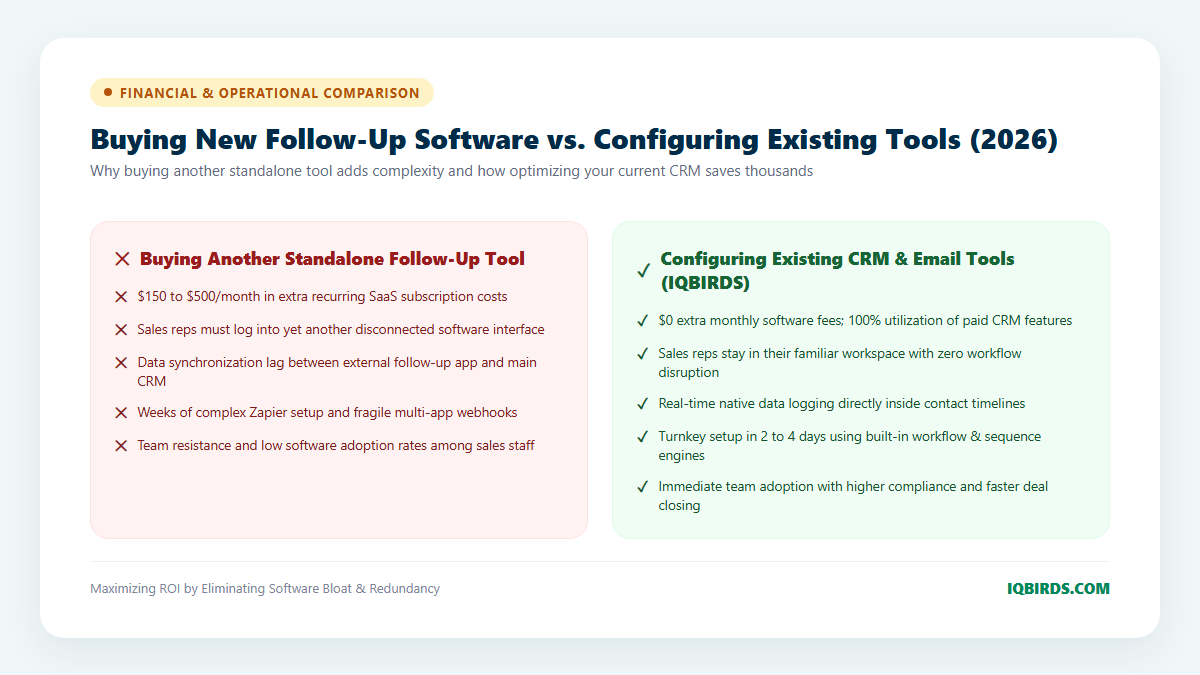
Buying Standalone Tools vs. Configuring Your Existing Stack
Consider the trade-offs between purchasing another standalone follow-up app versus configuring your current software:
7-Step Roadmap: Deploying Follow-Ups in Your Existing Stack
Configuring automated customer follow-ups within your current toolset requires methodical execution across workflow logic, sequence authoring, and sales training. Follow this 7-step blueprint:
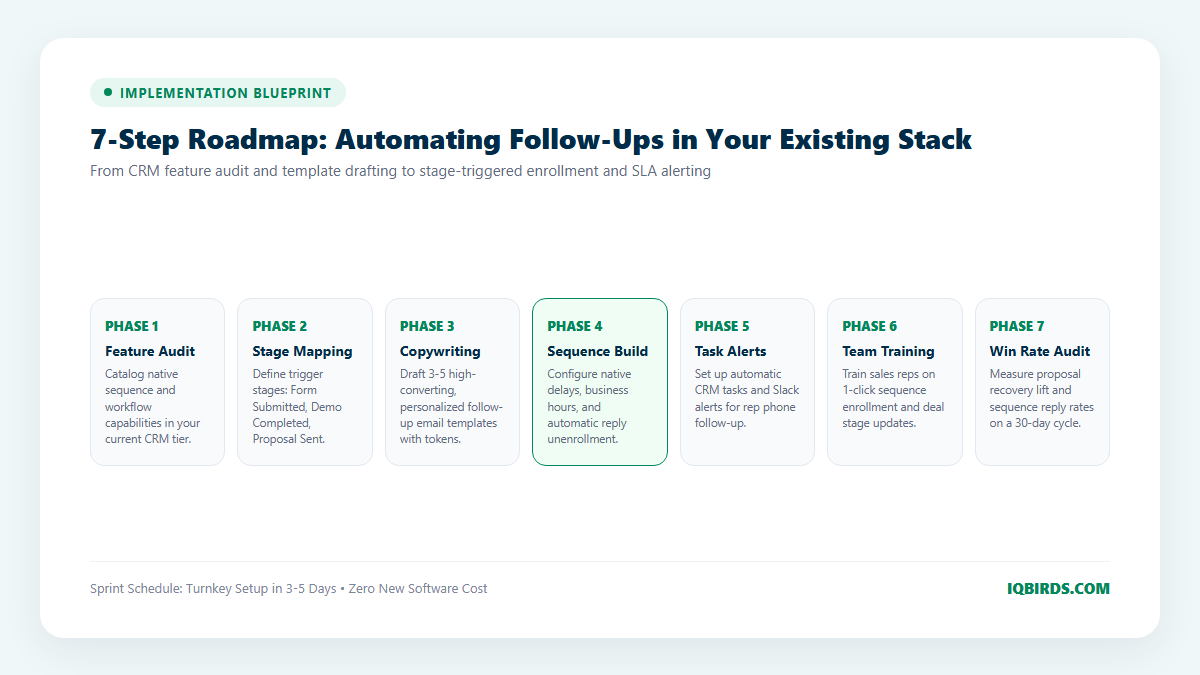
Step 1: CRM Feature & License Audit
Review your current CRM subscription tier (HubSpot Starter/Pro, Zoho One, Salesforce Professional, etc.). Identify built-in sequence and workflow automation capabilities that are currently unconfigured.
Step 2: Define Critical Follow-Up Touchpoints
Map the three core stages where follow-up automation creates immediate commercial impact: Inbound Speed-to-Lead, Post-Demo Follow-Up, and Stalled Proposal Chasing.
Step 3: Author High-Converting Email Copy Templates
Draft concise, personalized email templates for each stage. Keep messages under 100 words, embed custom contact tokens, and frame each note around customer value rather than demanding a sales call.
Step 4: Configure Native Sequences & Delays
Build the sequences inside your CRM. Set realistic delay intervals (e.g., Touch 1 after 2 business days, Touch 2 after 4 business days) and configure sending hours strictly within 9:00 AM to 5:00 PM in the prospect’s local time zone.
Step 5: Implement Automated Enrollment Triggers
Create workflow automation rules that automatically enroll contacts when deal stages update, removing the need for sales reps to manually launch sequences.
Step 6: Configure Real-Time Rep Notification Alerts
Set up Slack or mobile notifications that alert sales reps whenever an enrolled lead clicks a proposal link, downloads an attachment, or replies to an automated email.
Step 7: Conduct 30-Day Win Rate & Telemetry Reviews
Review sequence performance every 30 days: monitor open rates, reply rates, proposal win rates, and time-to-close metrics, continuously refining copy and timing.
Connecting Existing Tools with Advanced AI Automation
Once your existing CRM and email follow-up workflows are humming, you can easily augment them with intelligent AI layers through custom AI automation services and system integration pipelines.
For example, you can deploy AI voice agents to handle inbound phone overflow or add conversational SMS bots through marketing automation engines—creating an enterprise-grade omnichannel revenue engine while keeping your core CRM as the single source of truth.
Frequently Asked Questions
Does our CRM need to be on an expensive Enterprise tier?
No. Most mid-tier plans (such as HubSpot Sales Pro or Zoho CRM Professional) include full sequence and workflow automation features sufficient to run world-class follow-up cadences.
Can sales reps customize individual emails within an automated sequence?
Yes. Native CRM sequences allow sales reps to review and customize individual email steps before enrollment, adding bespoke personal touches while letting the CRM manage follow-up timing automatically.
How do we ensure automated emails don’t land in spam folders?
Because these emails are sent directly through your authenticated Google Workspace or Microsoft 365 inbox (utilizing your established corporate SPF, DKIM, and DMARC credentials), they enjoy the highest possible inbox placement rates.
How can IQBIRDS help configure follow-ups in our current tools?
At IQBIRDS, we specialize in lean AI CRM development and workflow automation services. We audit your existing software, build custom deal-stage sequences, and train your sales team to maximize pipeline velocity—without forcing you to purchase expensive new subscriptions. Schedule a CRM optimization consultation with IQBIRDS today to unlock the hidden revenue potential inside your current tools.