
AI Automation
How Connected AI Systems Eliminate Data Silos
Data silos slow growing businesses long before leaders notice the full cost. Sales may have one version of the customer, support may have another, finance may track a different status, and marketing may still be working from old campaign data. AI integration solves this problem by connecting systems so teams can work from shared, current, and useful information.
When company data stays trapped inside separate tools, AI cannot see the complete picture. It may write a follow-up without support context, score a lead without purchase history, or create a report that misses billing issues. Therefore, connected AI systems are not only about automation. They are about giving every workflow better context.

What Data Silos Mean for Growing Businesses
A data silo is a system, department, spreadsheet, or database that stores information separately from the rest of the business. The data may be useful, but it is not easily shared. As a result, teams make decisions with partial context.
For example, a sales team may see a hot opportunity inside the CRM. However, the support team may know that the same customer has an unresolved service issue. If those systems are not connected, the business may send the wrong message at the wrong time.
Data silos also create duplicated work. Employees copy information between tools, ask other departments for updates, and manually combine reports. Over time, this creates delays, errors, and frustration. In addition, leaders struggle to trust dashboards because each department may define numbers differently.
Why AI Makes Data Silos More Visible
Traditional reporting can hide silos because people fill the gaps manually. AI exposes the issue faster. If the system only sees one part of the business, its recommendations will reflect that limited view.
For instance, an AI sales assistant may recommend aggressive outreach because a prospect opened several emails. Meanwhile, the billing system may show that the same account has a payment dispute. Without integration, the AI assistant cannot understand the real customer situation.
This is why AI integration matters. A connected AI system can pull context from CRM, support tickets, product usage, marketing engagement, invoices, documents, and analytics. Then, it can generate recommendations that are more accurate, timely, and useful.
How Connected AI Systems Work
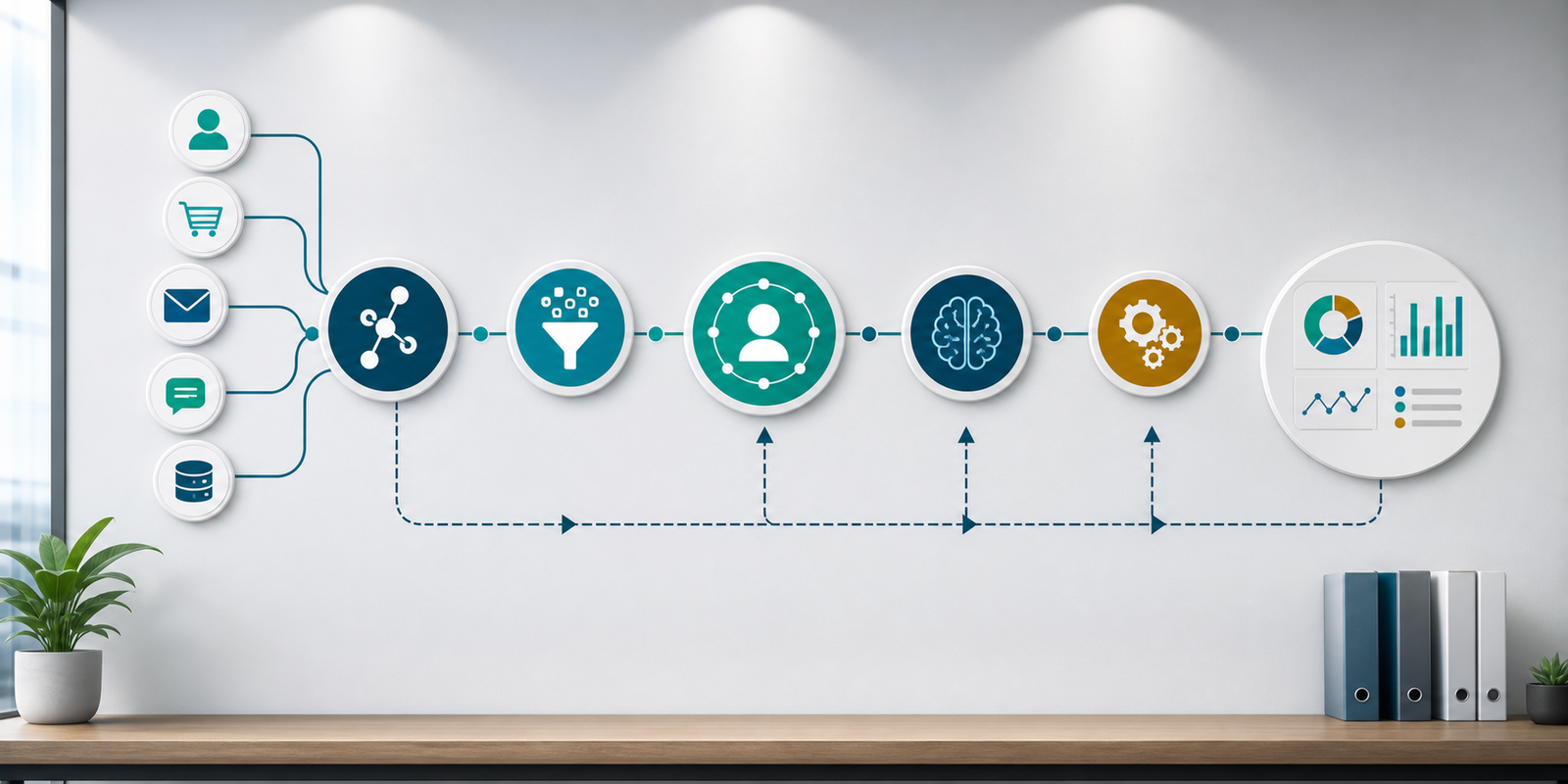
Connected AI systems combine data integration, automation, and intelligence. First, they link the tools that already run the business. Next, they standardize important fields such as customer ID, email, account owner, lifecycle stage, deal status, ticket priority, and invoice status. After that, AI can analyze the combined context and support better workflows.
The goal is not always to move every piece of data into one giant database. Instead, the business needs a reliable way for systems to exchange the right information at the right time. APIs, webhooks, data pipelines, CRM integrations, middleware, and automation platforms can all support that connection.
Once the connections are in place, AI can summarize customer history, detect workflow gaps, route tasks, enrich CRM records, identify churn risk, generate reports, and trigger follow-up actions. Because the system has broader context, the output becomes more useful.
Data Silos vs Connected AI Systems
The difference between siloed systems and connected AI systems is not just technical. It changes how teams work, how quickly customers receive answers, and how confident leaders feel about decisions.
| Business Area | Siloed Data | Connected AI System |
|---|---|---|
| Customer view | Each team sees only its own records. | Teams share a unified view across CRM, support, billing, marketing, and operations. |
| Decision quality | Decisions depend on incomplete or outdated context. | AI recommendations use broader data and clearer customer history. |
| Manual work | Employees copy data, reconcile reports, and chase updates. | Connected workflows sync records, route tasks, and update dashboards automatically. |
| Reporting | Reports conflict because departments define data differently. | Metrics use shared definitions, cleaner records, and connected sources. |
| Customer experience | Customers repeat information across departments. | Teams respond with context because previous interactions are visible. |
Connected AI systems do not remove the need for good process design. However, they reduce the hidden friction that comes from disconnected information. Consequently, teams can spend less time searching for context and more time acting on it.

Where AI Integration Creates the Most Value
AI integration creates value in workflows that depend on information from more than one system. Lead management is one example. A better workflow may combine form data, campaign source, CRM history, website behavior, meeting notes, and company enrichment before assigning the lead.
Customer support is another strong use case. AI can summarize ticket history, check account status, identify product usage patterns, and suggest the next best response. Meanwhile, managers can see whether issues are linked to onboarding, billing, product confusion, or service delays.
Finance and operations also benefit. Connected AI systems can match invoices to projects, flag missing information, extract data from documents, and alert teams when approval steps are delayed. In addition, leaders can review performance without waiting for manual spreadsheet updates.
Helpful Internal and External Resources
If your company is dealing with disconnected tools, IQBIRDS can help through AI integration services, AI automation services, and AI CRM development. For customer-facing workflows, AI marketing automation can also connect campaign behavior, lead activity, and follow-up actions.
For additional context, IBM explains the business impact of data silos. Google Cloud outlines core ideas in its guide to data integration. Salesforce also describes how connected customer data supports unified experiences through Salesforce Data Cloud.
Step-by-Step Guide to Eliminate Data Silos with AI Integration
Step 1: Audit Your Systems
List every major tool that stores customer, sales, support, marketing, finance, project, and operations data. Include spreadsheets, forms, shared inboxes, document folders, and reporting tools. This audit shows where important context is trapped.
Step 2: Define the Shared Data Model
Decide which fields should mean the same thing across systems. Examples include customer ID, account owner, lifecycle stage, service status, product plan, renewal date, and support priority. Clear definitions prevent confusion later.
Step 3: Prioritize High-Value Workflows
Choose workflows where better context will improve speed, accuracy, revenue, or customer experience. Lead routing, support escalation, customer onboarding, renewal management, invoice approval, and reporting are practical starting points.
Step 4: Connect Systems with APIs or Automation
Use APIs, webhooks, CRM integrations, middleware, or automation tools to move data between systems. Start with the minimum connection needed to improve one workflow. Then, expand once the pattern works.
Step 5: Clean and Validate Data
AI integration depends on reliable records. Remove duplicates, standardize names, validate required fields, and create rules for missing data. Otherwise, the connected workflow may simply spread messy information faster.
Step 6: Add AI Insights and Human Review
After the data is connected, add AI where it can summarize, classify, recommend, extract, or predict. For sensitive actions, keep human review in place so employees can verify the output before it affects customers or revenue.
Step 7: Monitor Quality Over Time
Integration is not a one-time task. Monitor sync errors, missing fields, duplicate records, delayed updates, AI accuracy, and user feedback. Then, improve rules and workflows as the business changes.

Key Benefits of Connected AI Systems
The first benefit is a better customer view. When CRM, support, marketing, billing, and operations data work together, teams can understand the full relationship instead of one interaction at a time.
The second benefit is faster decision-making. Managers no longer need to wait for manual report consolidation. Instead, connected dashboards can highlight trends, exceptions, and next steps.
The third benefit is stronger automation. AI workflows become more accurate when they can use complete context. For example, a renewal workflow can consider support tickets, usage data, payment history, and account notes before recommending an action.
The fourth benefit is less duplicate work. Employees spend less time copying records, updating spreadsheets, and asking other departments for status updates. As a result, the business can scale without adding unnecessary manual effort.
Common Mistakes to Avoid
One mistake is connecting systems before defining data standards. If each tool uses different meanings for the same field, integration may create more confusion. Start with shared definitions.
Another mistake is trying to connect everything at once. A phased approach is usually safer. Pick one high-value workflow, prove the integration, and then expand to related processes.
A third mistake is ignoring ownership. Every shared field and workflow needs an owner. Without ownership, data quality declines and teams blame the system when results become unreliable.
Companies also struggle when they treat AI as a shortcut around process design. AI can improve connected workflows, but it cannot fix unclear rules, poor data hygiene, or missing accountability by itself.
Governance Keeps Connected Data Reliable
Connected systems need governance because shared data affects more teams. A field change in one tool can influence sales follow-ups, support routing, dashboards, and AI recommendations. Therefore, the business should define who can edit key fields, which systems are the source of truth, and how exceptions are reviewed.
Security also matters. AI integration should respect permissions, customer privacy, and internal access rules. Employees should only see the data needed for their role, while managers should be able to review audit trails, sync errors, and workflow changes. With these controls in place, connected AI systems become easier to trust.
How IQBIRDS Helps Your Business
IQBIRDS helps businesses eliminate data silos by designing connected AI systems around real workflows. The process usually starts with reviewing your current tools, data sources, manual handoffs, and reporting gaps.
After that, IQBIRDS can build integrations between CRM, forms, support tools, marketing platforms, documents, finance systems, and dashboards. The team can also add AI summaries, data extraction, lead scoring, customer insights, automated follow-ups, and human approval steps.
This approach is useful for growing companies that already have useful tools but need them to work together. Instead of replacing everything, IQBIRDS helps connect the systems that matter and build workflows that support better decisions.
What to Measure After Launch
After launch, measure data completeness, duplicate rate, sync errors, workflow cycle time, manual handoffs, report preparation time, lead response time, customer resolution time, and user adoption. These metrics show whether integration is improving daily operations.
Also, compare AI output quality before and after integration. If recommendations become more accurate, summaries become more useful, and reports require fewer manual corrections, the connected system is creating value.
Final Thoughts
Connected AI systems eliminate data silos by giving teams shared context and giving AI the information it needs to support better decisions. The result is not just cleaner data. It is faster work, better customer experiences, and more reliable automation.
The best path is practical: audit your systems, define shared data, connect one important workflow, add AI where it helps, and monitor quality over time. With that foundation, AI integration becomes a growth advantage instead of another disconnected tool.
Frequently Asked Questions
What is AI integration?
AI integration connects artificial intelligence tools with business systems such as CRM, support, marketing, finance, documents, and dashboards so workflows can use shared data.
How do connected AI systems eliminate data silos?
They eliminate data silos by linking separate systems, standardizing important fields, sharing context across teams, and allowing AI workflows to use information from multiple sources.
What systems should be connected first?
Start with systems tied to high-value workflows. Common first connections include CRM, website forms, email, support tickets, billing, marketing platforms, and reporting dashboards.
Does AI integration require replacing existing software?
Not always. Many businesses can keep their existing tools and connect them through APIs, automation platforms, CRM integrations, middleware, or custom workflows.
What are the risks of poor AI integration?
Poor integration can spread bad data, create duplicate records, trigger wrong actions, confuse reports, and reduce trust in AI recommendations.
How do you measure success after eliminating data silos?
Measure data completeness, fewer duplicates, faster response times, reduced manual work, cleaner reporting, better customer experience, and improved AI output quality.
How can IQBIRDS help my business?
IQBIRDS can audit your systems, design AI integration workflows, connect CRM and business tools, automate data movement, add AI insights, and build dashboards for better decisions.