
AI Automation
Mobile UI UX Design Services: Modern Frameworks for High-Converting Apps
In an era where over 68% of global digital traffic originates on handheld devices, an application’s interface is no longer just a visual wrapper—it is the direct engine of commercial growth and user retention. Engaging professional mobile ui ux design services allows product leaders, founders, and enterprises to transform complex digital workflows into frictionless, intuitive mobile journeys that convert casual downloaders into dedicated daily active users.
Yet, mobile design standards in 2026 have evolved dramatically. The days of simply shrinking desktop web pages into mobile viewport containers or deploying generic, cookie-cutter UI templates are over. Modern mobile consumers demand instant responsiveness, ergonomic thumb-zone positioning, tactile micro-interactions, and frictionless one-tap checkout funnels. In this comprehensive guide, we unpack the exact frameworks, architectural systems, design token workflows, and engineering processes top design studios use to build world-class mobile products.

The Shift in Mobile User Expectations: Why Design Determines App Longevity
According to app intelligence benchmarks across the Apple App Store and Google Play, over 77% of mobile apps are uninstalled within 72 hours of download. When asked why they abandon an app, over 65% of users cite poor navigation, unintuitive onboarding forms, or laggy touch feedback—not missing features. A user will forgive a missing advanced setting, but they will instantly abandon an app if they cannot find the checkout button or if a form resets after an error.
Investing in specialized UI UX design services bridges the gap between technical capability and human ergonomics. Effective mobile product design accounts for physical constraints: users operate smartphones with one hand while walking, sitting on transit, or multitasking. Designing for these real-world conditions requires strict adherence to touch targets, visual hierarchy, and cognitive psychology.
The 4 Pillars of High-Converting Mobile UI/UX Design
High-conversion mobile interfaces do not happen by accident; they are engineered upon four foundational pillars that align user psychology with ergonomic physics:
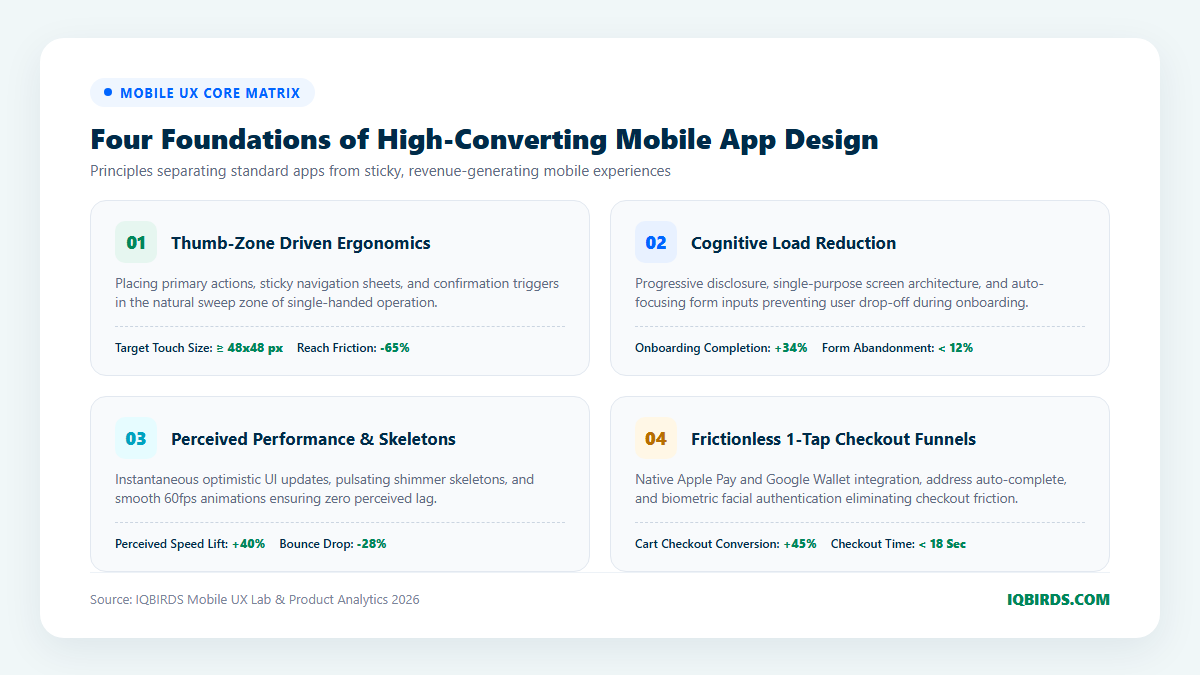
1. Thumb-Zone Driven Ergonomics
Over 75% of mobile interactions are executed using a single thumb. As modern smartphone display diagonals regularly exceed 6.5 inches, the upper third of the screen has become an “unfriendly zone” requiring painful physical finger gymnastics or two-handed operation.
Modern mobile UI design inverts traditional desktop hierarchy by anchoring critical interactive elements—such as sticky action buttons, filter drawers, bottom navigation bars, and search inputs—strictly within the natural arc of the thumb (the lower 40% of the display). Furthermore, every clickable button is engineered to meet Apple Human Interface Guidelines and Google Material Design standards: a minimum bounding touch target of 48×48 pixels with at least 8 pixels of padding to prevent accidental mis-taps.
2. Cognitive Load Reduction & Progressive Onboarding
Every unnecessary decision, complex form field, or visual distraction forces the user’s brain to expend mental energy. When cognitive load exceeds a threshold, users experience friction and drop off. Elite mobile UX employs progressive disclosure—presenting only the essential information needed for the immediate decision and revealing secondary details on demand.
Nowhere is this more critical than user onboarding. High-converting apps eliminate lengthy account creation forms. Instead, they leverage native Apple ID, Google One-Tap, or biometric authentication, allowing users to experience the “aha moment” of core product value before requesting secondary profile information.
3. Perceived Performance & Micro-Interactions
In mobile applications, how an interface feels is just as important as how fast the server responds. A blank white screen during a network fetch causes users to wonder if the app has crashed. Professional design teams implement “optimistic UI” updates and animated shimmer skeletons that preview incoming data structures instantly.
Moreover, subtle micro-interactions—such as spring-physics toggle switches, haptic vibrational feedback on successful payments, and progress bar animations—provide physical confirmation to digital actions. These sensory cues create an addictive, polished tactile experience that elevates brand credibility.
4. Frictionless 1-Tap Checkout Funnels
For mobile commerce and subscription applications, the checkout flow is where revenue is won or lost. Requiring users to manually type 16-digit credit card numbers and billing addresses on a virtual glass keyboard results in catastrophic mobile cart abandonment rates exceeding 70%.
Engineering a high-converting mobile checkout requires deep native OS integrations: Apple Pay, Google Wallet, autofill address lookups, and biometric Face ID/Touch ID authorization. By compressing the checkout journey from six pages to a single bottom sheet, apps experience immediate conversion lifts of 30% to 50%.
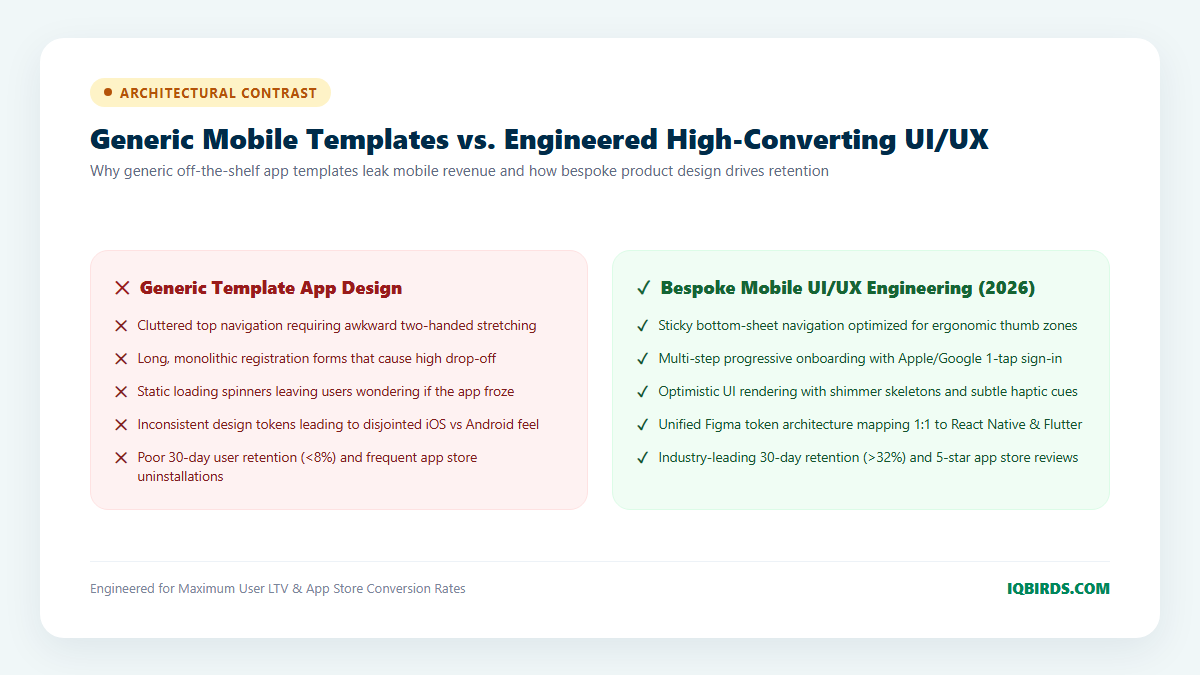
Generic Templates vs. Bespoke Mobile UI/UX Engineering
Founders often question whether to use a cheap pre-built mobile app UI kit or invest in custom design engineering. The operational and commercial contrast is stark:
7-Step Roadmap: From App Concept to Production Handoff
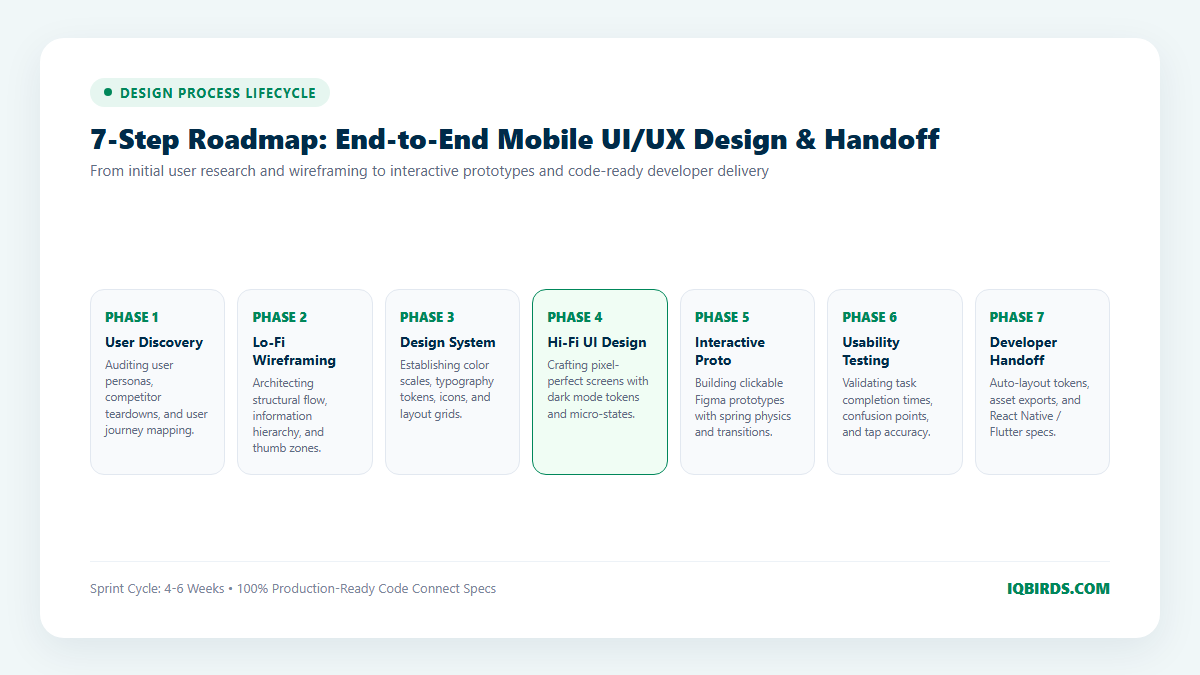
Executing a high-performing mobile design sprint requires structured methodology to prevent scope creep and ensure engineering feasibility. Here is the 7-phase roadmap utilized by top design agencies:
Step 1: User Discovery & Behavioral Research
Before launching Figma, product designers conduct in-depth interviews with target users, analyze heatmaps from existing web funnels, and audit top competitor applications. This phase produces detailed user journey maps, identifies core emotional drop-off points, and clarifies the primary “Jobs-to-be-Done” (JTBD) the app must fulfill.
Step 2: Information Architecture & Low-Fidelity Wireframing
Designers architect the app’s navigational hierarchy using low-fidelity grayscale wireframes. This step validates user flow logic, screen transitions, and bottom-sheet drawers without getting distracted by colors, photography, or typography.
Step 3: Design System Architecture & Token Definition
A scalable mobile product requires a comprehensive design system. Designers construct a centralized Figma token library specifying typography hierarchies (using legible mobile typefaces like Inter or Geist), 8-point spatial grids, radius scales, and semantic color palettes that support automatic light and dark mode toggling.
Step 4: High-Fidelity UI Design & State Modeling
Every screen is designed in high fidelity across all possible states: default, active, loading shimmer, empty state, and error handling. Designers incorporate modern 2026 visual aesthetics—such as subtle ambient mesh glows, crisp 1px borders, and frosted glass bottom sheets—ensuring the app looks stunning on high-DPI OLED screens.
Step 5: High-Fidelity Interactive Prototyping
Static screens cannot convey the fluidity of a mobile experience. Designers build interactive Figma or ProtoPie prototypes featuring realistic spring physics, drag gestures, and page swipe transitions. This clickable model behaves identically to a native mobile application.
Step 6: Rigorous Usability Testing & Heatmap Teardowns
The interactive prototype is deployed to real users across various device form factors (iPhone Pro Max, standard iPhone, and Samsung Galaxy models). By recording user interactions, designers identify confusing micro-copy, miss-sized touch targets, or hesitation points, iterating the design before a single line of backend code is written.
Step 7: Production-Ready Developer Handoff
Finally, the design is prepared for seamless engineering handover. Utilizing Figma Dev Mode and Code Connect, designers document exact auto-layout constraints, export multi-resolution SVG/PNG assets, and synchronize design token JSON files directly with frontend engineers building in React Native, Flutter, Swift, or Kotlin.
How Mobile UX Connects with Automated Backend Workflows
An exceptional mobile app cannot operate in isolation from your core business logic. World-class mobile applications combine intuitive client interfaces with intelligent automated backends through AI automation services and system integration pipelines.
For example, when a mobile user completes a consultation request inside an app, modern architectures instantly trigger automated AI qualification pipelines, route customer records into CRM pipelines, and dispatch personalized SMS notifications through marketing automation engines—ensuring instantaneous fulfillment across the entire customer lifecycle.
Frequently Asked Questions
What is the typical timeline for an end-to-end mobile UI UX design project?
A comprehensive mobile design sprint typically spans 4 to 8 weeks, depending on the number of unique screens, complexity of user roles, and depth of third-party integrations. This timeline includes user research, wireframing, high-fidelity UI design, prototyping, and developer handoff.
Should our app be designed differently for iOS and Android?
While brand identity and core design tokens remain consistent, native interaction paradigms differ between platforms. iOS relies heavily on bottom sheets and swipe-to-back gestures, whereas Android incorporates specific back-button handling and Material Design guidelines. High-end design services ensure your design system adapts gracefully to native OS conventions while preserving brand consistency.
How do you measure the ROI of investing in custom mobile UI UX design?
Mobile design ROI is directly measurable through key commercial metrics: reduction in onboarding abandonment rates, increases in daily active users (DAU) and 30-day retention, higher checkout conversion rates, lower customer support ticket volumes, and higher average App Store ratings.
How can IQBIRDS help my company build high-converting mobile applications?
At IQBIRDS, we deliver enterprise-grade mobile UI UX design services that bridge human-centered design with cutting-edge engineering standards. Our design team creates comprehensive design token architectures, interactive prototypes, and code-ready Figma handoffs tailored for React Native, Flutter, and native iOS/Android applications. Whether you are launching a new mobile venture from scratch or redesigning an existing app to unlock higher conversion and retention, our engineers and product designers ensure your mobile product stands alongside market leaders like Linear, Stripe, and Apple. Schedule a design consultation with IQBIRDS today to evaluate your mobile product vision.