
AI Automation
UI UX Design and Development Services: How Integrated Teams Ship Faster
For over a decade, software development has suffered from a painful and costly operational division: the “throw-it-over-the-fence” handoff between design studios and engineering teams. Designers spend weeks crafting pixel-perfect Figma mockups without understanding backend API constraints or responsive edge cases. In turn, software engineers receive flat static files, guess interaction states, rewrite styling from scratch, and deliver a final product that looks and feels nothing like the original vision. In 2026, leading product companies have eliminated this friction by partnering with integrated ui ux design and development services.
When user interface designers, interaction specialists, and frontend engineers operate as a unified, cross-functional squad sharing a synchronized design token architecture, time-to-market is compressed by over 50%. In this comprehensive guide, we unpack the exact engineering frameworks, living component libraries, token pipelines, and collaborative workflows integrated product teams use to ship world-class software that matches the standards of Linear, Stripe, and Apple.

The Hidden Costs of Siloed Design and Engineering
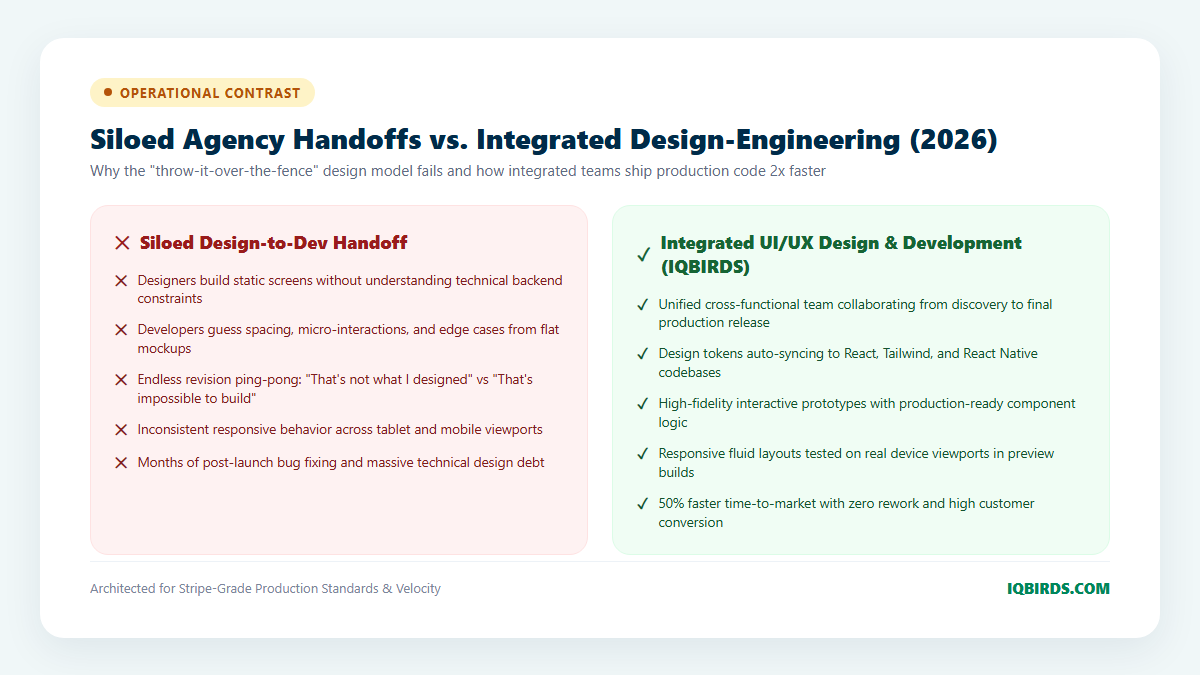
Separating UI/UX design from software engineering creates massive organizational friction that quietly erodes product budgets and delays launch deadlines. The primary pain points of the legacy handoff model include:
- Severe Design Drift: When frontend engineers code interfaces from static mockups without shared tokens, subtle errors accumulate. Typography line-heights drift, color hex codes vary, padding feels uneven, and the final production application looks amateurish compared to the original design.
- Endless Revision Ping-Pong: Quality assurance becomes an adversarial battleground. Designers spend hundreds of hours submitting bug tickets (“the button radius should be 8px, not 4px”), while engineers push back citing architectural complexity or delivery deadlines.
- Neglected Micro-Interactions & Edge States: Static mockups fail to communicate how an interface responds to user behavior: button hover states, optimistic UI loading skeletons, form validation errors, and smooth spring-physics transitions are frequently omitted, leaving users with a stiff, clunky experience.
- Ballooning Engineering Budgets: According to product management research, fixing design and usability defects post-launch costs up to 100 times more than resolving them during initial collaborative architecture.
By engaging unified UI UX design services with built-in frontend engineering, companies bridge the chasm between design aesthetics and production code.
The 4 Pillars of Integrated UI/UX Design and Development
High-velocity product teams achieve rapid release cadence by anchoring their workflow upon four foundational engineering pillars:
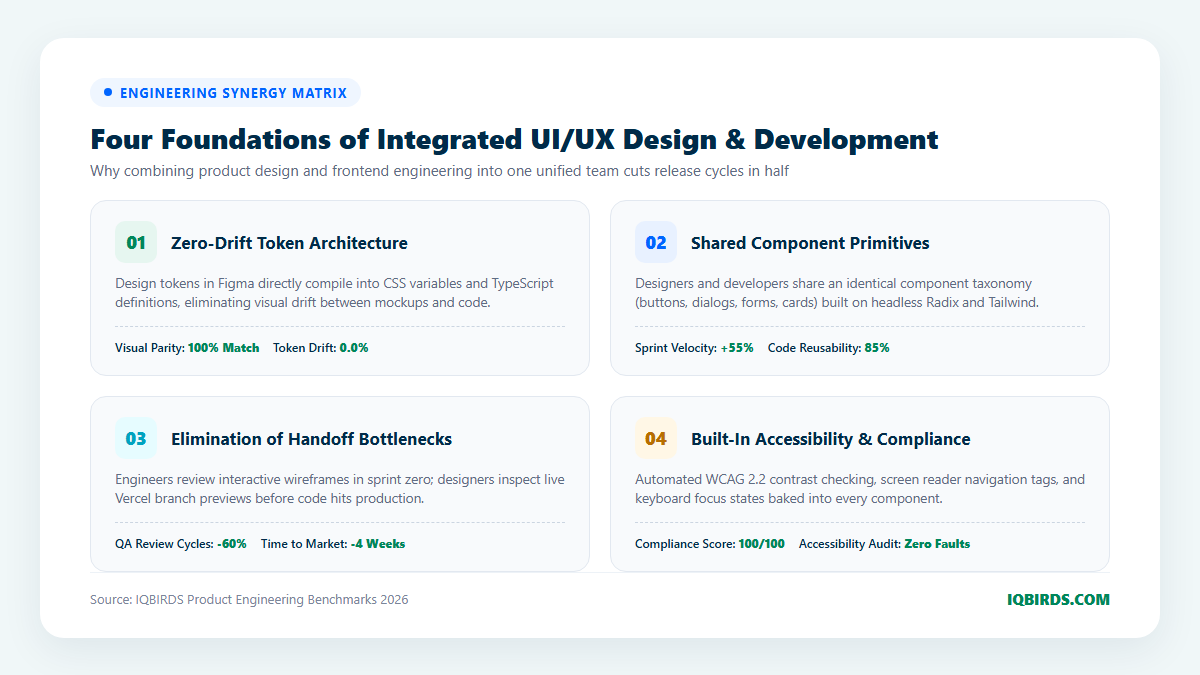
1. Zero-Drift Design Token Architecture
In modern integrated product development, design variables—such as primary color scales, spatial margins, corner radii, and typographic font scales—are treated as single-source-of-truth code assets. Utilizing automated pipelines like Style Dictionary and Figma Tokens, any change made by a designer in Figma compiles automatically into CSS custom properties, Tailwind config objects, and TypeScript interfaces.
If a product lead updates brand accent colors or adjusts dark mode contrast ratios, the change propagates into production code repositories automatically via pull requests, ensuring 100% visual parity across web, iOS, and Android platforms with zero manual developer overrides.
2. Living Component Systems (Storybook + Headless UI)
Instead of designing isolated, static web pages, integrated teams build living component systems. Designers and engineers establish a shared vocabulary anchored around atomic components: buttons, dropdown sheets, modal dialogs, data tables, and input fields.
Components are developed in isolated environments like Storybook using accessible, unstyled headless primitives (such as Radix UI, Headless UI, or React Aria) styled with Tailwind CSS. Every component documents its full state matrix: default, hover, focused, disabled, loading shimmer, and error state. Designers review the live interactive code in Storybook, ensuring what gets tested is exactly what ships.
3. Micro-Interaction & Tactile Motion Engineering
World-class software is defined by subtle micro-interactions that communicate system responsiveness. A button should provide immediate tactile feedback when clicked; modal sheets should slide with realistic spring-inertia physics; and data updates should render optimistically before server confirmation.
Integrated teams collaborate closely on motion design using animation libraries like Framer Motion. By defining shared spring physics parameters (stiffness, damping, and mass), designers and engineers craft fluid 60fps transitions that delight users without adding sluggish animation bloat.
4. Automated Accessibility (WCAG 2.2 AA) & Visual Testing
Accessibility is not an afterthought; it is baked directly into the design and engineering pipeline. Every component undergoes automated contrast audits, ARIA attribute validation, and keyboard navigation testing before code review.
Furthermore, automated visual regression tools (such as Percy or Playwright) capture screenshots across multiple viewport breakpoints (mobile, tablet, desktop, ultra-wide) whenever code changes are proposed, instantly flagging unintended layout shifts before they ever reach real customers.
Siloed Agency Handoffs vs. Integrated Product Squads
Compare the operational reality of managing separate design and development vendors versus partnering with an integrated digital product team:
7-Step Roadmap: Shipping Web & Mobile Apps with Integrated Teams
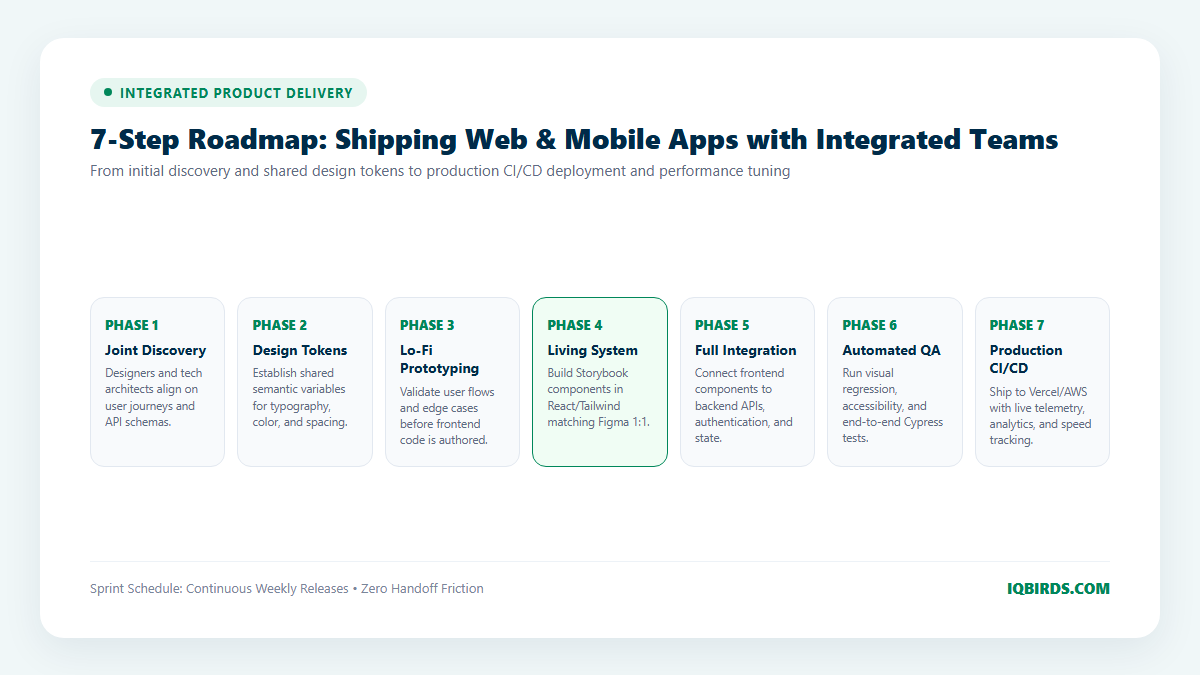
Executing an integrated design and development engagement requires structured alignment across visual and technical sprints. Follow this battle-tested 7-phase product roadmap:
Step 1: Joint Product Discovery & Technical Mapping
Product designers and technical architects collaborate during initial customer interviews and scoping sessions. While designers map user personas and task journeys, engineers evaluate third-party API dependencies, database schemas, and performance constraints—ensuring every proposed design concept is technically viable from day one.
Step 2: Shared Design Token Architecture
The team constructs a centralized design token repository in Figma and GitHub. Tokens define the app’s spatial rhythm (4px/8px grids), type scale, semantic color systems (with built-in dark mode contrast pairings), and component radiuses. These tokens are exported automatically into Tailwind CSS and React Native config files.
Step 3: Rapid Low-Fidelity Prototyping & Flow Validation
Designers construct interactive wireframes to validate user navigation, information hierarchy, and checkout funnels. Engineers review the flows to design optimal REST and GraphQL endpoint schemas, ensuring data payloads match frontend UI requirements.
Step 4: Living Component System Development (Storybook)
As high-fidelity Figma components are finalized, frontend developers immediately build matching components inside an interactive Storybook environment. Designers, product managers, and developers inspect the living code side-by-side, verifying edge cases such as long text strings, network timeout states, and responsive breakpoints.
Step 5: Full Frontend & Backend Integration
With component primitives approved, engineers connect frontend UI views to backend microservices, authentication systems, and database layers through robust system integration services. State management is handled with modern lightweight tools like Zustand or TanStack Query, enabling optimistic UI updates that make the app feel instantaneous.
Step 6: Automated End-to-End & Accessibility QA
The staging build is subjected to automated test suites: Cypress and Playwright run automated end-to-end user journeys (e.g., registration, searching, checking out), while Percy validates visual regression across desktop, tablet, and mobile displays. Dedicated accessibility linters ensure 100% WCAG 2.2 AA compliance.
Step 7: Production CI/CD Deployment & Performance Telemetry
The application is deployed to modern cloud infrastructure (such as Vercel, AWS, or Railway) with automated CI/CD pipelines. Real-time telemetry monitors Core Web Vitals (Largest Contentful Paint, Cumulative Layout Shift, and Interaction to Next Paint), ensuring the user experience remains blazingly fast under real-world traffic loads.
Connecting Frontends to Intelligent Automation Backends
A beautiful interface is only as powerful as the business logic running beneath it. High-converting digital products combine world-class UI/UX with autonomous operational backends through custom AI automation services and AI CRM development.
When customer interactions inside your app trigger automated lead enrichment, instant SMS follow-ups, and self-healing CRM pipeline updates, user satisfaction and commercial conversion multiply simultaneously.
Frequently Asked Questions
What technologies do your integrated teams build with?
Our engineering squads specialize in modern, high-performance web and mobile technologies: Figma for UI/UX design systems, React, Next.js, and TypeScript for web applications, Tailwind CSS for styling, Framer Motion for micro-interactions, React Native and Flutter for mobile apps, and robust Node.js/Python backends hosted on Vercel and AWS.
How does integrated design and development save our budget?
Traditional handoff models incur enormous “hidden costs” in the form of post-launch redesigns, developer rework, and delayed launch deadlines. By designing and building components in parallel with shared design tokens, you eliminate visual drift, reduce QA bug cycles by 60%, and bring products to market weeks ahead of competitors.
Can you work with our existing backend engineering team?
Yes. Many clients hire our integrated UI/UX design and frontend development squad to deliver the complete client-facing application layer, while their internal engineers focus exclusively on proprietary core backends and database infrastructure. We deliver clean, fully typed TypeScript components and Storybook documentation that your backend team can integrate effortlessly.
How can IQBIRDS help my company build and ship digital products?
At IQBIRDS, we deliver Stripe-grade UI UX design and development services that unify product strategy, high-craft aesthetics, and robust frontend engineering. We don’t just hand over static design files—we build and ship living component systems, interactive mobile prototypes, and production-ready applications that convert users and elevate brand equity. Schedule a product strategy consultation with IQBIRDS today to accelerate your next software release.