
AI Automation
AI Agents vs AI Assistants: Key Business Differences
AI agents vs AI assistants is one of the most important business technology comparisons right now. Both can help teams save time, improve communication, and reduce repetitive work. However, they are not the same thing. An AI assistant usually helps a person complete a task after being asked. An AI agent can often plan and carry out a series of steps toward a goal, especially when it is connected to tools, data, and workflow rules.
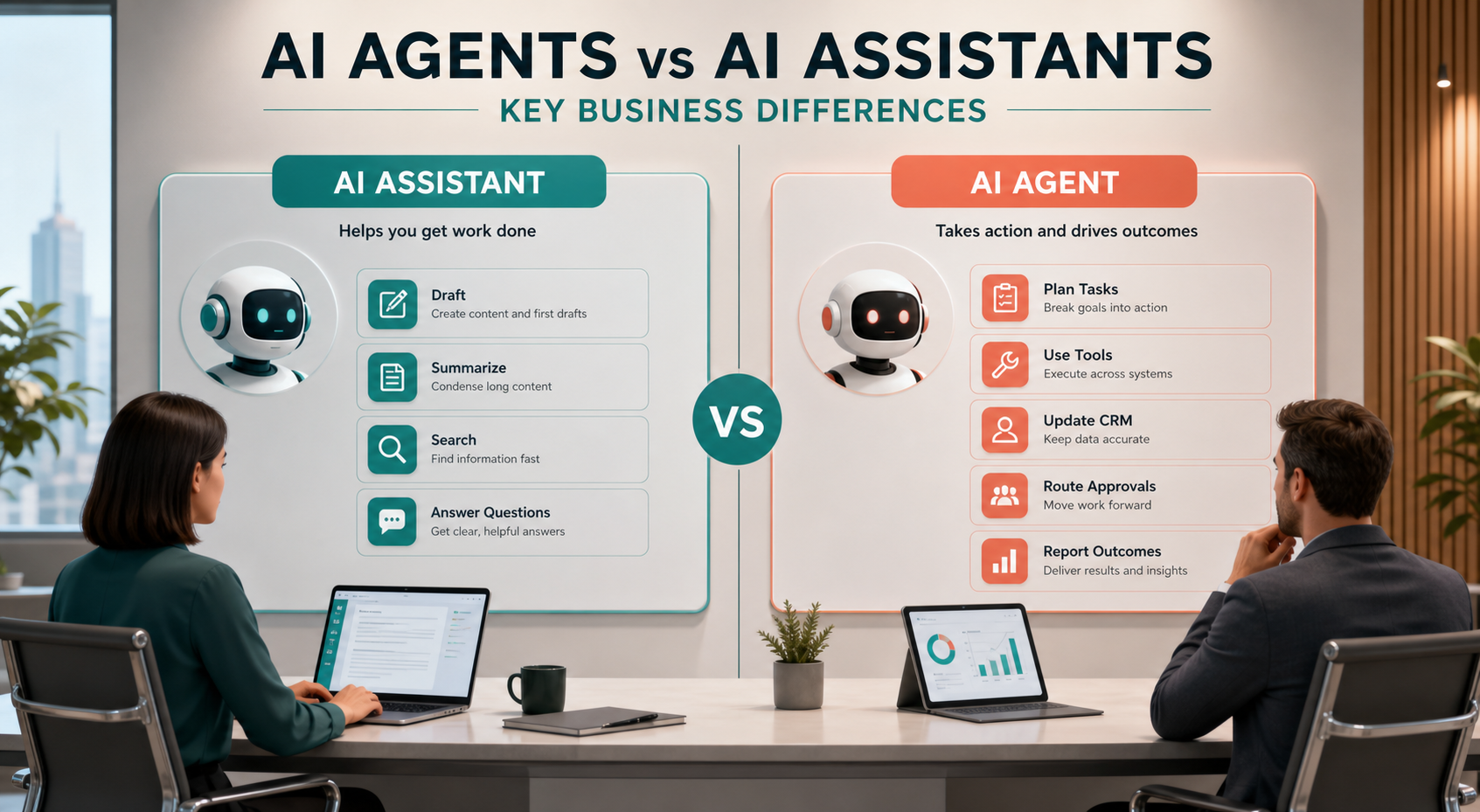
For growing businesses, this difference matters because it changes how AI should be used. A simple assistant may be perfect for drafting emails, summarizing meetings, answering questions, or helping staff write faster. Meanwhile, an agent may be better for work that requires triggers, decisions, tool use, follow-up, routing, and measurement. Therefore, the right choice depends on how much autonomy the workflow needs.
What AI Agents vs AI Assistants Means in Business
An AI assistant is usually request-based. A user asks for help, and the assistant responds. For example, an employee may ask an assistant to summarize a document, draft a proposal, rewrite a customer email, explain a report, or find an answer from a knowledge base. The assistant supports the person, but the person remains clearly in control of the next action.
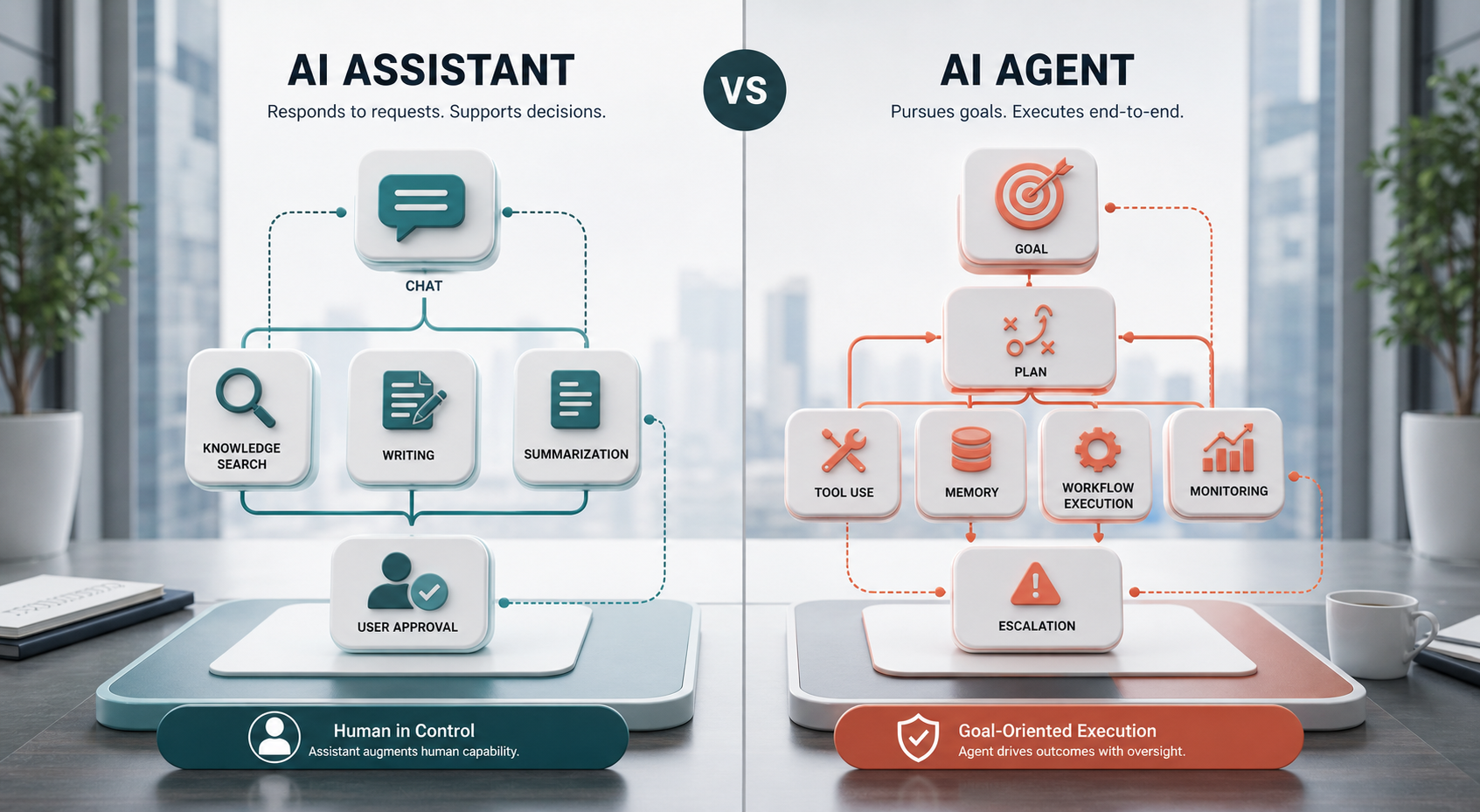
An AI agent is usually goal-based. A user or system gives the agent an objective, and the agent breaks that objective into steps. Then it may call tools, check data, make limited decisions, route approvals, and continue until the goal is completed or escalated. In addition, many agent systems include memory, monitoring, guardrails, and human-in-the-loop review.
In simple terms, an assistant helps you do work. An agent can do parts of the work with you or for you within clear boundaries. Still, businesses should avoid thinking of agents as fully independent digital employees. Good agents need specific goals, approved tools, access rules, monitoring, and human oversight.
Why the Difference Matters
The difference between an assistant and an agent affects cost, risk, setup time, training, and business value. A basic assistant can often be adopted quickly because employees already understand chat-style help. However, an agent touches more systems and can take more actions, so it needs better planning before launch.
For this reason, businesses should not jump straight to agents for every problem. First, identify whether the work requires autonomy. If the employee only needs a better draft, summary, or answer, an assistant may be enough. If the workflow requires multiple steps across CRM, email, calendars, documents, approvals, and reporting, an agent may create more value.
Where AI Assistants Usually Fit Better
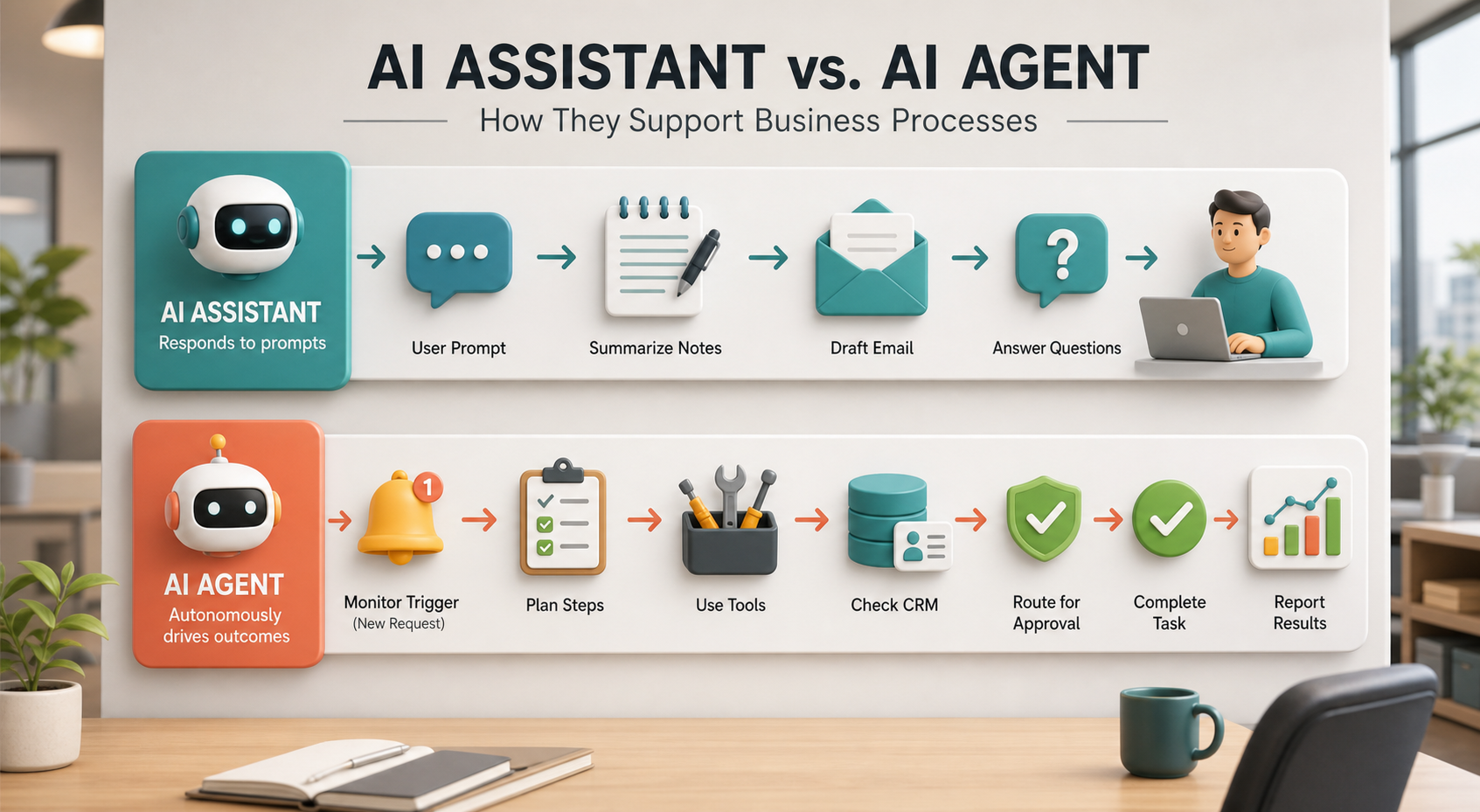
AI assistants usually fit better when the task is short, clear, and controlled by a person. For example, sales teams can use assistants to draft follow-up emails, summarize call notes, and prepare questions before a meeting. Marketing teams can use them to outline content, improve headlines, and repurpose long material into shorter formats. Support teams can use them to suggest replies and summarize customer conversations.
Assistants are also useful when staff members need knowledge support. For example, an internal assistant can help employees search policies, explain onboarding steps, or answer common operational questions. In these cases, the assistant improves productivity without taking full control of the workflow.
However, assistants have limits. They often wait for the user to ask. They may not automatically monitor triggers, execute multi-step tasks, or update multiple systems unless connected to extra automation. Therefore, assistants are best when human control and human judgment remain central.
Where AI Agents Usually Fit Better
AI agents usually fit better when the business needs a workflow to move forward across steps. For example, an agent can monitor a new lead, check the CRM, enrich the record, score the lead, draft a reply, assign the task, notify the sales team, and create a follow-up reminder. The agent is not simply answering a question. Instead, it is moving a process toward an outcome.
Agents can also help with support operations, recruiting, finance checks, project management, and customer onboarding. For example, a support agent might classify a ticket, look up the customer history, suggest the right response, route urgent issues, and update the ticket status. In addition, a project agent might collect updates, identify blocked tasks, remind owners, and prepare a weekly report.
Still, agents need stronger governance than assistants. Because agents may take action, businesses must define permissions, escalation rules, approval points, logs, and failure handling. Otherwise, a helpful agent can become risky or confusing.
AI Agents vs AI Assistants Comparison Table
| Business Factor | AI Assistants | AI Agents |
|---|---|---|
| Main role | Help users complete prompted tasks such as drafting, summarizing, searching, and answering questions. | Pursue goals through multi-step workflows, tool use, monitoring, and task execution. |
| Autonomy | Lower autonomy because the user usually starts and guides the task. | Higher autonomy because the agent can plan steps and continue toward an approved goal. |
| Tool use | May use tools, but usually in response to direct user prompts. | Often relies on connected tools, APIs, CRM systems, calendars, documents, and workflow automations. |
| Best business fit | Writing, research, summaries, internal Q&A, meeting prep, and staff productivity. | Lead routing, customer onboarding, support triage, workflow monitoring, operations, and reporting. |
| Risk level | Usually lower because people approve most actions. | Usually higher because the system may act across tools and records. |
| Setup needs | Can start quickly with prompts, knowledge sources, and basic training. | Needs workflow design, integrations, permissions, guardrails, logs, and human review. |
| Success measure | Better drafts, faster answers, less research time, and improved staff productivity. | Completed workflows, faster response times, fewer missed steps, cleaner records, and measurable outcomes. |
This table shows the practical difference. Assistants are best when people need help thinking, writing, searching, or summarizing. Agents are best when the business needs a process to move forward with less manual effort. However, many companies need both. An assistant can help employees work faster, while an agent can handle repeatable workflow steps behind the scenes.
How to Choose the Right Option
Start with the task, not the label. If the task is mostly about helping an employee create or understand information, choose an assistant first. If the task requires an AI system to monitor, decide, use tools, and move work across systems, consider an agent. Next, ask how much risk is involved if the AI makes a mistake. The higher the risk, the more review and approval you need.
This is where implementation support matters. IQBIRDS helps businesses design practical AI workflows through AI automation services, AI integration services, and AI CRM development. For sales and operations teams, our guide on AI sales assistants vs traditional sales teams also shows how AI support can improve daily workflows without replacing human judgment.
For current technical context, review resources such as IBM’s AI agents overview, OpenAI Agents SDK documentation, Salesforce Agentforce, and Microsoft Copilot agents. Because AI platforms evolve quickly, official documentation should guide tool selection and implementation details.
Step-by-Step Guide to Adopting Assistants and Agents
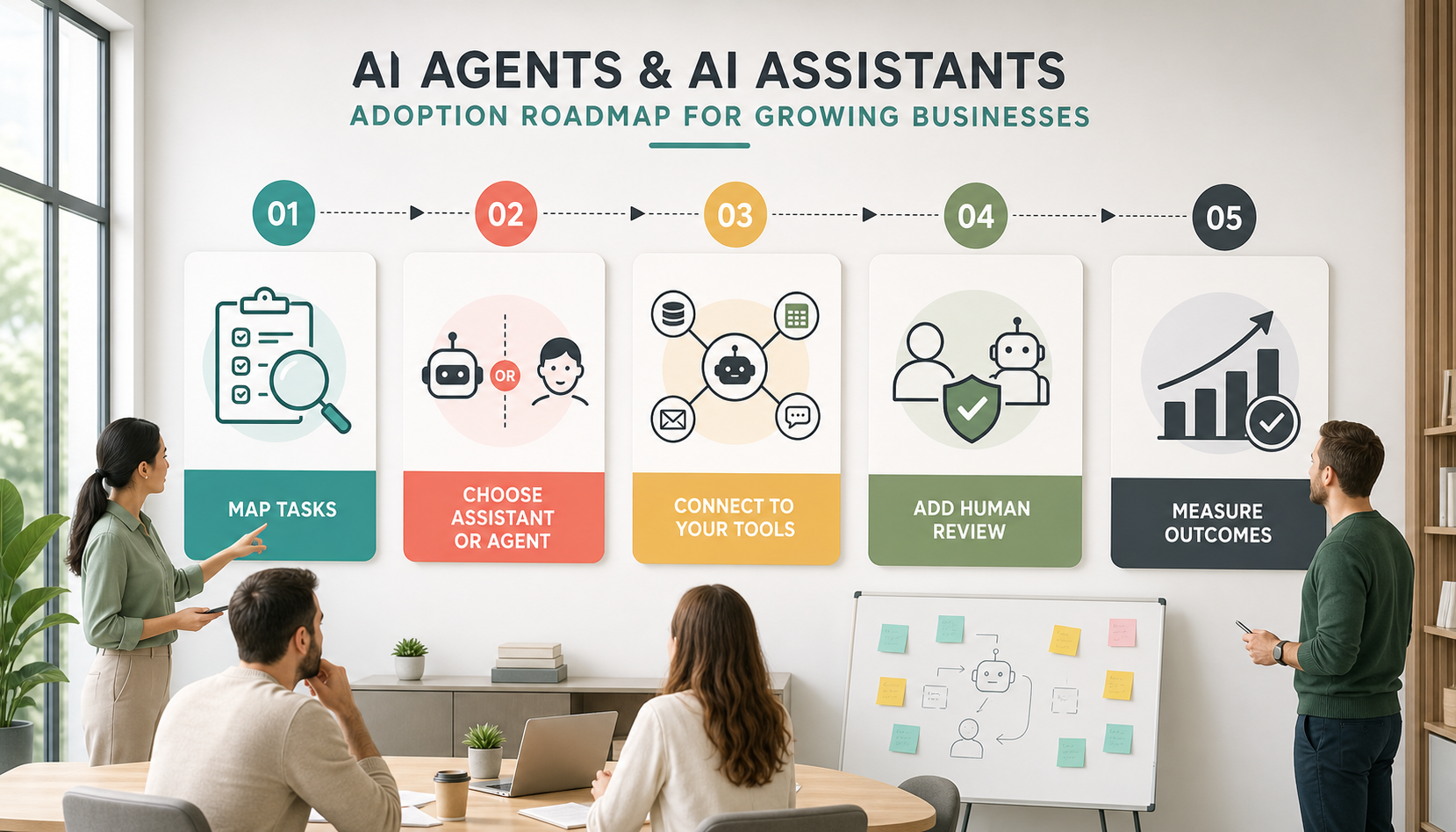
First, map the tasks your team repeats every week. Separate information tasks from action tasks. Information tasks include drafting, summarizing, research, and Q&A. Action tasks include updating records, assigning work, sending reminders, routing approvals, and reporting outcomes.
Next, choose the simplest useful starting point. If the team struggles with writing, research, or internal knowledge access, start with an assistant. However, if the team misses follow-ups, repeats the same admin steps, or manually moves data between systems, an agent workflow may be worth testing.
After that, connect the right tools carefully. Agents usually need access to CRM, email, calendars, databases, ticketing systems, files, or automation platforms. Also, each connection should have a clear purpose and limited permissions.
Then, add human review. Begin with draft-only or recommendation-only actions before allowing automatic changes. For example, let the agent draft a customer reply or prepare a CRM update, but require approval before sending or saving it.
Finally, measure outcomes. Track time saved, response speed, missed tasks, data quality, customer satisfaction, and staff confidence. Most importantly, review logs regularly so the workflow improves over time.
Key Benefits for Growing Businesses
- Faster drafting, summarizing, research, and internal knowledge access.
- Less manual admin work across sales, support, operations, and service delivery.
- Cleaner CRM records because agents can prepare or update structured information.
- Fewer missed follow-ups, reminders, approvals, and customer handoffs.
- Better reporting because workflow activity can be tracked and measured.
- Improved customer experience when routine requests move faster.
- More time for employees to focus on judgment, relationships, and complex decisions.
In addition, the right mix of assistants and agents can make AI adoption feel more natural. Employees can start with assistants for daily help, while the business gradually adds agents for well-defined workflows. As a result, teams build trust before giving AI more responsibility.
Common Mistakes to Avoid
Calling Every Chatbot an Agent
Not every AI tool is an agent. If it only answers questions or drafts content after a user prompt, it is closer to an assistant. Use the term agent when the system can pursue goals through steps and tools.
Giving Agents Too Much Freedom
Agents should start with limited permissions. For example, begin with read-only access, draft suggestions, or approval-required actions before allowing automatic updates or customer-facing messages.
Skipping Workflow Mapping
If the process is unclear, an agent may automate confusion. First, document the workflow. Then define triggers, tools, rules, approvals, and success metrics.
Ignoring Staff Training
Employees need to know when to use an assistant, when to trust an agent, and when to escalate. Also, staff should understand what the AI can and cannot do.
Measuring Usage Instead of Outcomes
High usage does not always mean high value. Instead, measure response time, task completion, fewer errors, cleaner records, customer experience, and saved labor hours.
How IQBIRDS Helps Your Business
IQBIRDS helps businesses decide where AI assistants are enough and where AI agents can create stronger workflow value. We start by mapping your current process, identifying repeated tasks, and separating simple information work from multi-step action work. Then we recommend the right AI setup for your team, systems, and risk level.
We can help design assistants for knowledge access, sales support, content drafting, internal Q&A, and customer communication. In addition, we can build agent-style workflows for CRM updates, lead routing, customer onboarding, support triage, reminders, approvals, and reporting dashboards. Because agents touch real systems, IQBIRDS also helps add permissions, human review, logging, and monitoring.
This practical approach helps your business avoid hype. Instead of deploying AI everywhere at once, you can start with useful assistants, add agents where they make sense, and improve the workflow as your team gains confidence.
Frequently Asked Questions
What is the difference between AI agents and AI assistants?
AI assistants usually respond to user prompts and help with tasks like writing, summarizing, searching, and answering questions. AI agents can pursue goals through multiple steps, tool use, workflow execution, and monitoring.
Are AI agents better than AI assistants?
AI agents are not always better. They are better for multi-step workflows that need tool use and action. AI assistants are often better for simpler, lower-risk tasks where a person remains in control.
Can a business use both AI agents and AI assistants?
Yes. Many businesses should use both. Assistants can help employees work faster, while agents can automate structured workflows such as lead routing, onboarding, support triage, and reporting.
Which is safer for small businesses?
AI assistants are usually safer to start with because they take fewer actions on their own. However, AI agents can be safe when they have limited permissions, human review, logs, and clear rules.
What tasks are best for AI agents?
AI agents are best for repeatable workflows with clear triggers, steps, tools, and outcomes. Good examples include CRM updates, lead follow-up, support triage, customer onboarding, reminders, and reporting.
What tasks are best for AI assistants?
AI assistants are best for drafting, summarizing, brainstorming, research, internal Q&A, meeting preparation, customer reply suggestions, and helping employees understand information faster.
How can IQBIRDS help my business?
IQBIRDS can help your business compare AI agents vs AI assistants, map workflows, choose the right AI setup, connect CRM and business tools, add approval rules, and measure real results after launch.
Final Thoughts
AI agents vs AI assistants is not just a terminology debate. It is a business design decision. Assistants are great for helping people work faster. Agents are useful when a workflow needs to move across steps, systems, and decisions with the right level of oversight.
If your business wants to use AI in a practical way, IQBIRDS can help you identify where an assistant is enough, where an agent can save time, and how to build both safely into your daily operations.
Need AI Automation?
Discover how IQBirds helps businesses automate workflows and build custom digital products.