
AI Automation
From Contact Form to Customer Using AI
A contact form looks simple from the outside. A visitor fills in a name, email, phone number, and message. Then they click submit and wait. However, inside the business, that one form can create several tasks: checking the inquiry, adding it to the CRM, deciding who should follow up, sending a response, booking a call, and tracking whether the lead becomes a customer.
AI workflow automation makes that path faster and more consistent. Instead of letting form submissions sit in an inbox, AI can read the inquiry, organize the details, score the lead, assign the right person, trigger follow-up, and prepare the next step for a human to review.
For growing businesses, this matters because form leads often arrive when staff are busy, after hours, or spread across different tools. If the first response is slow, the customer may choose another company before your team even sees the message.

Why Contact Forms Lose Good Leads
Many businesses spend money on websites, ads, SEO, and content, but they still lose leads after the form submission. The problem is usually not the form itself. The problem is what happens after the form.
In many teams, form entries go to a shared inbox. Someone checks the message when they have time. Then they copy the details into a CRM, send a reply, ask for missing information, or forward the request to another person. Meanwhile, the lead is waiting.
Because customers expect fast answers, even a short delay can hurt conversion. A lead who is ready to book today may not wait until tomorrow. In addition, manual handoffs create mistakes. Names are entered incorrectly, phone numbers are missed, follow-up tasks are forgotten, and sales teams lose context.
What AI Workflow Automation Does After a Form Submission
AI workflow automation turns a contact form into a connected process. It can validate the submission, detect the service request, create or update a CRM record, score the lead, assign ownership, send a response, and schedule the next step.
Most importantly, it does not need to remove people from the process. AI can handle the repetitive work around the lead, while your team handles judgment, sales conversations, pricing, complex questions, and relationship-building.
For example, a form message that says “I need pricing for automation support” can be categorized as an automation inquiry, routed to the right sales person, added to the CRM, and answered with a helpful confirmation. Then the system can create a follow-up task if the lead does not book a call.
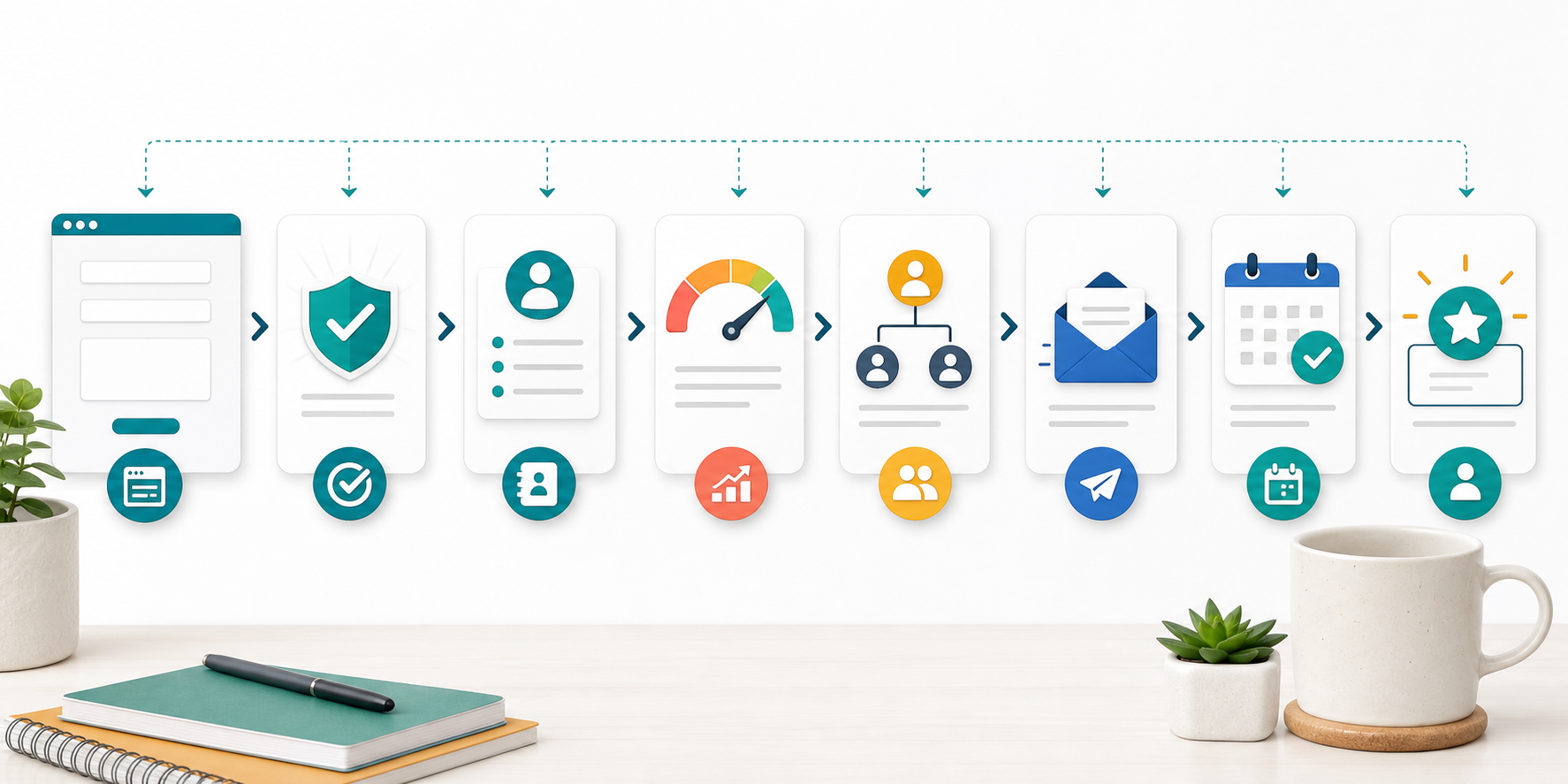
The Contact Form to Customer Workflow
1. Capture the form submission
First, the form should collect the information your team actually needs. This usually includes name, email, phone number, company, service interest, message, urgency, and consent. Simple forms are good, but they should still give the workflow enough context.
2. Validate and clean the data
Next, AI and automation rules can check whether the email looks valid, whether a phone number is present, and whether the message includes enough detail. If information is missing, the system can ask for it before the lead gets buried.
3. Create or update the CRM record
After that, the workflow can create a new CRM lead or update an existing contact. This step is important because duplicate records and incomplete profiles make follow-up harder later.
4. Score and classify the lead
Then AI can classify the inquiry by topic, urgency, value, location, company size, or service fit. As a result, urgent and high-fit leads can move faster without forcing staff to read every form manually.
5. Assign the right owner
Once the lead is categorized, the workflow can assign it to the correct person or team. For example, technical requests may go to an automation specialist, while pricing questions may go to sales.
6. Trigger fast follow-up
Finally, the system can send an immediate confirmation, draft a personalized response, create a call task, or share a booking link. This keeps the customer journey moving while the lead is still interested.
Manual Form Follow-Up vs AI Workflow Automation
| Area | Manual Follow-Up | AI Workflow Automation |
|---|---|---|
| Speed | Lead waits until someone checks the inbox | Lead is acknowledged and routed quickly |
| CRM updates | Staff copy details by hand | Records are created or updated automatically |
| Lead quality | Every inquiry looks the same at first | AI can score urgency, fit, and service interest |
| Assignment | Requests may be forwarded manually | Rules route each lead to the right owner |
| Follow-up | Tasks can be forgotten during busy periods | Reminders and next steps trigger automatically |
| Reporting | Managers guess where leads are dropping off | Dashboards can show form volume, response time, and conversion |
This table shows why the workflow matters as much as the form. A contact form creates the opportunity, but the process after submission decides whether that opportunity becomes a real sales conversation. In short, AI workflow automation helps the business respond while interest is fresh.

Tools That Should Connect in the Middle
A strong form-to-customer process usually connects your website form, CRM, email, calendar, task management tool, analytics, and reporting dashboard. Therefore, the goal is not to add another isolated app. The goal is to make the tools share context.
If your business needs help connecting these steps, IQBIRDS offers AI Automation Services, AI CRM Development, and AI Integration Services. These services are useful when leads arrive through forms but follow-up still depends on manual copying, inbox checking, and spreadsheet updates.
For related guidance, read IQBIRDS articles on AI lead response automation for local businesses, CRM automation vs manual lead management, and how businesses waste leads without AI automation. External resources from Microsoft Power Automate, Salesforce sales automation, HubSpot lead management, and IBM intelligent automation also explain why connected workflows are important for customer-facing teams.
Why Lead Source Tracking Matters
Before a business automates form follow-up, it should decide how lead sources will be tracked. A form submission should not only say who the lead is. It should also show where the lead came from, which page they visited, which campaign influenced them, and what service they asked about.
In addition, source tracking helps sales and marketing teams make better decisions. If one landing page creates many qualified leads, the business can invest more in that page. If another form brings low-fit inquiries, the team can adjust the offer, questions, or targeting.
For this reason, the CRM workflow should capture source, page, campaign, service interest, and lead stage from the beginning. Clean data makes AI workflow automation more useful because the system can score, route, and report on leads with better context.
Step-by-Step Guide to Build the Workflow
1. Map the current form process
First, document what happens after someone submits your form today. Include who receives the message, where it is stored, how fast staff respond, and where the lead is tracked.
2. Define required form fields
Next, decide which fields are required for a useful follow-up. Keep the form simple, but make sure the workflow can understand service interest, urgency, and contact details.
3. Connect the form to your CRM
After that, connect the form to your CRM so leads do not live only in email. Add rules for duplicate checks, source tracking, tags, and lead stage.
4. Add AI classification
Then use AI to classify the message. It can identify the service requested, urgency, likely intent, missing information, and whether the lead should be handled by sales, support, or another team.
5. Create follow-up rules
Set rules for response timing, assigned owner, task creation, email templates, booking links, and escalation. However, keep human review for complex pricing, complaints, sensitive details, and high-value opportunities.
6. Test with real submissions
Before going live, test the workflow with real examples. Check whether leads are classified correctly, CRM fields are clean, follow-up messages sound natural, and tasks go to the right people.
7. Measure conversion and improve
Finally, measure form submissions, response time, booked calls, qualified leads, closed customers, and missed follow-ups. Use those numbers to improve the workflow over time.

Key Benefits of AI Workflow Automation
- Faster response to new form submissions
- Cleaner CRM records and fewer duplicate leads
- Better lead scoring and routing
- Fewer missed follow-ups during busy periods
- More consistent email and booking workflows
- Clearer reporting on form-to-customer conversion
- Less manual copying between tools
- More time for sales teams to have real conversations
Most importantly, these benefits help the business protect the leads it already paid to attract. A form submission is not valuable until someone responds, qualifies it, and moves it toward a decision.
Common Mistakes to Avoid
Automating a weak form
If the form asks the wrong questions, automation will not fix the problem. Start by making sure your fields match the sales process.
Sending generic follow-up messages
Generic messages can feel cold. Instead, use the form details to personalize the response by service interest, urgency, and customer need.
Skipping human review
AI can route, draft, and summarize, but people should review complex questions, pricing discussions, complaints, sensitive requests, and high-value leads.
Ignoring CRM data quality
Messy CRM fields weaken the whole workflow. Therefore, define required fields, naming rules, tags, stages, and lead source tracking before scaling automation.
Measuring only form submissions
More submissions do not always mean more customers. Track response time, qualification rate, booked calls, close rate, and revenue from each form source.
How IQBIRDS Helps Your Business
IQBIRDS helps businesses build practical AI workflow automation from website forms to CRM, follow-up, booking, and reporting. The work usually starts with mapping your current lead journey and finding where form submissions slow down or disappear.
From there, IQBIRDS can help with workflow mapping, CRM automation, AI automation, tool integration, lead management, customer journey automation, human approval workflows, and reporting dashboards. The goal is to make every form submission easier to understand, route, and convert.
If your contact forms are generating leads but your team is still chasing messages manually, a connected AI workflow can help you respond faster and turn more inquiries into customers.
Frequently Asked Questions
What is AI workflow automation for contact forms?
It is the process of using AI and automation to handle form submissions, create CRM records, score leads, assign tasks, trigger follow-up, and move qualified leads toward becoming customers.
How does AI turn a form submission into a customer?
AI helps by reading the submission, identifying the need, routing the lead, creating follow-up tasks, sending helpful responses, and keeping the sales process moving until a human closes the deal.
Should every form lead be automated?
No. Routine steps can be automated, but complex, sensitive, or high-value inquiries should include human review before important decisions or messages are sent.
What tools should connect to the contact form?
Most businesses should connect the form to CRM, email, calendar, task management, analytics, and reporting tools. The exact setup depends on the sales process.
Can AI improve lead response time?
Yes. AI workflow automation can acknowledge submissions quickly, route leads to the right owner, draft responses, and create reminders so fewer leads wait unnoticed.
How do I measure form-to-customer performance?
Track form submissions, response time, qualified leads, booked calls, conversion rate, close rate, revenue by source, and missed follow-up tasks.
How can IQBIRDS help my business?
IQBIRDS can map your lead journey, connect your form to CRM and follow-up tools, build AI workflow automation, add human review rules, and create dashboards that show how form leads become customers.
Conclusion
A contact form is only the beginning of the customer journey. What happens after the form determines whether the inquiry becomes a conversation, a booked call, and eventually a customer.
AI workflow automation helps by connecting the form to CRM, lead scoring, assignment, follow-up, booking, and reporting. It keeps the process moving while still allowing people to review important decisions.
If your business wants to turn more form submissions into real customers, contact IQBIRDS. We can help you build a clear, practical workflow that protects leads, improves response time, and supports better sales outcomes.
Need AI Automation?
Discover how IQBirds helps businesses automate workflows and build custom digital products.