
AI Automation
MCP vs APIs: What’s Better for AI Integrations?
MCP vs API is becoming an important question for businesses that want AI systems to connect with real tools, data, apps, and workflows. APIs have powered software integrations for decades. However, MCP, or Model Context Protocol, is designed specifically for AI assistants that need structured access to tools, files, databases, prompts, and business systems.
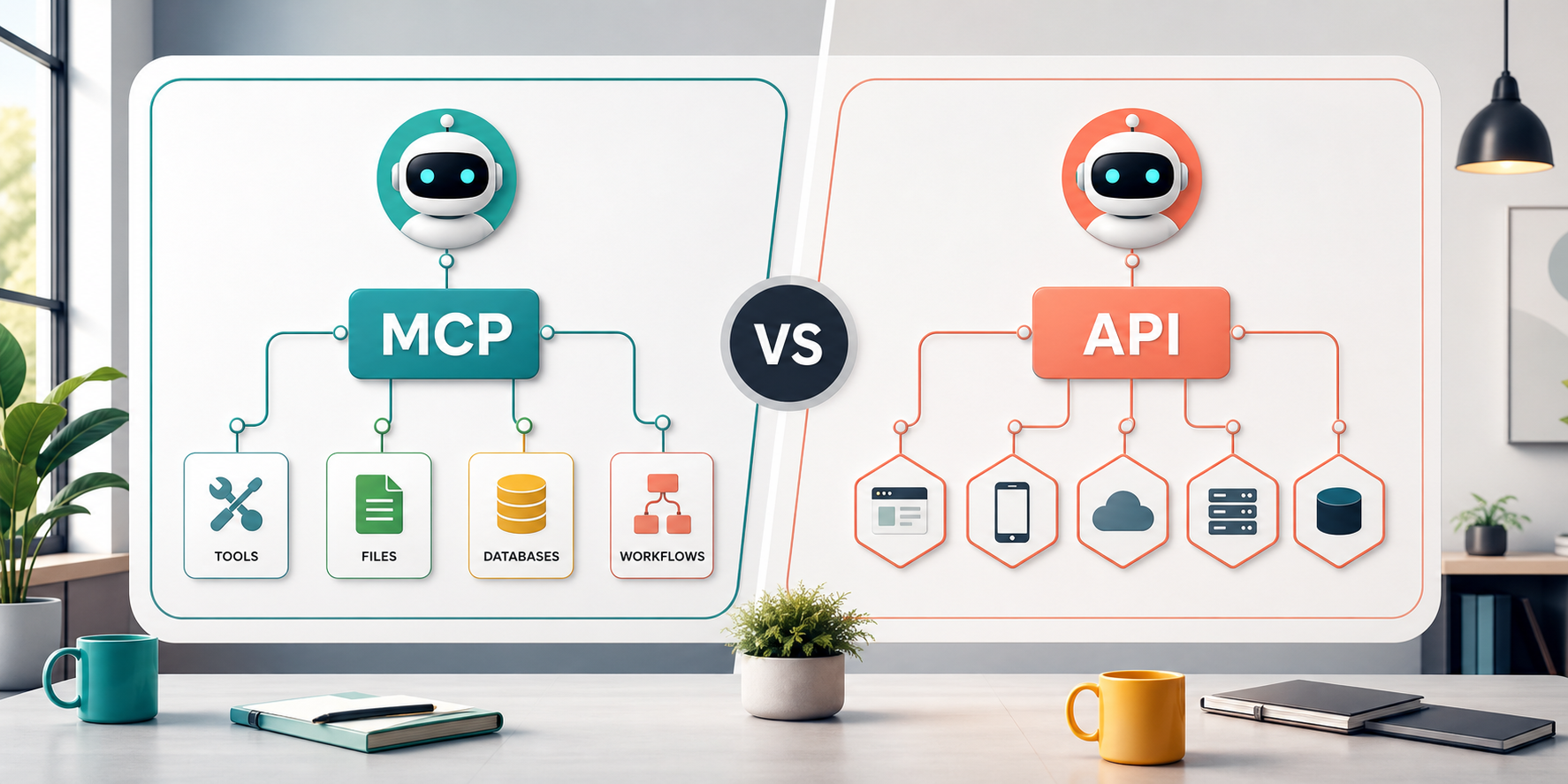
The short answer is simple: MCP does not fully replace APIs. In practice, MCP often works above or beside APIs. APIs still connect software systems, send requests, receive responses, trigger webhooks, and move data between applications. MCP gives AI applications a more consistent way to discover and use those capabilities in context. Therefore, the better choice depends on what you are building.
What MCP vs API Means in Simple Terms
An API, or application programming interface, is a set of rules that lets one software system communicate with another. For example, a CRM API may let your website create a lead, update a contact, fetch a deal, or trigger a notification. APIs are direct, powerful, and widely supported across almost every modern business tool.
MCP is different. It is an open protocol that helps AI applications connect to external tools and data sources in a standardized way. Instead of every AI app needing a custom connector for every system, MCP creates a common structure between an AI client and MCP servers. Those servers can expose tools, resources, prompts, and workflows that the AI can use.
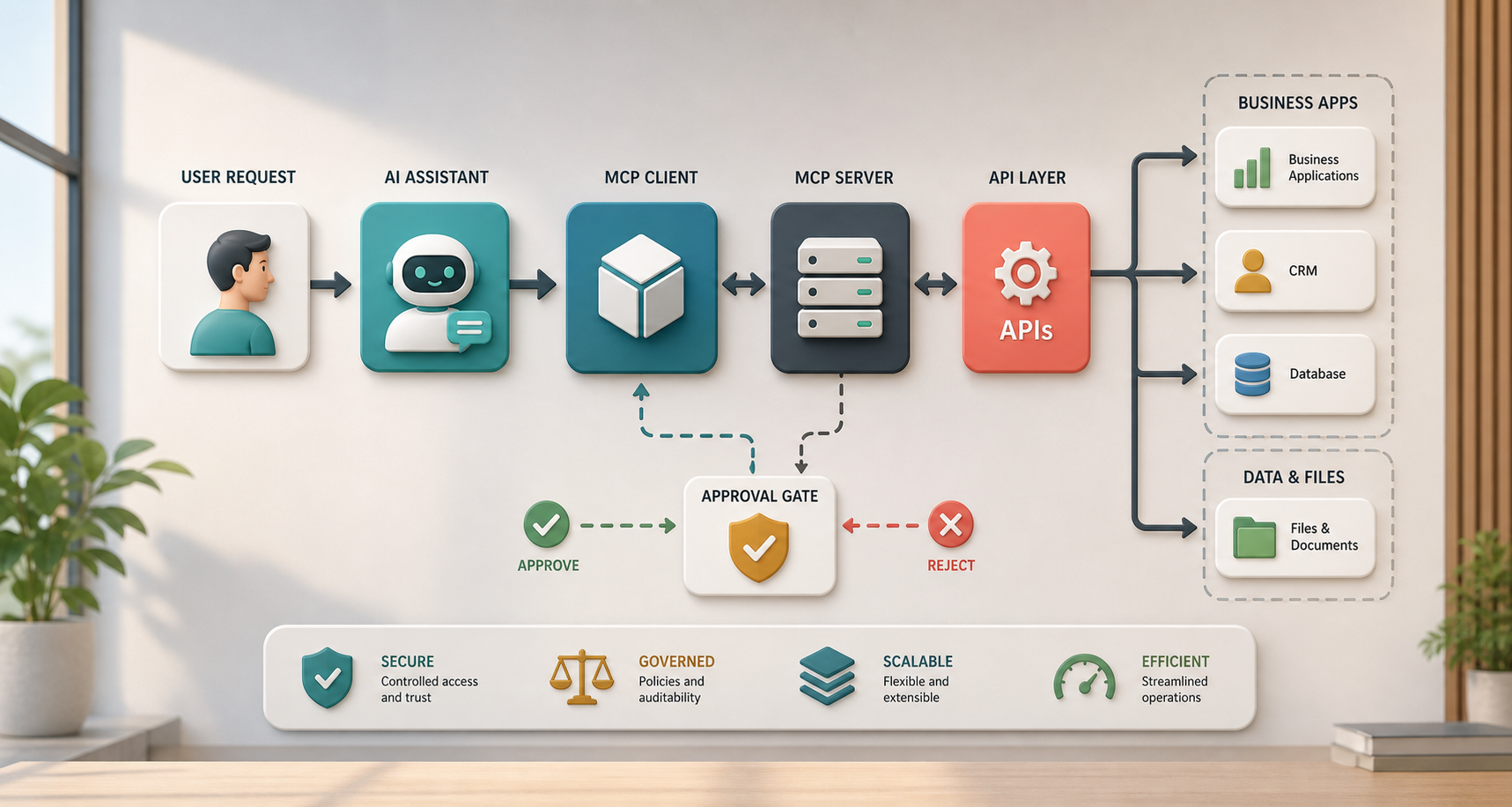
In short, APIs are general software integration building blocks. MCP is an AI-focused integration layer. Also, MCP servers may still call APIs behind the scenes. That is why the smartest comparison is not MCP vs API as enemies. It is MCP and APIs as different layers in a complete AI integration architecture.
Why This Matters for AI Integrations
Traditional integrations usually follow predictable instructions. A system sends a request to an endpoint, gets a response, and moves to the next step. However, AI workflows are often more dynamic. An AI assistant may need to search documents, check a customer record, call a scheduling tool, summarize a support ticket, ask for approval, and then draft a response. Because of that, AI integrations need context, tool descriptions, permissions, and guardrails.
This is where MCP becomes useful. It can make tools easier for AI clients to understand and use. Meanwhile, APIs remain essential because the actual business systems still need reliable ways to receive commands and return data. For this reason, a strong AI integration strategy usually considers both.
Where APIs Usually Fit Better
APIs usually fit better when you need direct, stable, high-volume software communication. For example, a payment system needs a reliable API. A CRM sync needs an API. A shipping platform, booking engine, accounting tool, or reporting dashboard also needs APIs. These integrations are often deterministic, meaning the system should do the same thing every time when the same data is sent.
APIs are also better when developers need exact control over authentication, data formats, endpoints, rate limits, retries, webhooks, and error handling. In addition, APIs work across many types of software, not only AI tools. If your business simply needs two systems to exchange data, an API may be the cleanest answer.
However, APIs can become harder to manage when an AI assistant needs to choose between many tools. The AI needs to know what each tool does, when to use it, what parameters are required, and what result to expect. Without a clear AI-friendly layer, developers may need to build custom glue for every use case.
Where MCP Usually Fits Better
MCP usually fits better when an AI assistant needs access to tools and context in a consistent way. For example, an internal AI assistant may need to read knowledge base articles, inspect CRM data, create support tickets, summarize files, or call a workflow automation. MCP can expose those abilities as AI-usable tools while keeping the integration structure more standardized.
MCP can also help when a company wants to avoid building separate custom integrations for each AI client. If multiple AI tools support MCP, one server can expose a useful business capability to more than one AI interface. As a result, teams can reduce repeated integration work and make AI tool access easier to govern.
Still, MCP is not magic. It needs thoughtful implementation, permission design, logging, human review, and secure access to underlying systems. Also, many MCP servers still rely on APIs underneath. Therefore, MCP is best viewed as an AI integration protocol, while APIs remain the foundation that many business systems expose.
MCP vs API Comparison Table
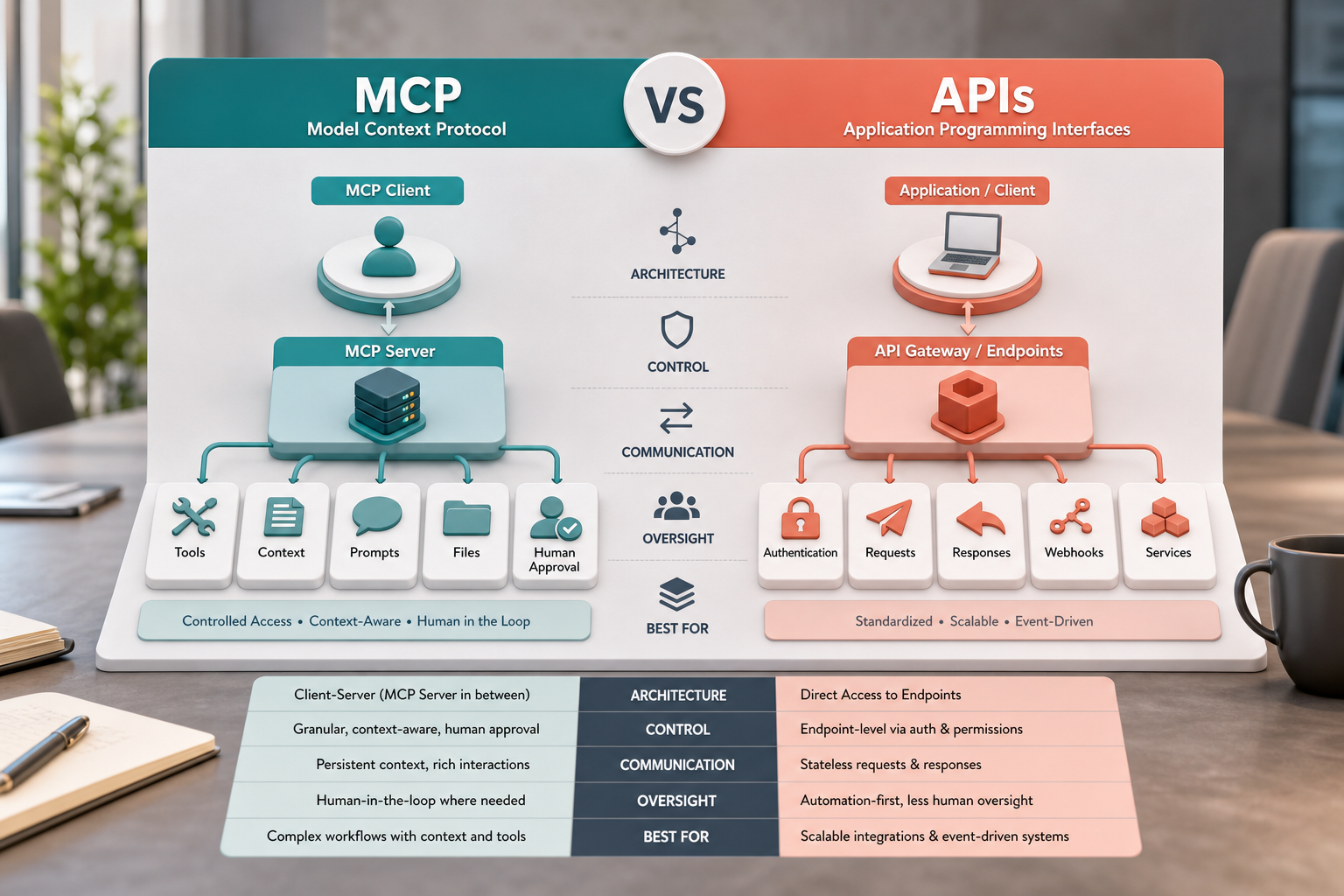
| Integration Need | MCP | APIs |
|---|---|---|
| Main purpose | Connect AI clients to tools, resources, prompts, and context in a standardized way. | Connect software systems through endpoints, requests, responses, and events. |
| Best use case | AI assistants that need to discover and use tools across files, databases, and workflows. | Direct app-to-app integrations, data syncs, transactions, webhooks, and backend services. |
| AI friendliness | Designed for AI context and tool use, so it can be easier for AI clients to work with. | Not AI-specific, so developers may need extra layers to make endpoints easy for AI to use. |
| Control | Good for exposing approved tools and context to AI with clear boundaries. | Good for precise control over endpoints, authentication, rate limits, and data contracts. |
| Implementation | Requires MCP clients, MCP servers, tool definitions, permissions, and monitoring. | Requires endpoints, authentication, documentation, requests, responses, and error handling. |
| Relationship | Often sits above APIs and makes them usable by AI assistants. | Often powers the underlying data and actions that MCP servers expose. |
| Best fit | AI integrations with tool use, context, human approval, and multi-system workflows. | Traditional integrations, backend workflows, and reliable system-to-system automation. |
This table shows the key idea clearly. MCP is better when the main user is an AI assistant that needs context and tool access. APIs are better when the main need is stable software communication. However, many real projects need both. For example, an MCP server may expose a “create customer summary” tool to an AI assistant, while that server uses CRM, support, and billing APIs behind the scenes.
How to Decide Between MCP and APIs
Start by asking who will use the integration. If another application needs to send predictable data to your system, use an API. If an AI assistant needs to understand available tools and decide which one to call, MCP may be useful. Next, ask how much context the AI needs. If the workflow needs files, knowledge, prompts, and tools together, MCP can provide a cleaner structure.
This is also where expert implementation support helps. IQBIRDS helps businesses design practical AI integrations through AI integration services, AI automation services, and AI CRM development. For teams thinking about connected workflows, our article on from contact form to customer using AI also shows how data, automation, and follow-up can work together.
For current technical context, review the official Model Context Protocol documentation, Anthropic’s MCP announcement, OpenAI MCP documentation, and the Swagger API guide. Because protocols, SDKs, and platform support can change quickly, official documentation should guide the final implementation details.
Step-by-Step Guide for AI Integration Planning
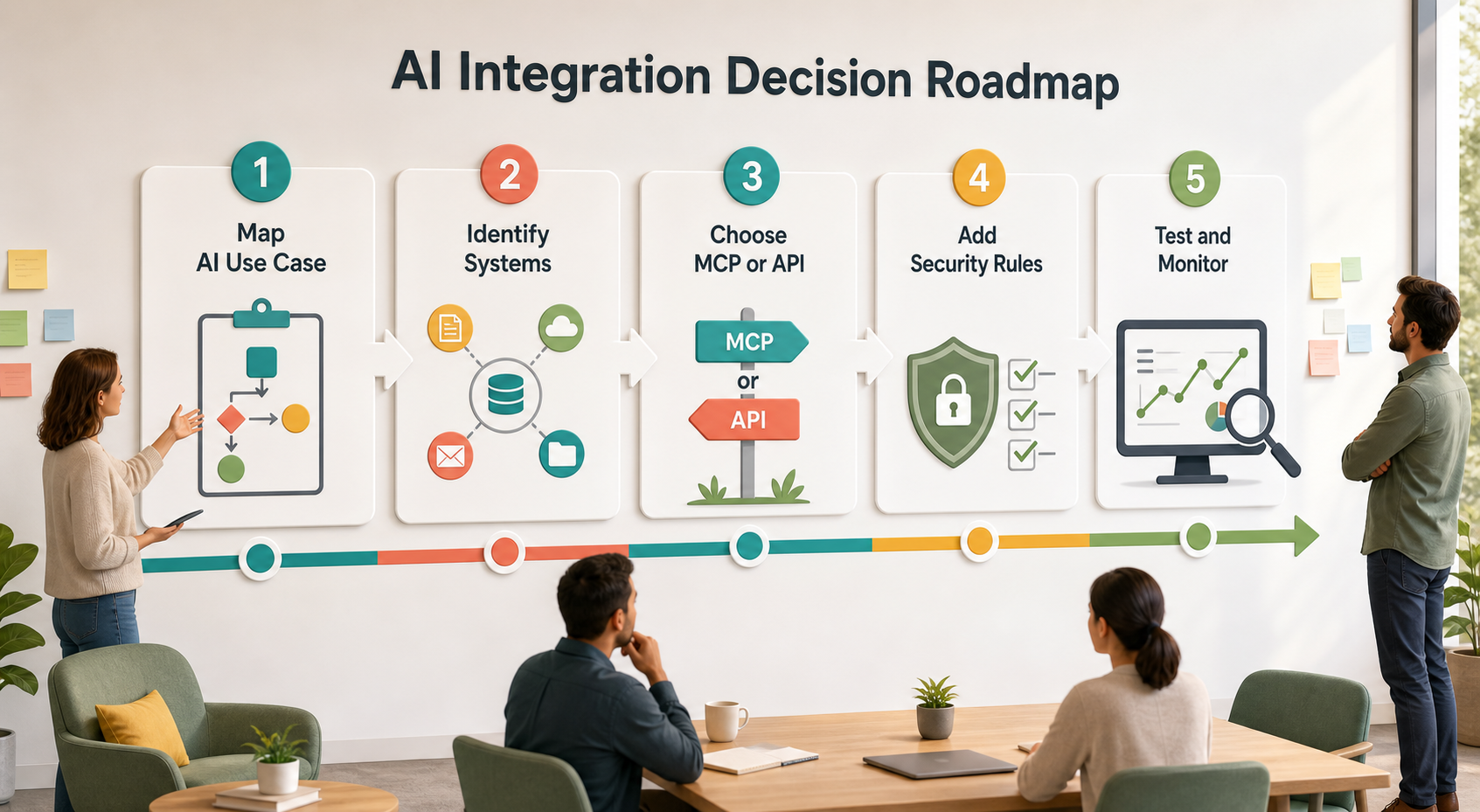
First, map the AI use case. Write down what the user asks, what the AI needs to know, what systems must be checked, and what action should happen at the end. This keeps the integration tied to a real business result.
Next, identify the systems involved. These may include CRM records, support tickets, internal documents, calendars, databases, email platforms, project tools, or billing systems. Also, decide which systems are read-only and which systems can be changed by automation.
After that, decide whether MCP, APIs, or both make sense. Use APIs for direct system actions and data access. Use MCP when an AI assistant needs a structured way to discover approved tools and context. In many cases, the best architecture is a hybrid.
Then, add security rules. Define authentication, permissions, audit logs, data limits, approval gates, and failure handling. Most importantly, decide which actions need human approval before they run, such as sending customer messages, changing account records, or making financial decisions.
Finally, test with real examples. Use messy customer questions, incomplete records, unusual edge cases, and realistic staff requests. Then measure accuracy, response time, error rate, user confidence, and how often a human had to correct the output.
Key Benefits of Choosing the Right Integration Layer
- Better AI tool access without building every connector from scratch.
- Cleaner system-to-system automation through reliable API foundations.
- More secure AI workflows with approved tools and permission boundaries.
- Faster development when reusable MCP servers expose common business actions.
- Less confusion because each integration layer has a clear role.
- Improved customer experience when AI can retrieve context and trigger the right workflow.
- More scalable operations when APIs, MCP servers, and human review work together.
In addition, the right architecture reduces long-term maintenance problems. Instead of letting each department build disconnected AI experiments, a company can create reusable integration patterns. As a result, AI becomes easier to govern, improve, and expand across the business.
Common Mistakes to Avoid
Treating MCP as an API Replacement
MCP can expose tools to AI assistants, but APIs still power many underlying systems. Therefore, businesses should avoid assuming MCP removes the need for API planning, authentication, or error handling.
Giving AI Too Much Access Too Soon
AI integrations should start with limited permissions. For example, begin with read-only access or draft-only actions before allowing the AI to update records, send messages, or trigger business-critical workflows.
Skipping Human Approval
Some actions need human review. Customer-facing responses, billing changes, legal language, pricing updates, and sensitive record edits should include approval steps until the workflow is proven reliable.
Ignoring Monitoring and Logs
Without logs, it is hard to know what the AI saw, what tool it used, and why a result happened. Also, monitoring helps teams catch failed API calls, incorrect tool choices, and permission issues early.
Building Before Mapping the Workflow
Technology choices should follow workflow clarity. First, map the business process. Then choose whether direct APIs, MCP, automation tools, or a combined setup best supports that process.
How IQBIRDS Helps Your Business
IQBIRDS helps businesses move from AI ideas to practical integrations. We start by mapping the workflow, identifying the systems involved, and deciding what the AI should read, suggest, draft, or trigger. Then we recommend the right integration approach, whether that means APIs, MCP, automation platforms, CRM integrations, or a hybrid architecture.
We can also help design guardrails such as human approval steps, access permissions, logging, and reporting dashboards. In addition, IQBIRDS can connect AI workflows to CRM systems, lead management tools, support platforms, internal databases, and customer communication channels. Because every business has different risk levels, the goal is always practical implementation, not trend chasing.
With the right plan, your AI assistant can become more than a chatbot. It can retrieve the right context, use approved tools, support your staff, and help customers faster while keeping control in the hands of your business.
Frequently Asked Questions
Is MCP better than APIs?
MCP is better for AI assistants that need structured access to tools and context. APIs are better for direct software-to-software communication. Many AI integrations use both.
Does MCP replace APIs?
No. MCP usually does not replace APIs. Instead, MCP can sit above APIs and expose approved tools to AI clients in a more standardized way.
What is MCP used for in AI integrations?
MCP is used to connect AI applications to tools, data sources, files, prompts, and workflows. It helps AI systems understand what tools are available and how to use them safely.
When should a business use APIs instead of MCP?
Use APIs when you need predictable app-to-app communication, backend integrations, data syncs, transactions, webhooks, or high-volume system workflows that do not require AI tool discovery.
Can MCP and APIs work together?
Yes. This is often the best setup. An MCP server can expose an AI-friendly tool, while APIs behind the scenes connect to CRM, databases, support platforms, calendars, or other systems.
Is MCP secure for business use?
MCP can be used securely when it is implemented with strong authentication, limited permissions, logging, human approval, and careful data access rules. Security depends on the design, not only the protocol.
How can IQBIRDS help my business?
IQBIRDS can help your business compare MCP vs API options, map AI workflows, connect tools, design secure integrations, add approval rules, and build practical AI automation that fits your systems.
Final Thoughts
MCP vs API is not a battle where one side must disappear. APIs remain the foundation of modern software integration. MCP adds an AI-focused way to expose tools, context, and resources to assistants that need to act intelligently inside business workflows.
If your business wants AI that can do more than answer questions, IQBIRDS can help you choose the right integration layer, connect your systems, and build safe AI workflows that improve response speed, reduce manual work, and support long-term growth.
Need AI Automation?
Discover how IQBirds helps businesses automate workflows and build custom digital products.