
AI Automation
AI CRM vs Traditional CRM: What’s Actually Different?
Most businesses already understand the basic idea of a CRM.
It is the place where leads, customers, deals, notes, follow-ups, and sales activity are supposed to live. A traditional CRM helps teams organize customer information and track relationships. When it is used well, it gives the business a clearer view of the pipeline.
But many CRMs still depend on people doing a lot of manual work.
Salespeople update fields. Managers chase notes. Leads wait for assignment. Follow-up tasks are created by hand. Reports depend on whether everyone remembered to update the system. The CRM stores data, but it does not always help the team move faster.
That is where AI CRM becomes different.
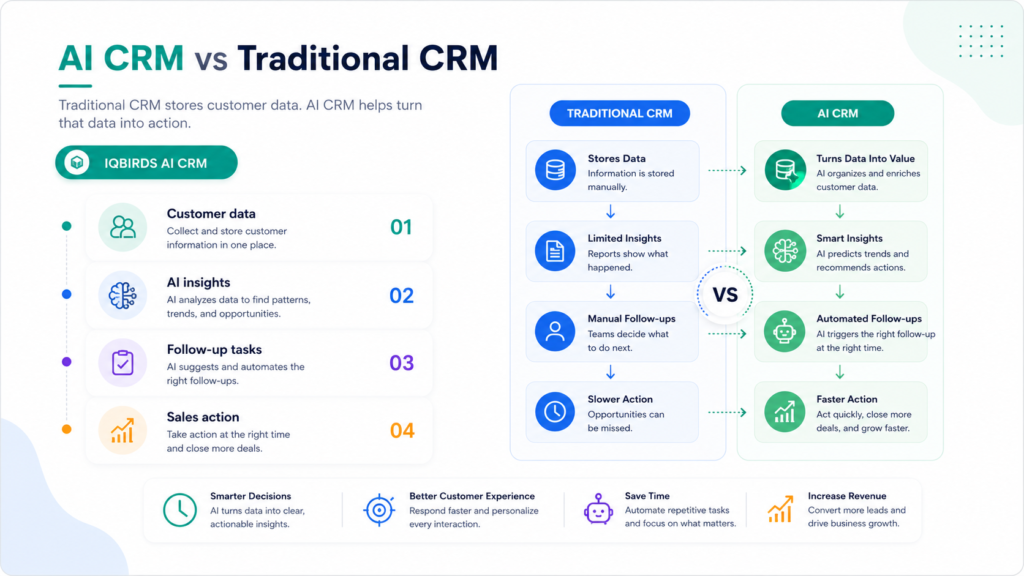
AI CRM does more than store information. It can summarize customer interactions, score leads, recommend next steps, draft follow-up emails, route inquiries, detect patterns, and trigger workflows. It helps turn customer data into action.
This guide explains AI CRM vs traditional CRM in simple terms, what is actually different, where AI CRM helps most, and how businesses can adopt it without creating confusion.
What Is Traditional CRM?
A traditional CRM is a system for managing customer relationships, sales activity, contacts, deals, tasks, notes, and communication history.
It gives teams a central place to store important information about prospects and customers. Instead of keeping details in email inboxes, spreadsheets, notebooks, or personal memory, the CRM keeps everything organized in one system.
Traditional CRM is useful because it creates structure.
It can show who owns a lead, what stage a deal is in, when the last contact happened, what notes were added, and what tasks need to be completed.
Where traditional CRM works well
Traditional CRM works well when the team uses it consistently.
It is helpful for contact management, pipeline tracking, activity history, customer notes, sales reporting, and basic task management.
The challenge is that the system often depends on manual updates. If the team does not enter the right information, the CRM becomes incomplete. If follow-up tasks are not created, the CRM does not protect the opportunity. If notes are added late, the customer history becomes weak.
In other words, traditional CRM is only as useful as the data people put into it.
What Is AI CRM?
AI CRM is a CRM system that uses artificial intelligence to help manage customer data, sales workflows, lead follow-up, customer insights, and repeated CRM tasks.
It can be a CRM platform with built-in AI features, or it can be a traditional CRM connected to AI automation through integrations and workflows.
The main difference is that AI CRM does not only store records. It helps the team understand and act on those records.
For example, an AI CRM workflow can summarize a long email thread, identify buying signals, suggest the next follow-up, draft an email, score the lead, update the deal record, and alert the salesperson when action is needed.
That changes the CRM from a passive database into an active sales and operations assistant.
AI CRM is not magic
AI CRM still needs good data, clear workflows, and human review.
It should not make every decision by itself. The best AI CRM setups automate repeated work while keeping people involved in important sales, customer, finance, or relationship decisions.
The Core Difference: Storage vs Action
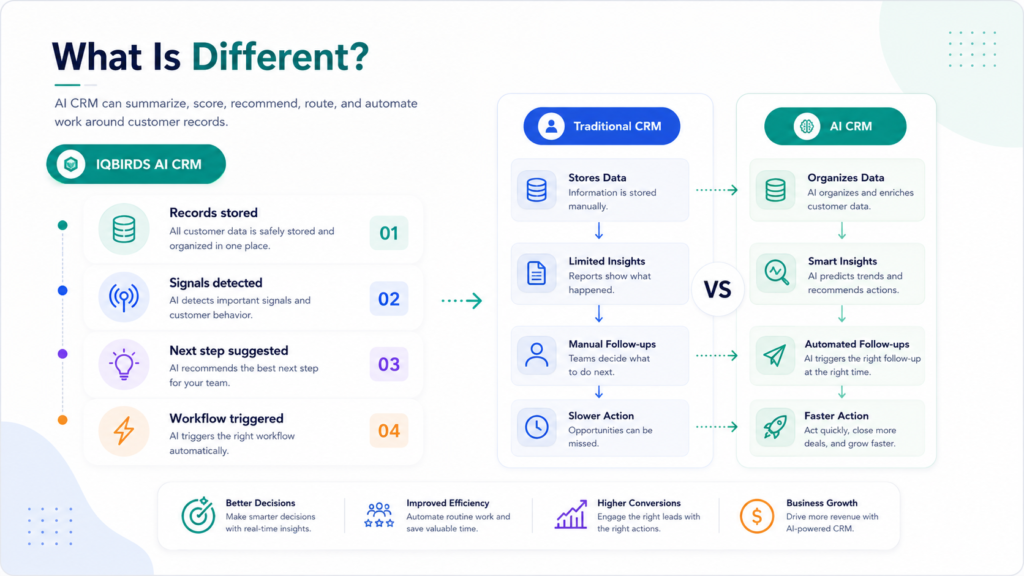
The simplest way to understand AI CRM vs traditional CRM is this:
Traditional CRM stores and organizes customer information.
AI CRM helps interpret that information and move the next action forward.
A traditional CRM can tell you that a lead exists. AI CRM can help summarize what the lead wants, estimate urgency, recommend the next step, assign the lead, and draft the first follow-up.
A traditional CRM can show a list of deals. AI CRM can help identify which deals are stuck, which contacts need follow-up, which leads look high intent, and which records are missing important data.
This difference matters because many businesses do not struggle because they lack customer data. They struggle because the data is not used quickly or consistently enough.
AI CRM vs Traditional CRM Comparison
| CRM Area | Traditional CRM | AI CRM |
|---|---|---|
| Data storage | Stores contacts, deals, notes, and tasks | Stores data and helps interpret it |
| Lead management | Requires manual review and assignment | Can score, summarize, and route leads automatically |
| Follow-up | Depends on manual tasks and reminders | Can draft replies, trigger reminders, and suggest next steps |
| Data entry | Often requires manual updates | Can extract information and update records more consistently |
| Reporting | Shows what was entered into the system | Can highlight trends, gaps, and recommended actions |
| Customer insights | Requires people to read notes and history | Can summarize interactions and detect patterns |
| Best use | Organizing customer information | Improving speed, prioritization, automation, and decision support |
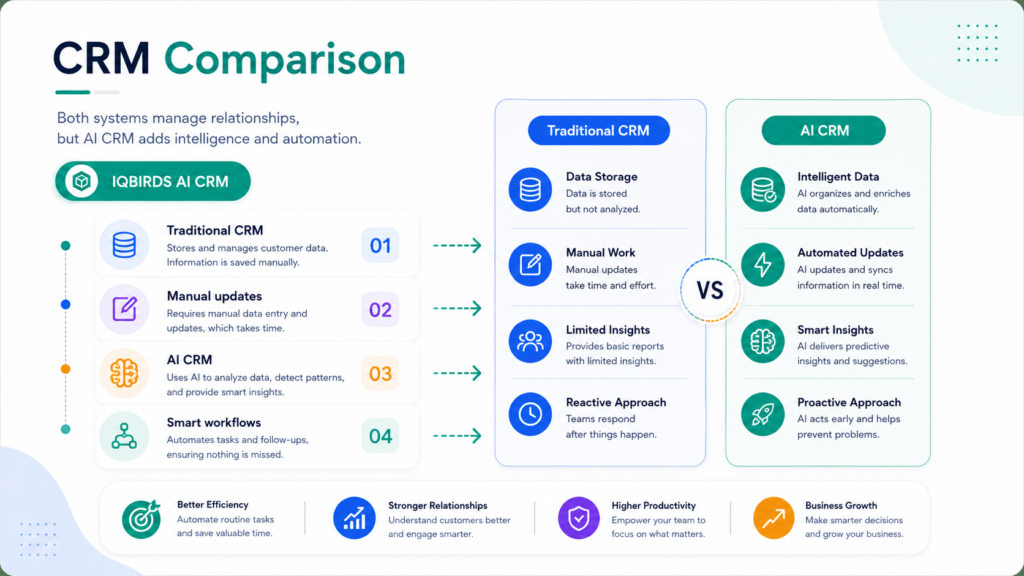
The table shows that traditional CRM and AI CRM are not completely different categories. AI CRM builds on the CRM foundation. The difference is that AI CRM adds intelligence, automation, and recommendations so the team can act faster and with better context.
Useful Research and Related IQBIRDS Reading
Major CRM platforms are moving toward AI-assisted workflows, customer insights, and automation. Salesforce uses Agentforce and CRM AI capabilities for sales, service, marketing, and customer operations. HubSpot has added AI features around its Smart CRM and sales workflows. Microsoft Dynamics 365 Sales connects CRM data with automation and AI-powered sales experiences.
For related IQBIRDS reading, see Is Your CRM Costing You More Than It Saves?, How Businesses Waste Leads Without AI Automation, and How AI Eliminates Repetitive Business Bottlenecks.
If your business wants help improving CRM workflows, explore AI CRM Development, AI Automation Services, and AI Integration Services.
Useful external references include Salesforce Agentforce, HubSpot CRM, Microsoft Dynamics 365 Sales, and IBM Workflow Automation.
Where AI CRM Helps Most
Lead scoring and prioritization
Traditional CRM can store lead details, but it may not tell the sales team which leads need attention first.
AI CRM can help score leads based on behavior, message content, source, company size, urgency, engagement, and historical patterns.
This helps sales teams focus on stronger opportunities instead of treating every lead the same way.
Faster follow-up
Slow follow-up is one of the easiest ways to lose a lead.
AI CRM can draft follow-up emails, create reminders, trigger alerts, and suggest the next best action. A human can review the message before sending when the lead is important or sensitive.
This gives the team speed without losing control.
Cleaner CRM data
Traditional CRM often becomes messy because people update records inconsistently.
AI CRM can help extract details from emails, forms, notes, and calls. It can fill missing fields, summarize interactions, identify duplicates, and flag records that need review.
Cleaner data leads to better reporting and better sales decisions.
Customer summaries
Before a call, a salesperson may need to read notes, emails, past tickets, deal history, and meeting records.
AI CRM can summarize the customer history and highlight the most important points. That saves time and helps the salesperson prepare faster.
Where Traditional CRM Still Matters
Traditional CRM is not outdated or useless.
AI CRM still needs the core CRM foundation: contacts, companies, deals, stages, tasks, permissions, reports, integrations, and customer history.
Without a structured CRM foundation, AI has less reliable information to work with.
Traditional CRM also matters for process control. A business still needs clear pipeline stages, ownership rules, required fields, access permissions, and reporting definitions.
AI can improve the workflow, but it should not replace process discipline.
Step-by-Step Guide to Move From Traditional CRM to AI CRM
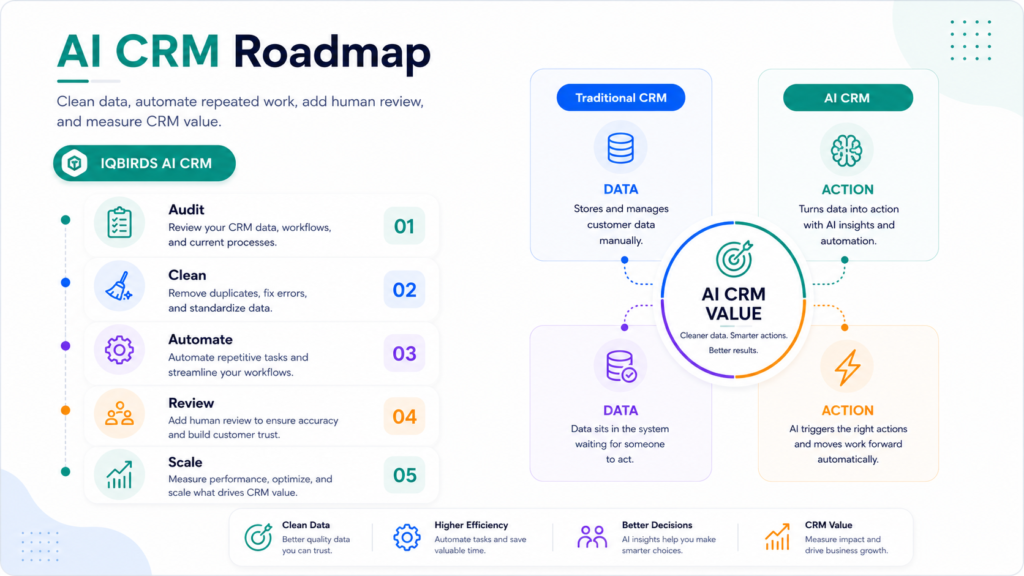
Step 1: Audit your current CRM
Start by reviewing how your CRM is used today.
Look for missing fields, duplicate records, outdated stages, poor adoption, weak reporting, and manual tasks that happen every day.
Step 2: Map the sales workflow
Write down how a lead enters the business, how it is assigned, how follow-up happens, how deals move through stages, and where managers need visibility.
This helps you see where AI CRM can create the most value.
Step 3: Choose one AI CRM use case
Do not try to add AI everywhere at once.
Start with one useful workflow such as lead scoring, lead routing, email drafts, CRM updates, meeting summaries, or follow-up reminders.
Step 4: Clean the required data
AI CRM works better with usable data.
Clean the fields that matter for the use case. This may include lead source, service interest, location, stage, owner, last contact date, and next step.
Step 5: Add human review
AI should not fully control sensitive sales communication or high-value decisions.
Add review steps for important emails, strategic accounts, pricing exceptions, discounts, contract changes, and unusual customer requests.
Step 6: Train the team
Explain what the AI CRM workflow does and what it does not do.
The team should know how to review AI output, correct mistakes, and give feedback.
Step 7: Measure the result
Track response time, follow-up completion, data quality, time saved, booked calls, pipeline visibility, and conversion rate.
If the workflow improves a real business outcome, expand carefully.
Key Benefits of AI CRM
- Faster response to new leads and customer inquiries
- Less manual CRM data entry
- Cleaner records and better reporting
- Smarter lead scoring and prioritization
- More consistent follow-up reminders
- Helpful summaries before calls and meetings
- Better visibility into stuck deals and missing actions
- More useful CRM automation across sales workflows
- More time for salespeople to focus on real conversations
- Better customer experience through faster and more informed communication
The biggest benefit is not that AI CRM sounds advanced. The biggest benefit is that it helps the CRM do more of the work the business expected it to do in the first place.
Common Mistakes to Avoid
Adding AI before fixing CRM basics
If your CRM data is messy, AI will struggle.
Fix the most important fields, stages, ownership rules, and duplicate problems before expecting strong AI results.
Automating every customer message
AI can draft messages, but not every message should be sent automatically.
Use human review for sensitive, high-value, or complex customer communication.
Confusing AI features with business value
A feature is only useful if it improves a workflow.
Measure whether AI CRM saves time, improves follow-up, reduces errors, or helps close more qualified opportunities.
Ignoring team adoption
If the sales team does not trust the CRM, AI features will not fix everything.
Make the workflow easier for the team, not harder.
Using AI without clear ownership
Every AI CRM workflow needs an owner.
Someone should monitor performance, review errors, update rules, and decide when the workflow is ready to expand.
How IQBIRDS Helps Your Business
IQBIRDS helps businesses move from traditional CRM frustration to practical AI CRM automation.
The process starts by reviewing how your CRM works today. Which fields are messy? Which tasks are manual? Where are leads delayed? Which follow-ups are missed? Which tools are disconnected? Which AI CRM use cases would create real business value?
From there, IQBIRDS can help design and build AI CRM workflows across your CRM, website forms, email, Google Sheets, calendars, documents, support tools, and reporting dashboards.
This can include lead scoring, lead routing, CRM field updates, AI summaries, email draft workflows, follow-up reminders, pipeline reporting, duplicate checks, and human approval steps.
The goal is simple: make your CRM smarter, easier to use, and more valuable for the team that depends on it.
FAQs
What is AI CRM?
AI CRM is a customer relationship management system that uses artificial intelligence to help with tasks such as lead scoring, summaries, follow-up suggestions, automation, customer insights, and sales workflow support.
How is AI CRM different from traditional CRM?
Traditional CRM stores and organizes customer data. AI CRM uses that data to recommend actions, automate repetitive tasks, summarize interactions, prioritize leads, and help teams respond faster.
Does AI CRM replace a traditional CRM?
AI CRM does not always replace traditional CRM. In many cases, it adds AI features, automation, and intelligence on top of the CRM system a business already uses.
Is AI CRM useful for small businesses?
Yes. Small businesses can use AI CRM to reduce manual updates, respond faster to leads, keep data cleaner, improve follow-up, and manage sales activity with less admin work.
What tasks can AI CRM automate?
AI CRM can automate lead capture, contact updates, lead scoring, email drafts, follow-up reminders, task creation, customer summaries, pipeline updates, and sales reporting.
What should businesses check before adopting AI CRM?
Businesses should check data quality, CRM adoption, workflow clarity, integration needs, human review requirements, security, and how AI CRM will improve a measurable business outcome.
How can IQBIRDS help my business?
IQBIRDS can help your business evaluate CRM workflows, improve data quality, connect tools, build AI CRM automation, add human review, and turn your CRM into a smarter sales system.
Conclusion
AI CRM and traditional CRM are not enemies.
Traditional CRM gives the business a structured place to manage customer data. AI CRM adds intelligence, automation, summaries, recommendations, and workflow support on top of that foundation.
The real difference is action.
A traditional CRM helps you store what happened. AI CRM helps your team understand what matters and what should happen next.
For businesses that want faster follow-up, cleaner data, better lead prioritization, and less manual CRM work, AI CRM can be a strong next step.
Ready to Make Your CRM Smarter?
If your CRM feels too manual or your sales team is spending too much time updating records, IQBIRDS can help. Contact IQBIRDS for a free consultation and build AI CRM workflows that improve follow-up, reduce admin work, and help your team act on customer data faster.
Need AI Automation?
Discover how IQBirds helps businesses automate workflows and build custom digital products.