
AI Automation
How AI Eliminates Repetitive Business Bottlenecks
Repetitive bottlenecks are one of the quietest ways a business loses time.
They do not always look serious at first. A team member copies data from one tool to another. A manager approves the same type of request every day. A salesperson waits for a lead to be assigned. A support ticket sits in an inbox. A weekly report takes two hours to prepare.
Each step may seem small. But when the same delay happens every day, across multiple people and tools, it becomes a business problem.
AI workflow automation helps remove those repeated bottlenecks.
It can read incoming information, summarize it, classify it, update systems, trigger alerts, draft replies, route work, and prepare reports. More importantly, it can keep the workflow moving without forcing people to manually push every step forward.
The goal is not to replace your team. The goal is to stop wasting human time on repeated admin work that software can handle faster and more consistently.
This guide explains how AI eliminates repetitive business bottlenecks, where automation works best, and how to start without creating confusion for your team.
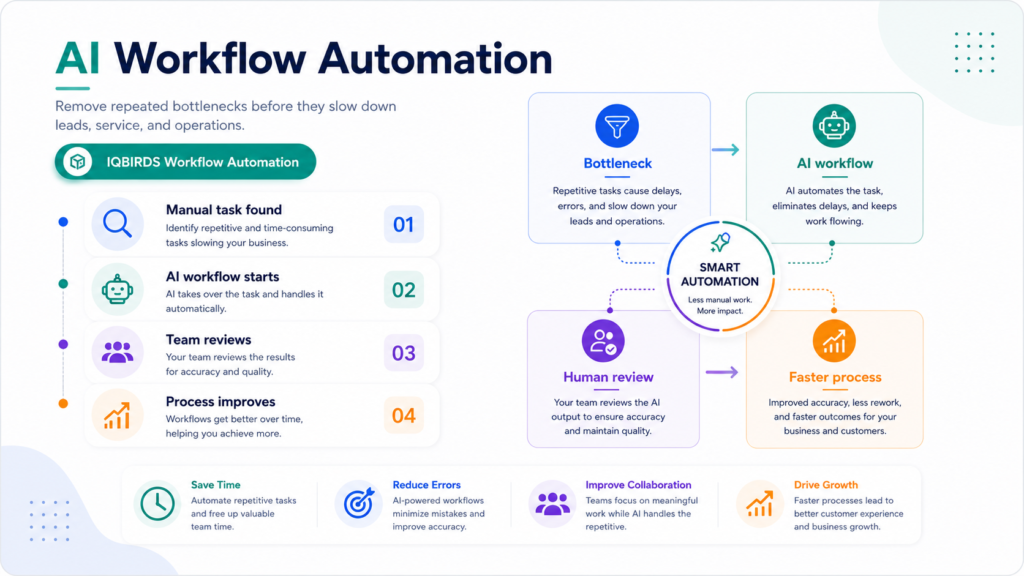
What Business Bottlenecks Really Look Like
A business bottleneck is any step that slows down the rest of the process.
Sometimes the bottleneck is obvious. A lead waits three days for a reply. A customer request is not assigned. A report is late every week. A project cannot move forward because one approval is missing.
Other bottlenecks are harder to see. People may be working hard, but the process still feels slow because too much work depends on manual checking, copying, updating, and remembering.
Common bottlenecks include manual data entry, slow approvals, repeated follow-ups, disconnected tools, unclear task ownership, messy CRM updates, manual reporting, and handoffs between departments.
Why repetitive bottlenecks are so damaging
Repetitive bottlenecks do not only waste time. They create frustration.
Employees feel busy but not productive. Customers wait longer than they should. Managers lose visibility. Sales teams miss follow-ups. Operations teams spend too much time fixing small errors.
Over time, the business starts solving workflow problems by adding more people, more spreadsheets, and more manual reminders. That may work for a short time, but it does not create a scalable process.
AI workflow automation gives the business a better option: automate the repeated steps and keep people focused on judgment, communication, and improvement.
How AI Workflow Automation Removes Repetitive Work
AI workflow automation removes bottlenecks by connecting information, decisions, and actions.
Instead of waiting for a person to manually check a system, the workflow starts when a trigger happens. That trigger may be a new form submission, email, CRM update, support ticket, document upload, calendar event, payment status, or customer reply.
AI can then process the information and help the workflow move forward.
For example, a new inquiry arrives from a website form. AI can summarize the request, identify the service needed, check urgency, create or update the CRM record, assign the lead, and draft a response for the sales team.
That one workflow removes several manual steps.
AI is useful when the next step is predictable
AI workflow automation works best when the repeated process has clear inputs and a clear next action.
If the same type of task happens every day, and the team already knows what should happen next, the workflow is usually a good automation candidate.
The system does not need to make every decision. It can prepare the work, move the data, create the task, and ask for human approval when the step requires judgment.
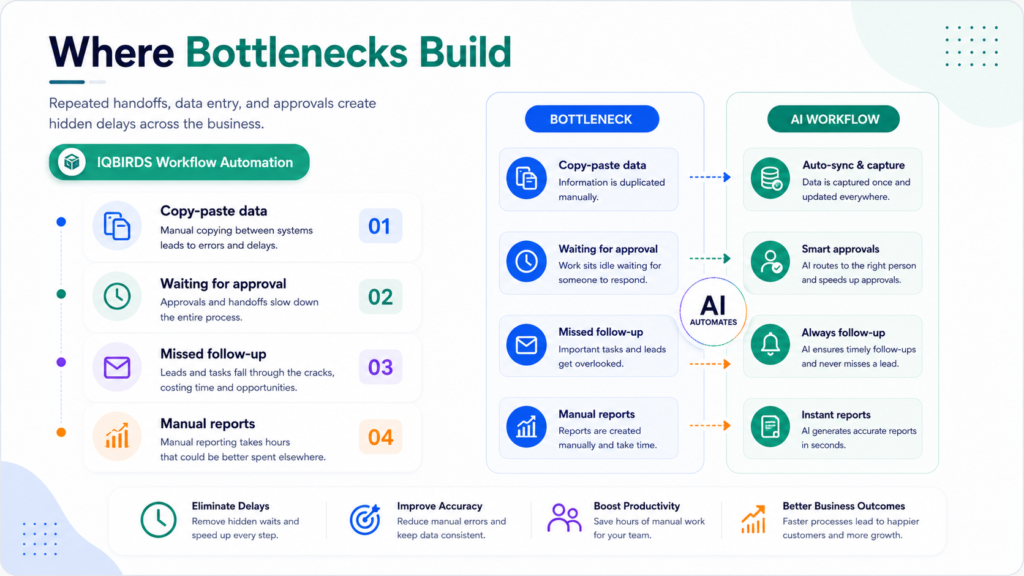
Common Bottlenecks AI Can Eliminate
Manual data entry
Manual data entry is one of the most common bottlenecks.
Teams copy information from forms, emails, spreadsheets, CRMs, documents, and support tools. This work is slow and easy to get wrong.
AI can extract details from messages, forms, PDFs, call notes, and documents. It can fill fields, summarize requests, flag missing information, and reduce duplicate records.
Lead routing delays
Leads are often wasted because they wait too long for assignment.
AI workflow automation can classify new leads by service type, location, company size, urgency, or message content. Then the workflow can route the lead to the right person and create a follow-up task.
This helps sales teams respond faster and reduces the chance that a warm lead becomes cold.
Approval bottlenecks
Approvals can slow down finance, sales, operations, HR, and customer service.
AI can prepare the approval request with context, summarize the reason, attach the relevant data, and notify the correct approver. For sensitive actions, the human still approves before the workflow continues.
Reporting delays
Many businesses spend hours preparing reports that use the same data every week.
AI can gather information, summarize performance, highlight changes, and prepare first-draft reports. The team can review the insights instead of building the report from scratch.
Manual Bottlenecks vs AI Workflow Automation
| Workflow Area | Manual Bottleneck | AI Workflow Automation |
|---|---|---|
| Lead intake | Lead waits in an inbox or spreadsheet | Lead is captured, summarized, and routed instantly |
| Data entry | Team copies details between tools | AI extracts and updates fields automatically |
| Approvals | Approver searches for context manually | AI prepares context and triggers review |
| Follow-up | Depends on memory or calendar discipline | Tasks, reminders, and drafts are triggered |
| Reporting | Reports are built manually each week | AI prepares summaries and dashboard updates |
| Customer support | Tickets are classified by hand | AI summarizes, tags, and routes requests |
| Scaling | More volume creates more admin work | Higher volume moves through repeatable workflows |
The table shows why bottlenecks become expensive as a business grows. A manual process may feel manageable with a small volume of work, but it becomes slower and less reliable when the same steps happen hundreds of times. AI workflow automation creates consistency by moving repeated tasks forward automatically while keeping people involved where review is needed.
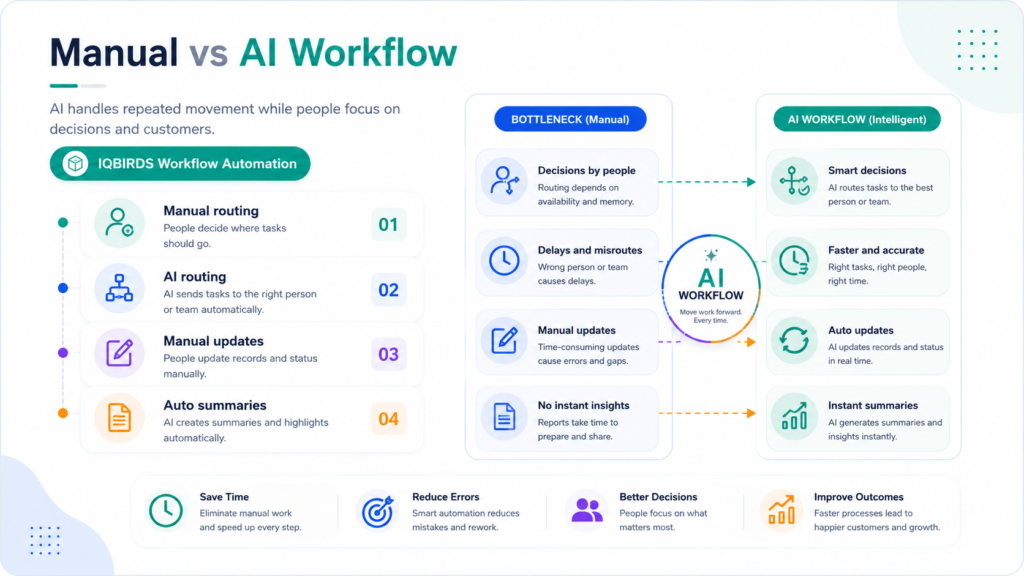
Useful Research and Related IQBIRDS Reading
Workflow automation platforms show how connected systems can reduce repeated manual work across teams. Microsoft Power Automate focuses on automating workflows between apps and services, IBM explains workflow automation as a way to streamline repeated business processes, and the NIST AI Risk Management Framework is useful when businesses want to add governance and oversight to AI systems.
For related IQBIRDS reading, see Why AI Workflows Need Human Oversight, Signs Your Business Is Ready for AI Automation, and Hidden Costs of Manual Business Processes in 2026.
If your business wants help removing repetitive bottlenecks, explore AI Automation Services, AI Integration Services, and AI CRM Development.
Useful external references include Microsoft Power Automate, IBM Workflow Automation, NIST AI Risk Management Framework, and OpenAI for Business.
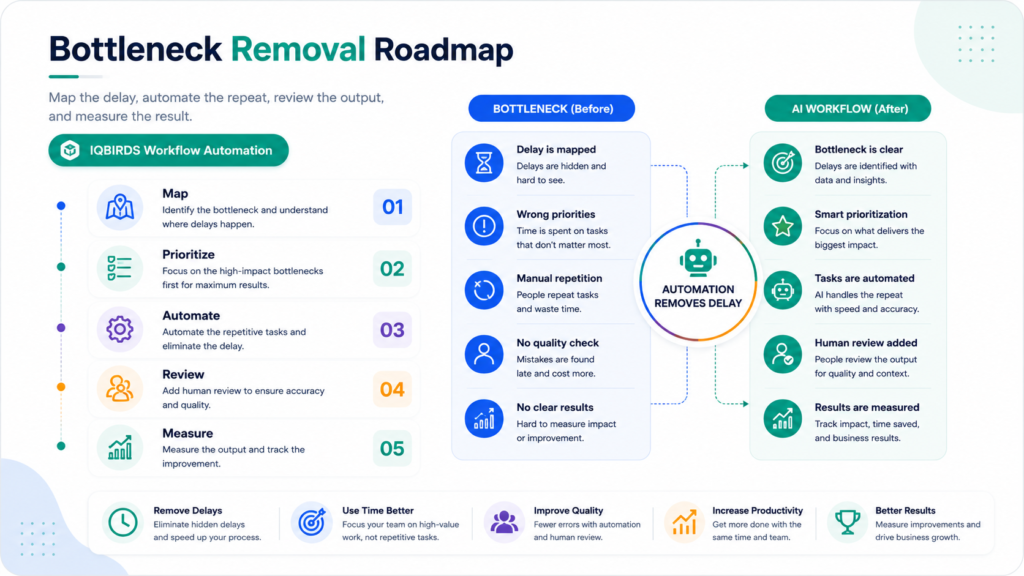
Step-by-Step Guide to Eliminate Bottlenecks With AI
Step 1: Map the slow workflow
Choose one workflow that regularly causes delays.
Write down the trigger, each task, each tool, each handoff, each approval, and the final output. This helps you see where the bottleneck really happens.
Step 2: Find the repeated steps
Look for work that happens the same way again and again.
Repeated steps may include copying data, assigning tasks, sending reminders, drafting messages, updating fields, checking statuses, or preparing reports.
Step 3: Decide what AI should handle
Give AI a clear role.
It may summarize a request, extract data, classify a ticket, draft a reply, create a CRM task, route a lead, or prepare a report. Avoid asking AI to control the entire workflow at once.
Step 4: Keep human review where risk exists
Some steps should not run fully automatically.
Use human review for customer-facing messages, finance actions, high-value leads, sensitive support cases, legal issues, and decisions that need context.
Step 5: Connect the tools
AI workflow automation becomes more valuable when it connects with the systems your team already uses.
This may include your CRM, email platform, website forms, Google Sheets, project management tools, support desk, calendar, documents, and reporting dashboard.
Step 6: Test with real examples
Use real forms, emails, support tickets, documents, and messy records.
Real examples show where the workflow needs better rules, cleaner data, or stronger human approval.
Step 7: Measure the improvement
Track response time, manual hours saved, error reduction, follow-up completion, customer satisfaction, and team adoption.
If the bottleneck is not improving, adjust the workflow before expanding automation to other areas.
Key Benefits of Removing Bottlenecks With AI
- Faster movement of leads, tasks, and customer requests
- Less manual copy-paste work across tools
- Cleaner CRM and operational data
- Fewer missed follow-ups and reminders
- More consistent task routing and approvals
- Faster report preparation
- Better visibility into workflow performance
- More time for employees to focus on valuable work
- Easier scaling without adding the same amount of admin work
- Better customer experience through faster response
The real benefit is not only speed. The real benefit is reliability. AI workflow automation helps the business create a repeatable system instead of relying on memory, inbox checks, and manual updates.
Common Mistakes to Avoid
Automating before mapping the process
If the workflow is unclear, automation will only move the confusion faster.
Map the process first. Then decide which repeated steps should be automated.
Trying to automate every bottleneck at once
Start with one workflow.
A focused automation is easier to test, improve, and trust. Once it works, you can expand to other bottlenecks.
Removing human approval from sensitive steps
AI can prepare the work, but people should review actions that affect customers, money, compliance, or important business decisions.
Ignoring data quality
Automation depends on usable inputs.
Clean your forms, CRM fields, labels, and source tracking so the workflow can work with consistent information.
Measuring activity instead of outcomes
Do not only count how many automations ran.
Measure whether the workflow saved time, reduced delays, improved follow-up, lowered errors, or helped customers get faster responses.
How IQBIRDS Helps Your Business
IQBIRDS helps businesses find repetitive bottlenecks and turn them into practical AI workflows.
The process starts by mapping how work moves through your business. Which steps repeat? Which tools are disconnected? Where do approvals slow down? Where are leads, tickets, or reports delayed? Which steps need human review?
From there, IQBIRDS can help build AI workflow automation across CRM systems, email, Google Sheets, forms, documents, support tools, project management platforms, and reporting dashboards.
This can include lead routing, CRM updates, email drafts, document extraction, task reminders, ticket summaries, approval workflows, reporting summaries, and operations dashboards.
The goal is simple: remove repeated friction, keep people involved where judgment matters, and create workflows that help your business move faster with less manual effort.
FAQs
What is AI workflow automation?
AI workflow automation uses artificial intelligence and connected systems to complete repeated business tasks such as routing, summaries, CRM updates, reminders, reports, and follow-ups with less manual effort.
How does AI remove business bottlenecks?
AI removes business bottlenecks by handling repeated tasks, moving data between tools, triggering the next step, summarizing information, and alerting the right person when human action is needed.
Which bottlenecks should businesses automate first?
Businesses should start with low-risk repeated bottlenecks such as lead routing, CRM updates, email drafts, reminders, report preparation, document summaries, and task assignment.
Can AI workflow automation replace employees?
AI workflow automation usually replaces repeated tasks, not full employees. It helps people spend less time on admin work and more time on decisions, customer relationships, and improvement.
Does AI workflow automation work for small businesses?
Yes. Small businesses can use AI workflow automation to reduce admin workload, respond faster, keep records cleaner, and manage more work without adding the same amount of manual effort.
What is the biggest mistake when automating bottlenecks?
The biggest mistake is automating a broken process without mapping it first. Businesses should understand the workflow, define ownership, add review steps, and test with real examples.
How can IQBIRDS help my business?
IQBIRDS can help your business find bottlenecks, map workflows, connect tools, build AI workflow automation, add human review, and create systems that save time without losing control.
Conclusion
Repetitive bottlenecks slow down businesses because they turn simple tasks into daily friction.
AI workflow automation helps remove that friction by handling repeated steps, moving data between tools, triggering the next action, and preparing work for human review.
The best approach is not to automate everything at once. Start with one clear bottleneck, map the workflow, automate the repeated tasks, keep review where risk exists, and measure the result.
When done correctly, AI does more than speed up a process. It gives the business a cleaner, more reliable way to work.
Ready to Remove Repetitive Bottlenecks?
If your business is losing time to manual tasks, slow handoffs, and repeated admin work, IQBIRDS can help. Contact IQBIRDS for a free consultation and build AI workflow automation that helps your team move faster with less friction.
Need AI Automation?
Discover how IQBirds helps businesses automate workflows and build custom digital products.