
AI Automation
Why AI Workflows Need Human Oversight
AI workflows can move business tasks faster than a manual team can handle them.
They can read forms, summarize emails, update CRMs, draft replies, route support tickets, prepare reports, trigger reminders, and connect tools without waiting for someone to check every step by hand.
That speed is useful. It is also the reason human oversight matters.
When an AI workflow is correct, it saves time. When it is wrong, the mistake can move quickly through the business. A wrong lead score can send a good prospect to the wrong queue. A weak email draft can damage customer trust. A bad data extraction can create reporting problems. A workflow with no review can make decisions nobody feels responsible for.
AI workflows should not be treated like magic. They are business systems. Like any business system, they need rules, testing, monitoring, ownership, and human judgment at the right moments.
This guide explains why AI workflows need human oversight, where review matters most, and how businesses can build automation that is fast without becoming careless.
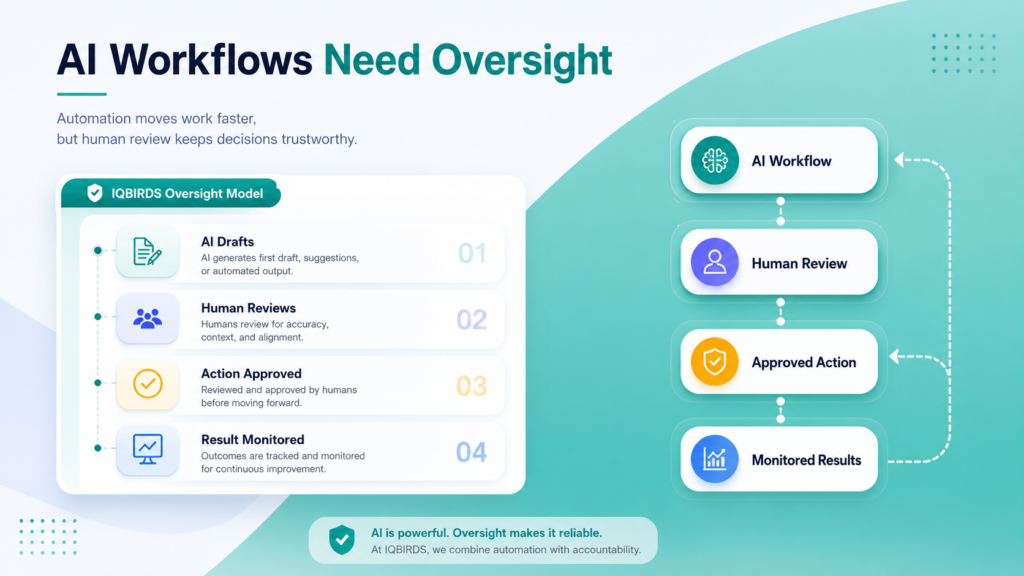
What Human Oversight Means in AI Workflows
Human oversight means people stay involved in the parts of an AI workflow where judgment, trust, risk, or accountability matter.
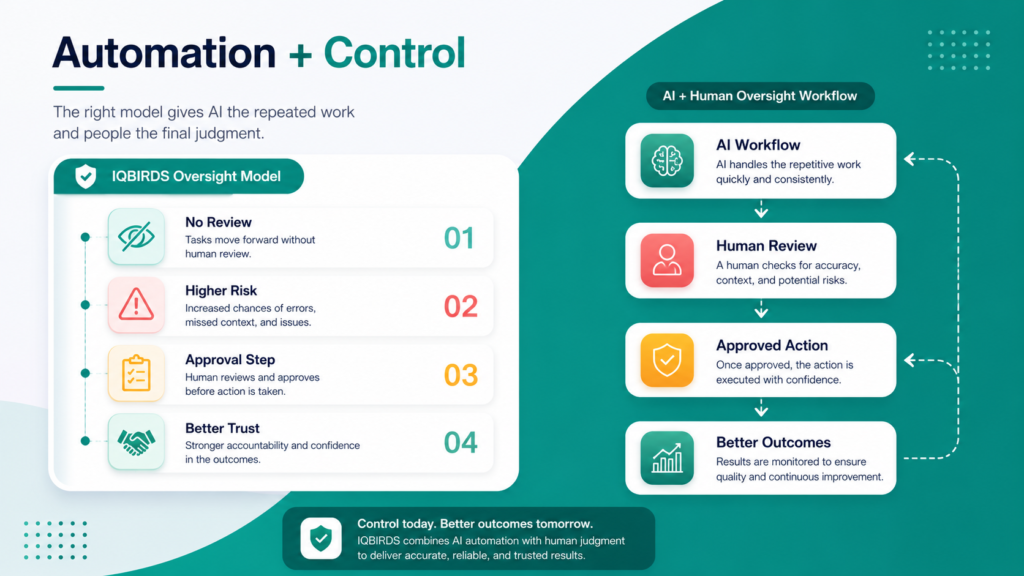
It does not mean a person must approve every tiny action. That would remove the value of automation.
Good oversight is selective. AI handles repeated work. People review important decisions, exceptions, sensitive communication, and outputs that could affect customers, money, compliance, or brand reputation.
For example, an AI workflow can summarize a customer complaint, identify the likely issue, attach the CRM history, and draft a response. A human support manager can review the final message before it is sent.
That is a balanced workflow. The AI saves time. The human protects tone, context, and accountability.
Human in the loop vs human on the loop
There are two common ways to think about oversight.
Human in the loop means the workflow stops and waits for a person to approve an action before it continues. This is useful for high-risk steps such as sending sensitive messages, approving refunds, changing deal stages, or making finance-related decisions.
Human on the loop means the workflow runs automatically, but a person monitors performance, reviews exceptions, and can step in when something looks wrong. This is useful for lower-risk tasks such as tagging, routing, reminders, and internal summaries.
Most businesses need both models.
Why AI Workflows Cannot Be Fully Trusted Without Review
AI workflows are powerful, but they are not perfect.
They can misunderstand context, make confident guesses, miss important details, use outdated information, classify a request incorrectly, or produce an answer that sounds polished but is not right.
In a manual workflow, a mistake may stay small because one person sees it before it moves forward. In an automated workflow, the same mistake can trigger several downstream actions.
This is why oversight is not only about checking AI output. It is about protecting the whole process.
AI can sound right even when it is wrong
One risk with AI-generated output is confidence.
A draft email, summary, or recommendation may look professional. But if the underlying information is wrong, the polished language can hide the problem.
Human review helps catch missing context and prevent a smooth-sounding mistake from reaching a customer or decision-maker.
AI may not understand business priorities
Your business may have rules that are not written clearly in the data.
A certain client may need special handling. A deal may be strategically important even if the budget is small. A support issue may need escalation because of customer history. A compliance rule may require extra review.
AI can support these workflows, but people often understand the business context better.
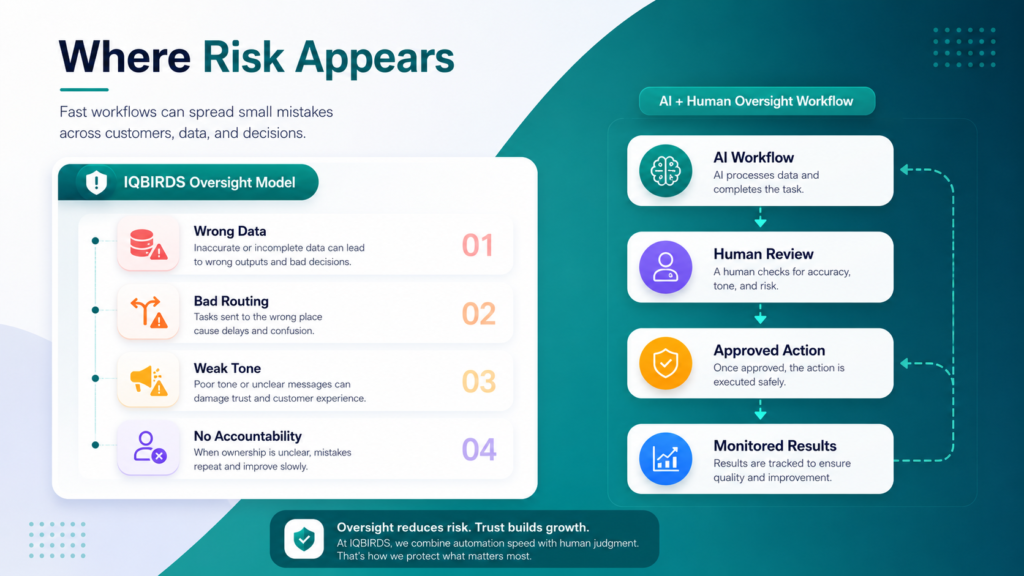
Where Human Oversight Matters Most
Customer-facing communication
AI can draft emails, chat replies, follow-up messages, onboarding notes, and support responses.
That saves time, but customer communication is sensitive. A message may be technically correct and still feel cold, rushed, or inappropriate.
Human oversight is important when the customer is upset, the deal is high-value, the issue is complex, or the message affects trust.
Lead scoring and sales prioritization
AI workflows can score leads based on form data, source, company size, message content, engagement, and buying signals.
This can help sales teams prioritize. But AI should not be the only decision-maker for important opportunities.
A human should review high-value leads, unusual requests, strategic accounts, and cases where the AI score does not match the salesperson’s judgment.
Finance and approval workflows
Refunds, discounts, invoices, contract changes, payment reminders, and budget approvals should not be fully automated without controls.
AI can gather information, prepare summaries, and recommend next steps. A person should approve actions that affect money or legal responsibility.
Compliance and data privacy
AI workflows may process personal data, customer records, contracts, support tickets, or internal documents.
Human oversight helps ensure that sensitive data is handled correctly, access rules are followed, and automated actions do not create compliance problems.
AI Workflows With and Without Human Oversight
| Workflow Area | Without Human Oversight | With Human Oversight |
|---|---|---|
| Customer emails | AI sends messages that may miss tone or context | AI drafts, human reviews sensitive replies |
| Lead routing | Wrong classification can send leads to the wrong owner | High-value or unusual leads are flagged for review |
| CRM updates | Incorrect fields can spread across reports | Exceptions and missing data are checked |
| Finance actions | Automated decisions may create costly errors | AI prepares information, people approve actions |
| Support tickets | Urgent issues may be misunderstood | AI summarizes and escalates risky cases |
| Compliance | Privacy or policy risks may be missed | Review rules protect sensitive data and actions |
| Accountability | No clear owner when something goes wrong | People own the workflow and monitor performance |
The table shows that oversight is not the opposite of automation. Oversight makes automation more useful. AI workflows can still move quickly, but review steps protect the moments where a mistake would be expensive, confusing, or harmful.
Useful Research and Related IQBIRDS Reading
Responsible AI guidance often points to the same practical idea: businesses need governance, monitoring, and human control around automated systems. The NIST AI Risk Management Framework helps organizations think about AI risk, Microsoft’s responsible AI resources emphasize accountability, IBM discusses AI governance for managing risk, and Google’s AI principles focus on responsible development and use.
For related IQBIRDS reading, see Signs Your Business Is Ready for AI Automation, AI Workflow vs Human Workflow: Where Automation Wins, and Why Most AI Automation Projects Fail Before Launch.
If your business wants practical automation with review and control, explore AI Automation Services, AI Integration Services, and AI CRM Development.
Useful external references include NIST AI Risk Management Framework, Microsoft Responsible AI, IBM AI Governance, and Google AI Principles.
Step-by-Step Guide to Add Human Oversight to AI Workflows
Step 1: Map the workflow
Write down the full workflow from trigger to final action.
Include the tools involved, the data used, the people responsible, the decisions made, and the customer or business outcome.
You cannot add useful oversight until you understand how work moves through the system.
Step 2: Mark the risk points
Look for steps where a mistake would matter.
Risk points may include customer communication, financial decisions, compliance issues, high-value leads, public content, legal language, sensitive data, and actions that change important records.
Step 3: Decide the right review level
Not every workflow needs the same level of oversight.
Low-risk tasks can run automatically with monitoring. Medium-risk tasks may need exception review. High-risk tasks should require approval before the workflow continues.
Step 4: Give reviewers useful context
A human reviewer should not have to search across five tools to approve one action.
The workflow should show the AI output, source data, customer history, confidence signals, and recommended next step in one clear view.
Step 5: Track overrides and mistakes
Every time a person changes an AI suggestion, that is useful feedback.
Track what was changed and why. Over time, this helps improve prompts, rules, data quality, and workflow design.
Step 6: Review performance regularly
AI workflows should be monitored after launch.
Check error rates, approval rates, missed exceptions, customer feedback, response time, data quality, and team adoption.
Step 7: Improve before expanding
Do not add AI to more workflows until the first workflow is stable.
Fix the process, improve the review rules, train the team, and make sure the automation is trusted before scaling.
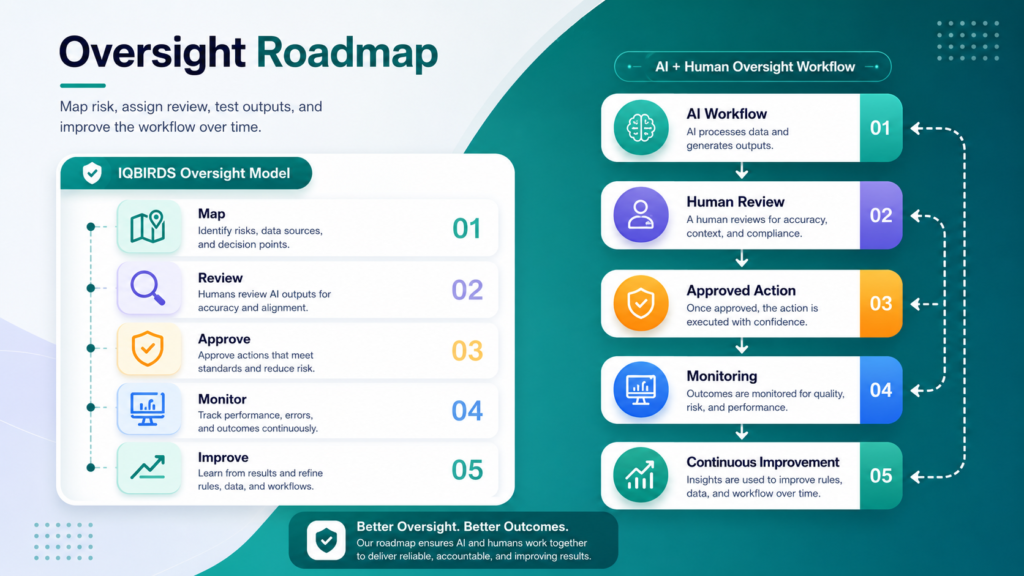
Key Benefits of Human Oversight in AI Workflows
- Fewer customer-facing mistakes
- Better control over sensitive actions
- More accurate CRM and business data
- Stronger trust from teams and customers
- Clear accountability when decisions matter
- Safer handling of finance and compliance workflows
- Better feedback for improving automation
- Reduced risk of repeated AI errors
- More confidence when scaling automation
- Better balance between speed and judgment
The biggest benefit is not slowing AI down. The benefit is making AI workflows reliable enough for real business use.
Common Mistakes to Avoid
Reviewing everything
If every AI action needs approval, the workflow becomes too slow.
Use human review where risk is meaningful. Let low-risk repeated tasks run with monitoring.
Reviewing nothing
The opposite mistake is letting AI workflows run without any review.
This may feel efficient at first, but it can create hidden risk. Sensitive workflows need approval, exception handling, and clear owners.
Giving reviewers too little context
A reviewer cannot make a good decision if they only see the AI output.
Show the source data, customer history, workflow reason, and recommended next step.
Ignoring team feedback
Your team will quickly notice where the AI is helpful and where it is unreliable.
Collect that feedback and use it to improve the workflow.
Forgetting ownership
Every AI workflow needs an owner.
Someone should be responsible for monitoring results, fixing issues, updating rules, and deciding when the workflow is ready to expand.
How IQBIRDS Helps Your Business
IQBIRDS helps businesses build AI workflows that are practical, controlled, and easy for teams to trust.
The process starts with workflow mapping. Which tasks repeat? Which actions are low-risk? Which decisions need human approval? Which tools hold the data? Where can a mistake affect customers, money, compliance, or reporting?
From there, IQBIRDS can design automation that connects your CRM, email, Google Sheets, forms, documents, support tools, project management software, and reporting systems.
This can include AI summaries, lead routing, email drafts, CRM updates, approval workflows, document processing, task reminders, support ticket classification, and monitoring dashboards.
The goal is simple: use AI to handle repeated work, keep people involved where judgment matters, and build workflows that improve speed without losing control.
FAQs
Why do AI workflows need human oversight?
AI workflows need human oversight because automation can move mistakes quickly. Human review helps catch errors, protect customers, approve sensitive actions, and keep the business accountable.
What is human oversight in AI workflows?
Human oversight means a person reviews, approves, monitors, or can override an AI workflow when the task involves risk, judgment, customer trust, compliance, or important business decisions.
Which AI workflow steps need human approval?
Human approval is important for customer-facing messages, finance actions, legal or compliance issues, high-value leads, sensitive support cases, hiring decisions, and any workflow where context matters.
Can AI workflows run without human review?
Some low-risk AI workflows can run automatically, such as internal tagging, reminders, summaries, and basic data routing. Higher-risk workflows should include review or approval steps.
Does human oversight slow down automation?
Good oversight should not slow everything down. It should focus human review only where risk is high, while low-risk repeated tasks continue to run automatically.
How do businesses monitor AI workflow quality?
Businesses can monitor AI workflow quality by tracking errors, approval rates, response time, customer feedback, data quality, exceptions, overrides, and team adoption.
How can IQBIRDS help my business?
IQBIRDS can help your business design AI workflows with human approval steps, risk controls, tool integrations, monitoring, and practical automation that supports your team.
Conclusion
AI workflows can make a business faster, but speed alone is not enough.
Without oversight, automation can spread mistakes, weaken customer trust, create messy data, and leave teams unsure who owns the outcome.
Human oversight gives AI workflows the control they need for real business use. AI handles repeated tasks. People review sensitive actions, make judgment calls, and monitor performance.
That balance is where automation becomes reliable.
Ready to Build AI Workflows With the Right Oversight?
If your business wants faster workflows without losing control, IQBIRDS can help. Contact IQBIRDS for a free consultation and build AI workflows that combine automation speed with human judgment, trust, and accountability.
Need AI Automation?
Discover how IQBirds helps businesses automate workflows and build custom digital products.