
AI Automation
Scaling Business Operations with Connected AI Workflows
Growing businesses rarely struggle because one task is difficult. They struggle because too many tasks depend on disconnected tools, scattered data, and manual handoffs. Leads live in one place, customer notes live somewhere else, support tickets move through another system, and reporting takes extra work every week. AI workflow integration helps solve that problem by connecting the steps that keep operations moving.
Instead of using AI as a separate assistant, connected AI workflows place AI inside the business process. The workflow can read the right data, summarize context, route work, update systems, trigger approvals, and send the next task to the correct person. As a result, the business can scale operations without adding manual work at every stage.

What AI Workflow Integration Means
AI workflow integration means connecting AI capabilities with the tools and processes a business already uses. That can include CRM systems, website forms, email, calendars, help desks, finance tools, project management systems, reporting dashboards, and internal databases.
The important word is integration. A chatbot that answers a question is useful, but a connected workflow can do more. It can understand the request, find the customer record, update the right field, notify the right team member, create a follow-up task, and log the result for reporting. Therefore, AI becomes part of the operation rather than a tool sitting outside it.
For growing businesses, this matters because scale creates coordination problems. More leads, more customers, more staff, more locations, and more service requests all create more handoffs. If every handoff is manual, growth creates friction. If key handoffs are connected, growth becomes easier to manage.
Why Disconnected Operations Slow Growth
Disconnected operations create delay in small ways that add up. A sales person waits for lead context. Meanwhile, a support agent asks a customer to repeat information. Later, a manager pulls numbers from three tools to build a report. A finance task is missed because no one received the handoff. None of these problems looks dramatic alone. However, together they limit growth.
As the business grows, these gaps become harder to manage. More people need the same information. Customers also expect fast responses. Managers need accurate reports as well. Also, more tools make it easier for data to become outdated or duplicated.
Connected AI workflows reduce this pressure by linking the systems around a clear process. The workflow does not replace the team. Instead, it removes repetitive coordination work so people can focus on decisions, relationships, and higher-value work.
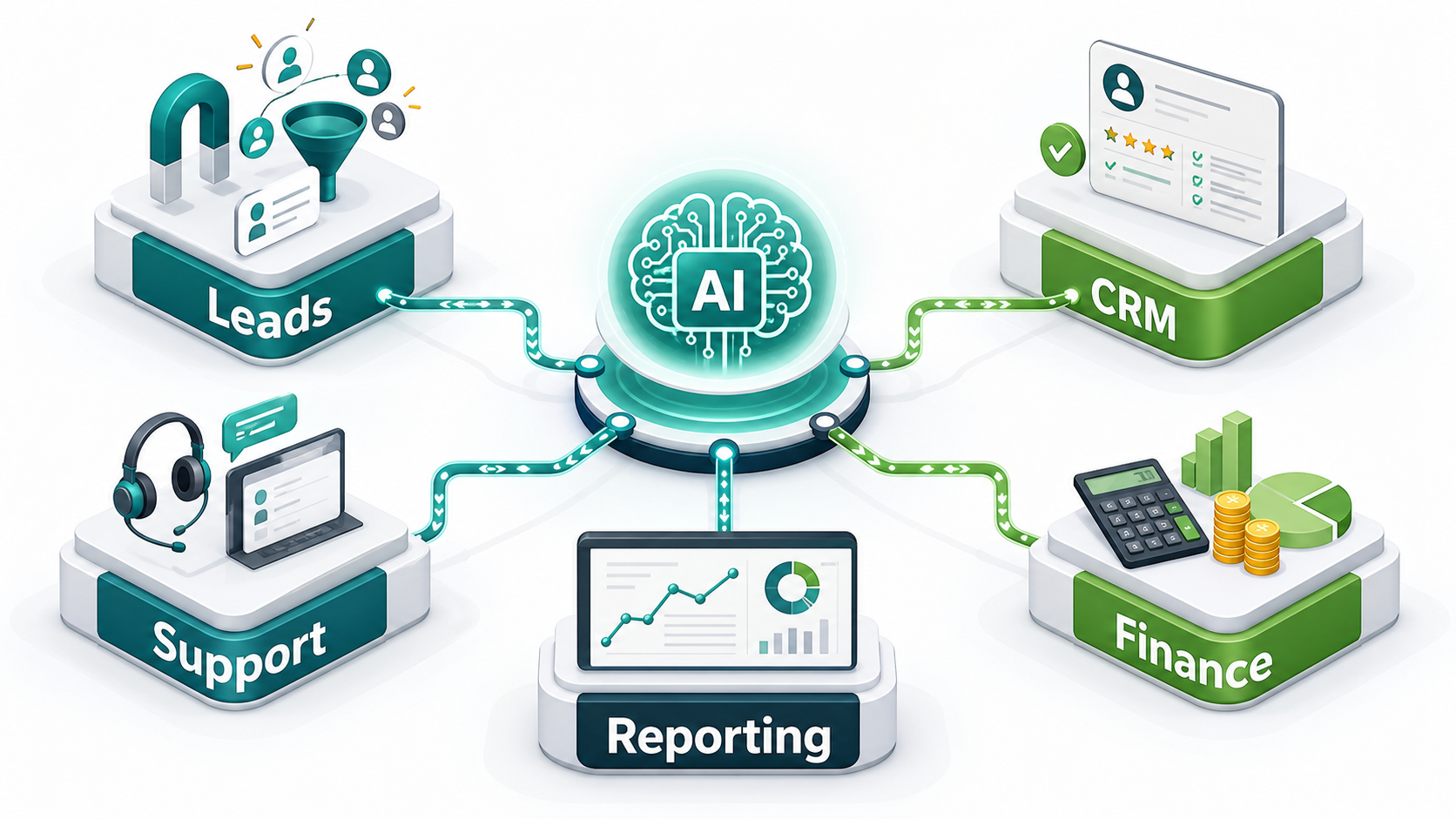
Where Connected AI Workflows Create Leverage
Lead Management
Lead management is one of the easiest places to see value. When a lead submits a form, AI can summarize the request, identify the service need, score urgency, update the CRM, assign an owner, and trigger a follow-up. Because the workflow connects the website, CRM, email, and calendar, the team responds faster without copying information between tools.
Customer Support
Support teams can use connected workflows to classify tickets, retrieve customer context, suggest replies, detect urgent issues, and route requests to the right person. Also, the workflow can update the help desk and CRM at the same time. This gives sales, support, and operations a shared view of the customer.
Operations and Scheduling
Operations teams often manage appointments, internal tasks, approvals, and status updates. AI workflow integration can connect calendars, project tools, staff availability, customer messages, and notifications. As a result, fewer tasks depend on someone remembering to send the next update.
Finance and Reporting
Finance and reporting workflows can benefit from automatic reminders, invoice status updates, exception alerts, and dashboard refreshes. Instead of waiting for manual exports, leaders can see trends earlier. Meanwhile, the finance team can focus on exceptions rather than routine follow-up.
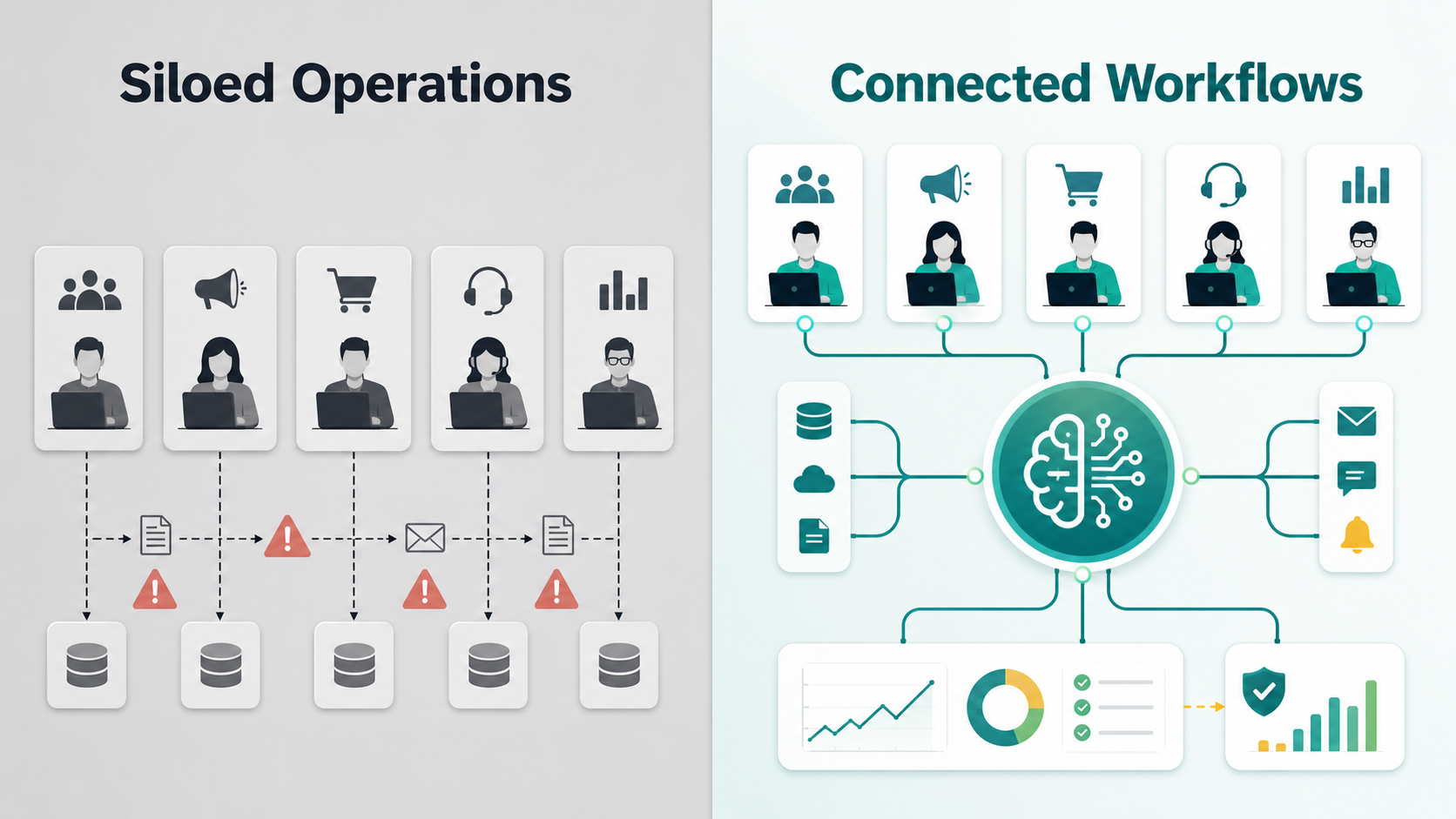
Siloed Operations vs Connected AI Workflows
| Area | Siloed Operations | Connected AI Workflows |
|---|---|---|
| Data | Customer and task data lives in separate tools | Key data moves between systems through planned integration |
| Handoffs | People manually send updates and reminders | Workflows trigger tasks, alerts, and approvals automatically |
| Speed | Response time depends on staff availability | AI summarizes, routes, and prepares next steps faster |
| Accuracy | Manual copying creates errors and duplicate records | Rules and connected fields keep information more consistent |
| Visibility | Reports require exports and manual cleanup | Dashboards can reflect live workflow activity |
| Scale | Growth requires more admin coordination | More volume can move through the same operational system |
This table shows why connected workflows matter. Siloed operations force people to carry information between systems. Connected AI workflows let the process carry the information. That difference becomes more important as the business grows, because every repeated handoff becomes either a cost or an opportunity to scale.
AI Workflow Integration Needs More Than Automation
Industry guidance supports this shift toward integrated, process-based AI. IBM describes intelligent automation as combining automation with AI to improve business processes. Meanwhile, Microsoft’s AI agent design pattern guidance explains how AI systems can coordinate tasks, tools, and decisions.
Business research also shows why operations leaders are paying attention. McKinsey’s State of AI research tracks how AI adoption is expanding across business functions. Also, Salesforce explains AI agents as systems that can help take action across business workflows.
If your business wants this kind of operational connection, IQBIRDS provides AI automation services, AI integration services, and AI CRM development. You can also read related IQBIRDS guides on AI automation checklist before deployment and common AI integration mistakes to plan safer connected workflows.
Step-by-Step Guide to Scaling with Connected AI Workflows
1. Map the Operational Journey
First, map the journey from the first trigger to the final result. For example, follow a lead from website form to booked call, closed deal, onboarding, service delivery, support, and reporting. This shows where information moves and where it gets stuck.
2. Identify Repeated Handoffs
Next, look for repeated handoffs between people and systems. These are strong candidates for workflow integration. Common examples include form-to-CRM updates, support-to-sales alerts, invoice reminders, project status changes, and customer follow-up tasks.
3. Choose the First Connected Workflow
Then, choose one workflow with clear value and manageable risk. A focused workflow is easier to test, explain, and measure. Once it works, the same pattern can often be reused in other departments.
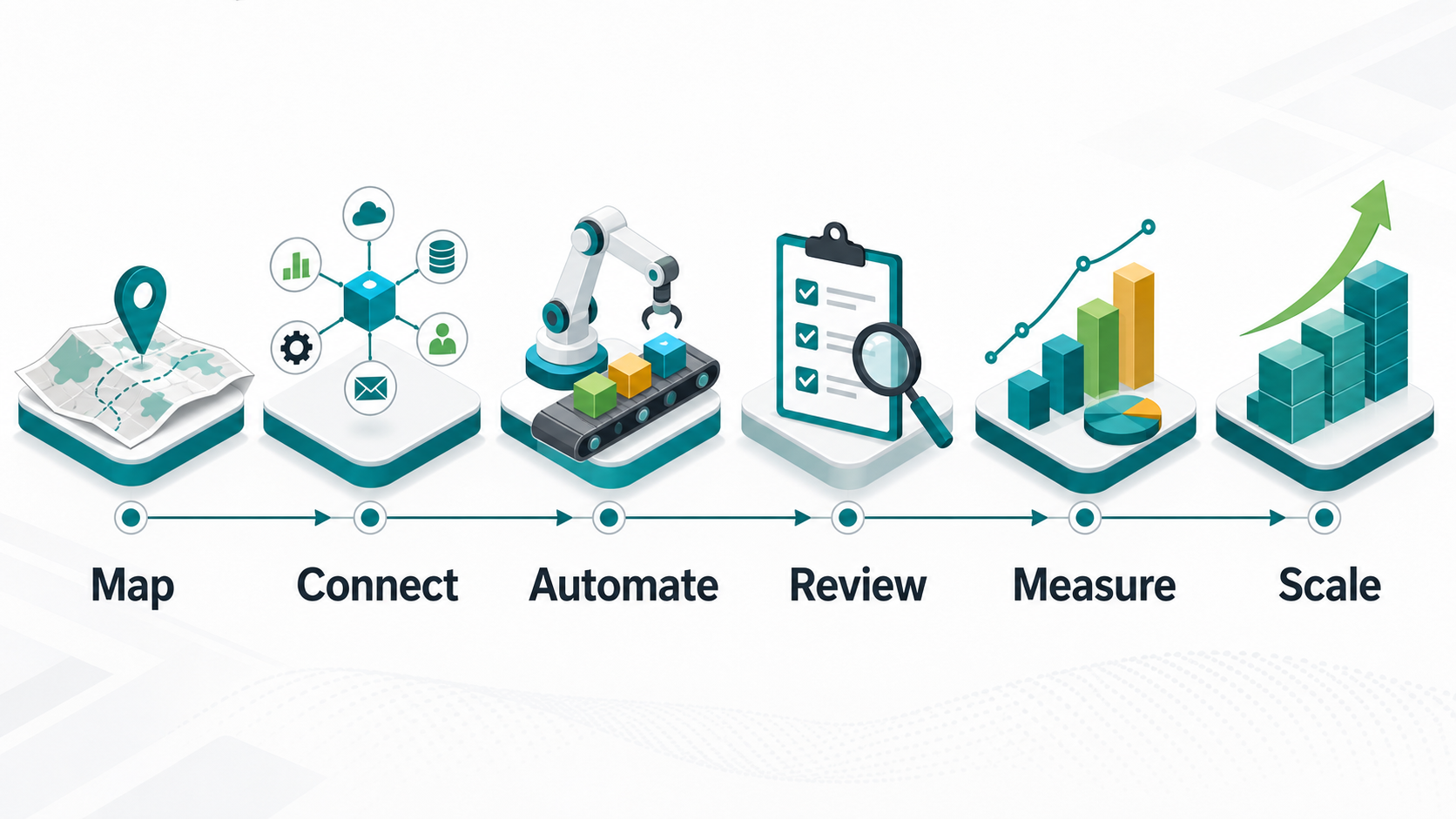
4. Connect the Right Tools
After that, connect the systems that hold the needed data. This may include CRM, email, forms, calendars, help desks, spreadsheets, payment tools, and reporting dashboards. Also, confirm API access, permissions, and ownership before deployment.
5. Add Human Review Where Risk Is Higher
Connected workflows should not remove human judgment too early. Add review for customer-facing messages, pricing, refunds, sensitive records, and important decisions. This keeps the workflow fast without making it careless.
6. Measure the Workflow
Finally, measure what changed. Track response time, completion rate, manual hours saved, conversion rate, customer satisfaction, error rate, and revenue impact where relevant. Measurement turns workflow integration into a business growth strategy, not just a technical project.
Key Benefits of Connected AI Workflows
- Faster handoffs between sales, support, finance, and operations
- Cleaner CRM records because updates happen inside the workflow
- Less manual copying between disconnected tools
- Better customer experience through faster and more informed responses
- Stronger reporting because workflow activity is easier to track
- More consistent approvals for sensitive actions
- Less dependency on individual memory or manual reminders
- More scalable operations without adding admin work at the same pace
Common Mistakes to Avoid
Avoid connecting tools before mapping the process. If the workflow is unclear, integration may only move confusion faster. Also, do not automate around messy data. Connected workflows rely on clean fields, clear ownership, and a defined source of truth.
Another mistake is trying to scale too many workflows at once. Start with one useful process, test it, measure it, and improve it. In addition, avoid removing human review too early. Review keeps sensitive workflows safe while the team learns how the AI performs.
Finally, do not measure only activity. More automated steps do not always mean better operations. Measure outcomes such as faster response time, fewer missed follow-ups, reduced manual hours, cleaner CRM records, and better customer results.
How IQBIRDS Helps Your Business
IQBIRDS helps businesses design and build connected AI workflows that support real operations. The work starts with workflow mapping, system review, CRM structure, integration planning, and automation design. Then, IQBIRDS connects the right tools around a clear business outcome.
The team can help with lead routing, customer journey automation, AI CRM updates, support handoffs, internal task flows, reporting dashboards, and human approval workflows. Also, IQBIRDS can help decide where AI should summarize, classify, recommend, or trigger the next step.
This keeps AI workflow integration practical. Instead of adding disconnected AI tools, the goal is to build an operational system that helps teams respond faster, reduce admin work, and scale with more control.
Frequently Asked Questions
What is AI workflow integration?
AI workflow integration means connecting AI with business tools and processes so work can move across CRM, support, finance, scheduling, reporting, and other systems with less manual effort.
How do connected AI workflows help business operations scale?
Connected AI workflows help operations scale by reducing manual handoffs, improving data consistency, speeding up responses, routing work automatically, and giving managers better visibility into workflow performance.
Which business workflows should be connected first?
Start with workflows that repeat often and affect revenue or customer experience. Good options include lead intake, CRM updates, support routing, appointment reminders, invoice follow-up, and reporting.
Does AI workflow integration replace employees?
No. The best workflow integrations reduce repetitive coordination work so employees can focus on decisions, customer relationships, problem solving, and higher-value tasks.
What tools can be connected in AI workflows?
Common tools include CRM platforms, website forms, email, calendars, help desks, payment tools, spreadsheets, project management software, databases, and reporting dashboards.
How should businesses measure connected workflow success?
Measure response time, manual hours saved, completion rate, error rate, conversion rate, support backlog, customer satisfaction, CRM quality, and revenue impact where possible.
How can IQBIRDS help my business?
IQBIRDS can help your business map workflows, connect tools, build AI automations, improve CRM structure, add human approval steps, create dashboards, and scale connected workflows safely.
Conclusion
Scaling business operations is not only about doing more work. It is about helping work move through the business with less friction. Connected AI workflows make that possible by linking systems, data, tasks, decisions, approvals, and reporting.
Start with one workflow. Map the journey, connect the right tools, add AI where it improves speed or clarity, keep review where risk is higher, and measure the outcome. Once the first workflow works, the business can scale the same pattern across more operations.
If your business wants to grow with connected AI workflows, contact IQBIRDS. The right AI workflow integration can help your team reduce manual work, improve customer response, and build operations that are ready to scale.
The Operating Model Behind Connected Workflows
Connected AI workflows work best when the business defines a simple operating model. This means deciding which team owns the workflow, which system is the source of truth, which actions AI can take, which actions need approval, and which metrics show whether the workflow is helping. Without this operating model, integration can become a collection of disconnected automations.
For example, a lead workflow may be owned by sales, but it may still depend on marketing forms, CRM stages, calendar availability, and operations capacity. Because several teams touch the journey, the workflow should have clear rules for ownership, escalation, and reporting. This prevents confusion when volume increases.
In addition, the operating model should include a review schedule. During the first month, review errors and exceptions weekly. After the workflow stabilizes, review performance monthly. This keeps the system useful as the business changes.
One helpful rule is to document every automated handoff in plain English. List the trigger, the data used, the AI action, the destination system, the person responsible, and the backup path. This simple documentation makes training easier and gives new team members a clear view of how operations actually run.
Need AI Automation?
Discover how IQBirds helps businesses automate workflows and build custom digital products.