
AI Automation
Common AI Integration Mistakes That Delay Projects
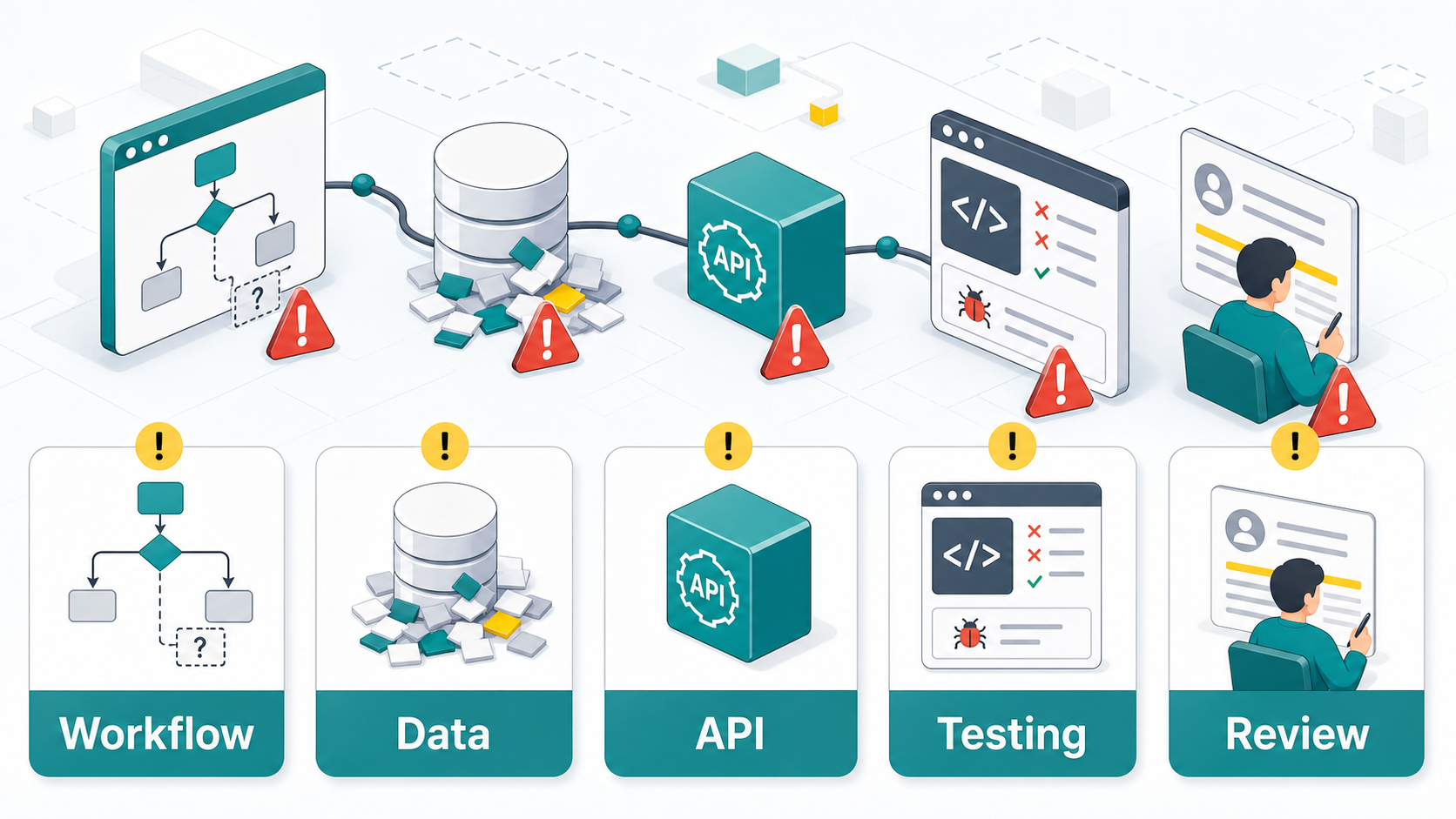
AI integration can make a business feel more connected, faster, and easier to run. However, many projects slow down before the real value appears. The problem is usually not the AI model itself. More often, the delay comes from unclear workflows, messy data, weak API planning, rushed testing, or missing human review.
That is why AI integration needs more than a tool subscription. It needs a practical plan for how data moves, which systems connect, who approves sensitive actions, and how results are measured. When this foundation is missing, even a simple integration can turn into weeks of rework.

Why AI Integration Projects Get Delayed
Most AI integration delays start with hidden assumptions. A team may assume the CRM data is clean, the API supports every action, the support team follows the same workflow, or the AI output can go directly to customers. Then, once development begins, those assumptions break.
For example, a company may want an AI assistant to qualify leads from a website form and update the CRM automatically. At first, that sounds simple. However, the project becomes slower if the form fields are inconsistent, the CRM has duplicate stages, the sales team uses manual notes, and the calendar tool is not connected properly.
Because of this, successful AI integration is not only a technical task. It is a workflow task, a data task, and a business process task. The strongest projects define the real-world process first and then connect the right AI tools around it.
Mistake 1: Starting Without a Clear Workflow
The first mistake is trying to integrate AI before mapping the workflow. If no one agrees on the exact steps, the integration team has to guess. As a result, the project may connect the wrong trigger, send the wrong message, update the wrong field, or create tasks at the wrong point in the customer journey.
A clear workflow should show where the process starts, what data enters the system, what decision needs to happen, what tool receives the result, and when a human should review the output. Also, it should include exceptions. Real business workflows are rarely perfect straight lines.
Before building, write the workflow in simple language. For example: when a new lead submits a form, AI checks the message, assigns a lead type, writes a short summary, updates the CRM, and alerts the correct team member. This gives everyone the same target.
Mistake 2: Ignoring Data Quality
AI integration depends on useful data. If the data is incomplete, outdated, duplicated, or stored in too many places, the AI workflow will produce inconsistent results. In practice, poor data quality is one of the fastest ways to delay an integration project.
For instance, an AI sales workflow may need lead source, service interest, location, budget, and stage. If those fields are missing or used differently by each team member, the AI cannot route leads reliably. Therefore, the project gets stuck in cleanup instead of moving into testing.
To avoid this, audit the data before connecting AI. Remove duplicates, standardize field names, define required fields, and decide which system is the source of truth. Also, keep the first integration focused on the data that truly matters. More data is not always better if it creates confusion.
Mistake 3: Choosing Tools Before Understanding the System
Many businesses choose an AI tool first and then try to force it into their existing systems. Sometimes this works. Still, it often delays projects because the chosen tool may not connect well with the CRM, help desk, booking platform, payment system, or internal database.
A better approach is to list the systems that must connect before choosing the final toolset. That includes triggers, actions, rate limits, authentication, available APIs, webhooks, permissions, and reporting needs. Once these details are clear, tool selection becomes more practical.
This is especially important when AI needs to do more than create text. If the workflow must update records, retrieve customer history, trigger follow-ups, or notify staff, the integration layer matters as much as the AI model.
Mistake 4: Treating APIs as an Afterthought
APIs are the bridge between systems. When API planning is weak, AI integration slows down quickly. The team may discover that an important action is not supported, a field cannot be updated, a webhook is missing, or the API has limits that affect performance.
In addition, API permissions can delay the project. Some systems require admin access, OAuth setup, approval from the software vendor, or careful security review. If these details are handled late, the project timeline stretches.
Plan API access early. Check documentation, confirm endpoints, test authentication, and verify that the integration can read and write the data needed for the workflow. Also, document failure behavior. If one system is unavailable, the business should know what happens next.
Rushed AI Integration vs Planned AI Integration
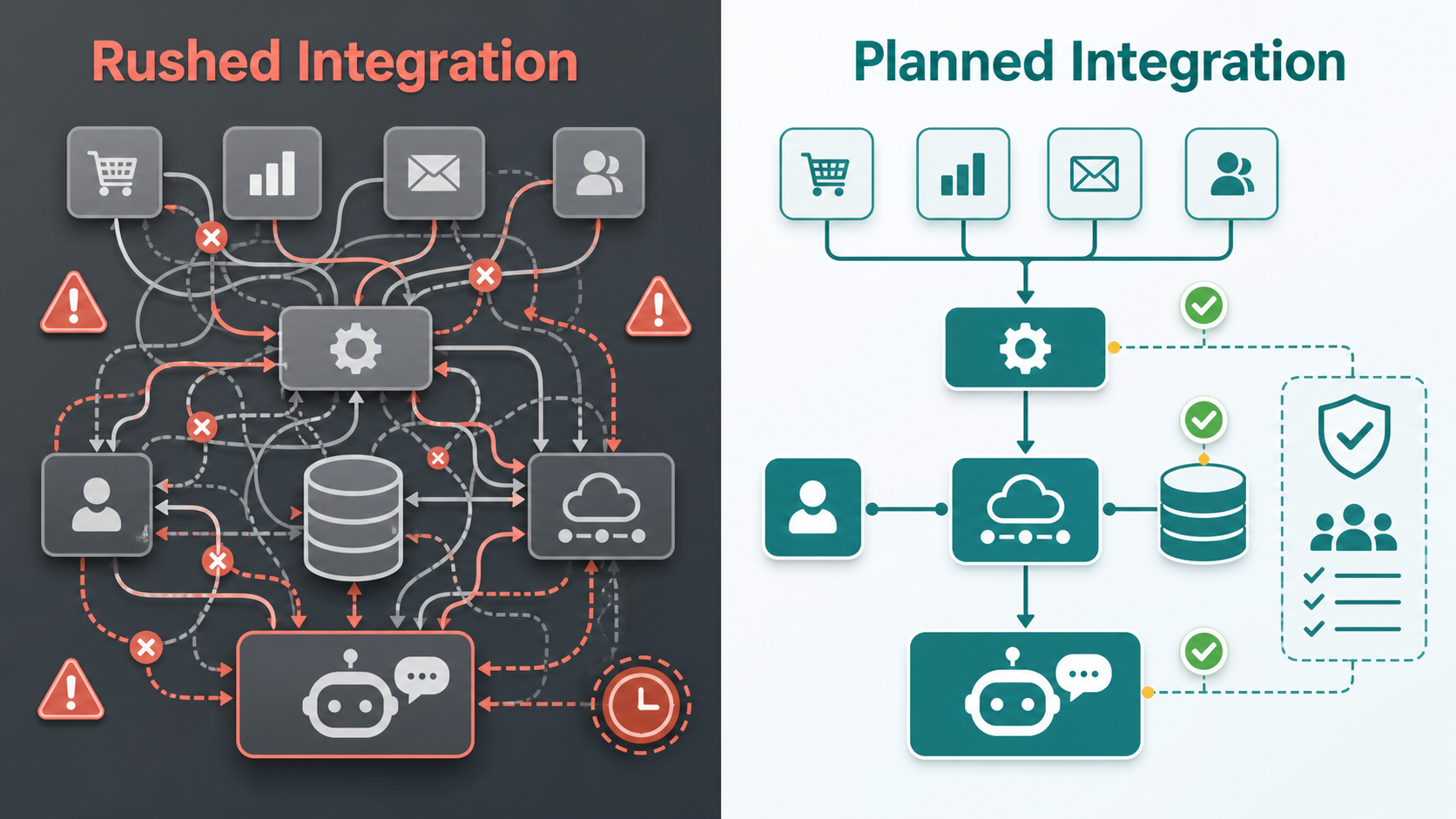
| Area | Rushed AI Integration | Planned AI Integration |
|---|---|---|
| Workflow | Built from assumptions and informal requests | Mapped with triggers, actions, owners, and exceptions |
| Data | Uses messy fields and duplicate records | Starts with clean source-of-truth data |
| APIs | Checked only when development gets blocked | Reviewed before tool selection and build work |
| Testing | Tested with a few perfect examples | Tested with real cases, edge cases, and failures |
| Review | AI output may go live too early | Human approval is added where risk is higher |
| Results | Delays, rework, and unclear ROI | Cleaner launch, faster learning, and better adoption |
The table shows why planning feels slower at first but saves time later. A rushed AI integration may look fast in week one. However, it often creates extra work during testing, training, and launch. A planned integration reduces surprises because the team understands the workflow, data, APIs, risks, and success metrics before building too much.
Use Reliable Integration Principles Around AI
Good AI projects borrow from proven integration and risk-management practices. For example, IBM explains application integration as a way to let independently designed applications work together. Meanwhile, Microsoft’s enterprise integration guidance highlights patterns that help systems exchange data reliably.
Security and governance also matter. The NIST AI Risk Management Framework is useful for thinking about trustworthy AI, while Google Cloud’s Application Integration overview shows how connected workflows can orchestrate business processes across tools.
If you want support with practical implementation, IQBIRDS provides AI integration services, AI automation services, and AI CRM development. Related IQBIRDS articles, including MCP vs APIs for AI integrations and AI workflows that deliver ROI in under 90 days, can also help you understand how integration choices affect project speed.
Mistake 5: Skipping Human Review
Some teams want AI to handle everything immediately. That can be risky. If the AI sends customer messages, changes CRM stages, approves refunds, quotes pricing, or updates sensitive records, human review may be needed at least during the early rollout.
Human review does not mean the integration failed. Instead, it creates a safer launch. The AI can draft, classify, summarize, or recommend, while a person approves the final action. Over time, the business can reduce review where performance is reliable and keep review where risk remains high.
Mistake 6: Testing Only the Happy Path
Happy-path testing uses perfect examples where everything works. It is useful, but it is not enough. Real customers send incomplete forms, use unclear language, ask unusual questions, enter bad phone numbers, and switch topics. Therefore, AI integration testing must include messy real-world cases.
Test missing fields, duplicate records, API errors, slow responses, confusing customer messages, permission issues, and handoff failures. Also, test what happens when the AI is unsure. A good integration should fail clearly, notify the right person, and protect the customer experience.
Mistake 7: Forgetting Adoption and Training
Even a strong AI integration can stall if the team does not understand it. Staff need to know what the AI does, what it does not do, when they should step in, and where to check results. Otherwise, people may avoid the system or create manual workarounds.
Training should be simple and practical. Show the workflow, explain the approval points, review common examples, and give the team a place to report issues. Also, update the workflow after real users give feedback. Adoption improves when people feel the system helps them, not replaces their judgment.
Step-by-Step Guide to Avoid AI Integration Delays
1. Map the Workflow
Start by writing the process from beginning to end. Include triggers, decisions, systems, owners, and exceptions. This gives the project a shared blueprint.
2. Audit the Data
Next, check the quality of the data that AI will read or update. Clean important fields, define required data, and choose the source of truth before connecting tools.
3. Confirm APIs and Permissions
After that, verify API access, webhooks, authentication, rate limits, and permissions. This step prevents late technical surprises.
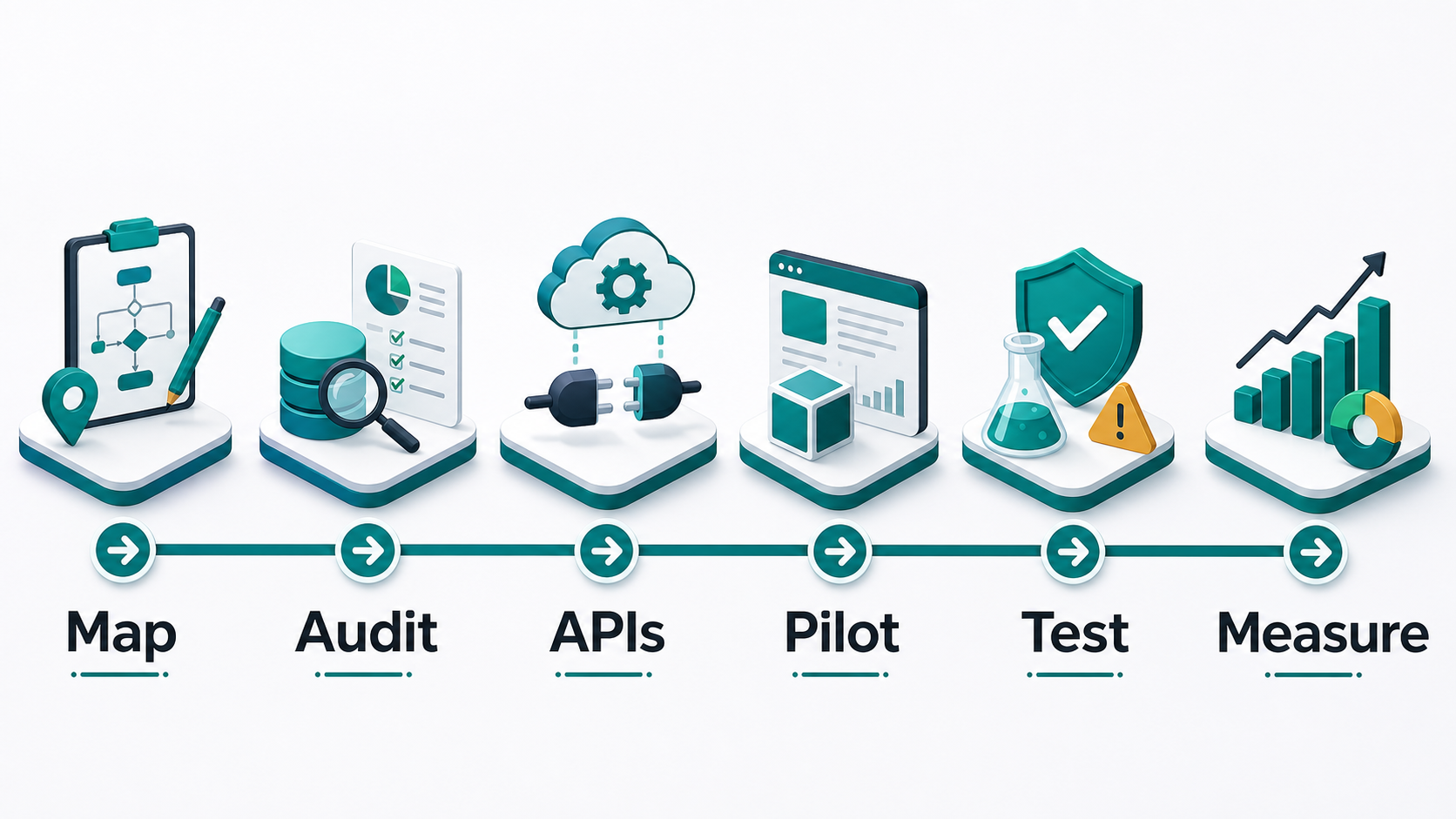
4. Build a Small Pilot
Then, build the first version around one useful workflow. A focused pilot is easier to test, improve, and explain to the team.
5. Add Human Review
Where risk is higher, add approval steps. This keeps the project safe while the team learns how the AI performs in real situations.
6. Test With Real Examples
Use real customer messages, messy data, edge cases, and system errors. Also, test fallback behavior so the workflow does not break silently.
7. Measure and Improve
Finally, measure response time, accuracy, saved hours, conversion rate, support speed, or other business outcomes. Use those results to improve the integration after launch.
Key Benefits of a Well-Planned AI Integration
- Fewer project delays caused by unclear requirements
- Cleaner CRM and customer data before launch
- More reliable connections between business tools
- Safer customer communication through review steps
- Less rework during testing and rollout
- Better team adoption because the workflow is easier to understand
- Stronger reporting on whether the integration is working
- More room to scale AI workflows after the first success
Common Mistakes to Avoid
Avoid building before the workflow is mapped. Also, do not connect AI to messy data and expect reliable results. Another mistake is choosing tools before checking whether they can actually connect to your existing systems.
In addition, do not treat testing as a final checkbox. Testing should happen with real examples and failure cases. Finally, avoid launching AI without clear ownership. Someone should monitor results, collect feedback, and improve the workflow after go-live.
How IQBIRDS Helps Your Business
IQBIRDS helps businesses plan, build, and improve AI integration projects without unnecessary delays. The process starts with workflow mapping, data review, tool selection, and integration planning. Then, IQBIRDS helps connect the right systems around a practical business outcome.
The team can support CRM automation, AI workflow design, lead routing, customer journey automation, API planning, approval workflows, and reporting dashboards. Also, IQBIRDS can help define where AI should act automatically and where a human should stay involved.
This approach keeps AI integration focused on business value. Instead of adding another disconnected tool, the goal is to create a connected workflow that saves time, improves response speed, and supports measurable growth.
Frequently Asked Questions
What is AI integration?
AI integration means connecting AI tools or models with business systems such as CRM, forms, email, calendars, databases, support platforms, and reporting tools so they can work together in a real workflow.
Why do AI integration projects get delayed?
They often get delayed because the workflow is unclear, data is messy, APIs are not checked early, permissions are missing, testing is too shallow, or the team has not agreed on review steps.
What is the biggest AI integration mistake?
The biggest mistake is starting with a tool before understanding the workflow. Once the workflow is clear, it becomes much easier to choose the right AI tool and integration method.
How can businesses avoid AI integration delays?
Businesses can avoid delays by mapping the workflow, cleaning key data, checking API access, building a small pilot, adding human review, testing real examples, and measuring results after launch.
Does every AI integration need an API?
Not always. Some integrations can use built-in connectors, webhooks, automation platforms, or file-based workflows. However, APIs are often needed when the workflow requires reliable data exchange between business systems.
Should AI integrations include human approval?
Yes, for higher-risk tasks. Human approval is useful when AI affects customer communication, pricing, sales stages, financial actions, sensitive records, or important business decisions.
How can IQBIRDS help my business?
IQBIRDS can help your business map workflows, clean data, choose integration tools, connect AI with CRM and other systems, build approval steps, test safely, and measure results after launch.
Conclusion
AI integration delays usually happen when teams rush past the basics. The workflow is unclear, the data is not ready, the API plan is incomplete, or testing happens too late. Fortunately, these problems can be avoided with a practical plan.
Start with the business process. Clean the data. Confirm the connections. Build a focused pilot. Add review where it matters. Then, test with real examples and measure the outcome. This gives your AI integration a stronger chance of launching on time and creating value after launch.
If your business wants AI integrations that connect cleanly with real workflows, contact IQBIRDS. A well-planned integration can help your team move faster, reduce manual work, and avoid the delays that slow down AI projects.
Need AI Automation?
Discover how IQBirds helps businesses automate workflows and build custom digital products.