
AI Automation
Why Businesses Lose Customers After the First Inquiry
The first inquiry is not the finish line.
It is the beginning of the customer relationship.
A prospect fills out a form, sends an email, starts a chat, calls your business, or asks for pricing. At that moment, they are interested enough to take action. But many businesses lose the opportunity after that first contact.
The problem is rarely one big mistake.
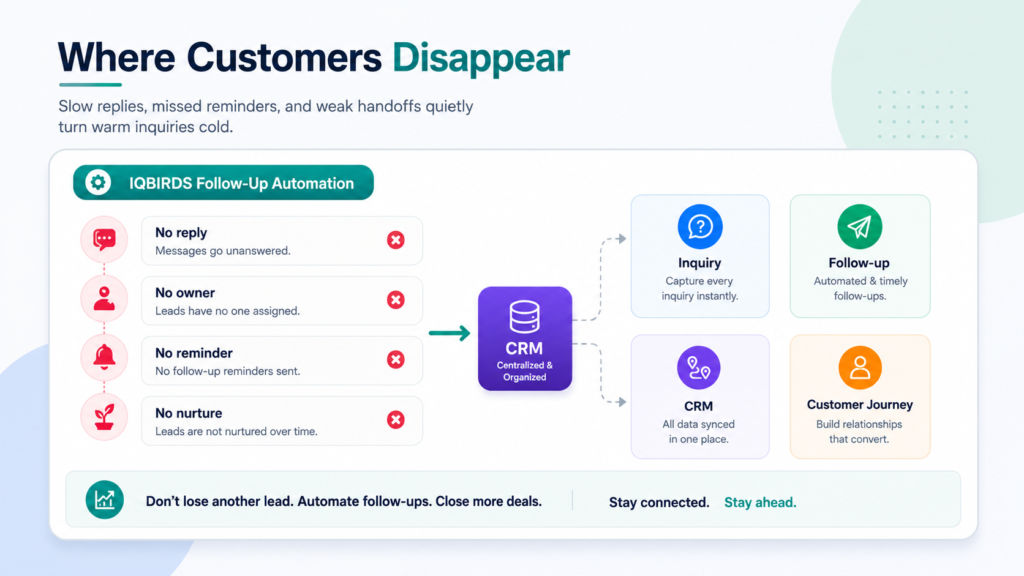
It is usually a chain of small gaps. The first reply is slow. The CRM is updated late. Nobody owns the next step. The second follow-up never happens. The customer receives a generic message. The salesperson forgets to check back. A warm inquiry becomes a cold lead.
Customer follow-up automation helps fix that gap.
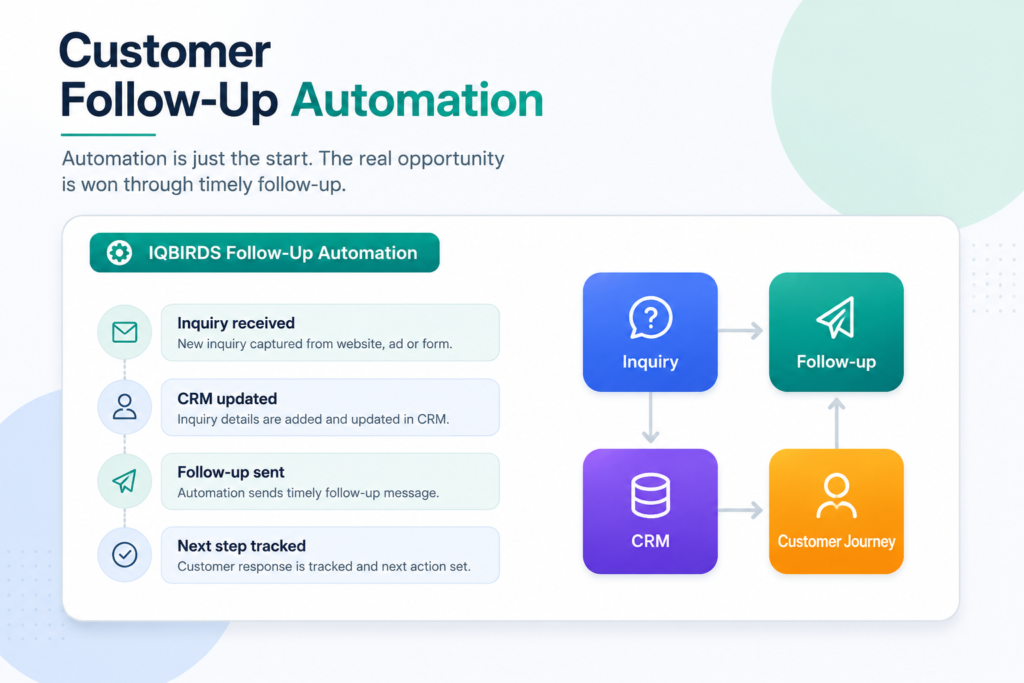
It gives every inquiry a clear path: capture the details, assign an owner, send or draft a response, create reminders, update the CRM, and keep the customer moving through the journey.
This guide explains why businesses lose customers after the first inquiry, how follow-up automation solves the problem, and how to build a follow-up system that feels helpful instead of robotic.
Why the First Inquiry Is So Important
A first inquiry shows intent.
The customer has already moved beyond casual browsing. They may need a quote, consultation, appointment, answer, demo, repair, service, or product recommendation. They may still be comparing options, but they have raised their hand.
That moment is valuable because attention is high.
If the business responds quickly and clearly, the customer feels seen. If the business delays, gives a weak answer, or never follows up again, trust starts to drop.
Many businesses spend heavily to generate inquiries but do not build a strong process for what happens next. That is where revenue leaks.
The first reply is only one step
A fast first reply matters, but it is not enough.
Some prospects need time. Some have questions. Some compare three providers. Some ask for pricing but are not ready to book. Some disappear and come back later.
Without follow-up, those opportunities are easy to lose.
The business needs a system that keeps the conversation alive without forcing the team to remember every next step manually.
Why Businesses Lose Customers After the First Inquiry
Slow response time
Slow response is one of the most common reasons customers move on.
When someone reaches out, they usually expect a clear next step. If they wait too long, they may contact another company, lose interest, or assume your business is not organized.
Customer follow-up automation can trigger an instant internal alert, create a CRM record, draft a response, and assign the inquiry to the right person.
No clear owner
Customers are often lost because nobody knows who owns the inquiry.
The message may go to a shared inbox. A sales rep may assume support is handling it. Support may think sales should reply. A manager may not notice the delay until the opportunity is already gone.
Automation can assign ownership based on service type, location, lead source, urgency, account owner, or customer stage.
No second follow-up
Many businesses send one reply and stop.
That is risky because not every customer responds immediately. People get busy. Emails get buried. Decision-makers need time. A follow-up can restart the conversation and show the business is paying attention.
Follow-up automation can create reminders or draft messages after a set time if there is no response.
The Hidden Cost of Missed Follow-Ups
Missed follow-ups are expensive because they waste work that already happened.
Marketing created the inquiry. The website or campaign attracted the customer. The customer took action. The team may have answered once. But without consistent follow-up, the opportunity slips away.
This creates several hidden costs.
The business pays more to generate replacement leads. Sales teams spend time chasing new inquiries instead of converting existing ones. Managers cannot see why prospects are not moving forward. Customers experience the business as slow or inconsistent.
Over time, this becomes a customer journey problem, not just a sales problem.
Follow-up is part of customer experience
Customers judge your business by how you communicate after they ask for help.
A thoughtful follow-up can make the business feel reliable. A missed follow-up can make the business feel careless.
Automation helps create consistency, but the message still needs to feel human, relevant, and useful.
Manual Follow-Up vs Customer Follow-Up Automation
| Follow-Up Area | Manual Process | Customer Follow-Up Automation |
|---|---|---|
| Inquiry capture | Details stay in inboxes, forms, or chats | Inquiry is captured and logged in the CRM |
| Ownership | Team members may be unsure who should respond | Inquiry is assigned based on rules or workflow logic |
| First response | Depends on team availability | Alerts, drafts, and response workflows start quickly |
| Second follow-up | Easy to forget after the first reply | Reminders and message drafts trigger automatically |
| CRM updates | Notes and stages may be incomplete | Records, summaries, and next steps are updated more consistently |
| Customer experience | Inconsistent across reps and channels | More timely, structured, and trackable |
| Reporting | Hard to see where customers drop off | Follow-up activity and outcomes are easier to measure |
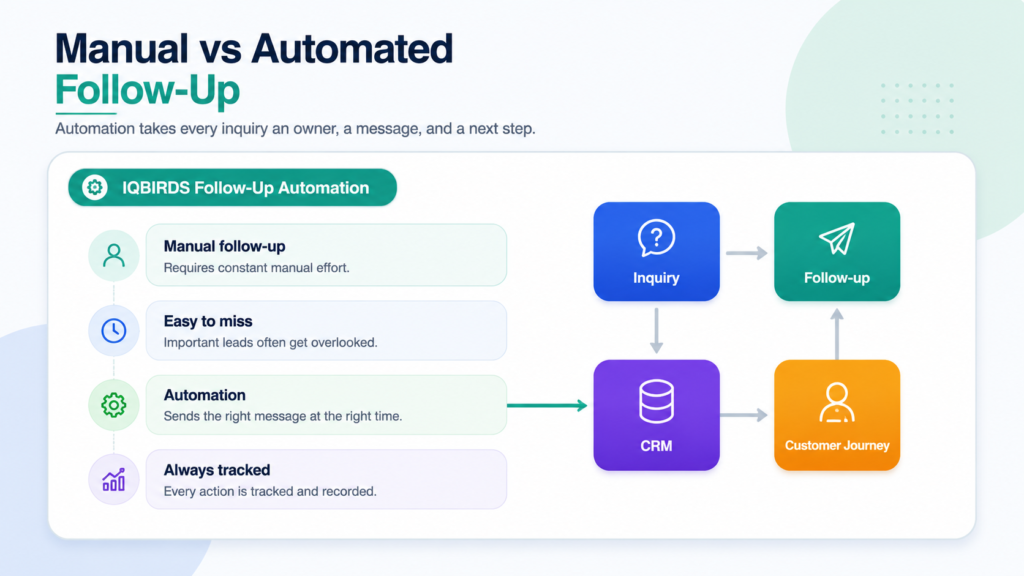
The table shows why manual follow-up becomes risky as inquiry volume grows. A small team may handle a few inquiries by memory, but the process breaks when customers come from many channels. Customer follow-up automation gives every inquiry a record, an owner, and a next step.
Useful Research and Related IQBIRDS Reading
Customer relationship and support platforms are increasingly focused on connected customer data, faster response, and automated workflows. HubSpot supports CRM, marketing, sales, and service workflows. Salesforce focuses on AI-assisted customer operations through Agentforce. Microsoft Dynamics 365 Customer Insights helps businesses unify customer data, and Google Analytics can help track customer actions across digital touchpoints.
For related IQBIRDS reading, see Building an AI-First Customer Journey, Why Fast Lead Response Beats Bigger Marketing Budgets, and How Businesses Waste Leads Without AI Automation.
If your business wants help improving follow-up, explore AI Automation Services, AI CRM Development, and AI Integration Services.
Useful external references include HubSpot CRM, Salesforce Agentforce, Microsoft Dynamics 365 Customer Insights, and Google Analytics Events.
What Customer Follow-Up Automation Can Do
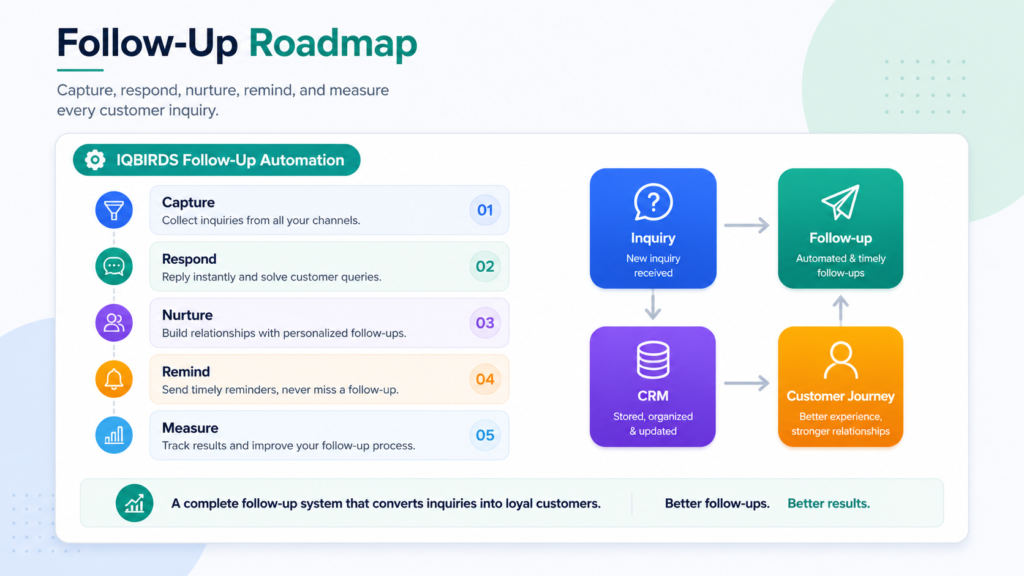
Capture every inquiry
Automation can connect website forms, email, chat, phone logs, ad leads, social messages, and booking tools to your CRM.
This prevents inquiries from living only in scattered inboxes or spreadsheets.
Summarize the customer request
AI can summarize what the customer asked, detect urgency, identify service interest, and highlight missing information.
This helps the team respond with better context.
Draft personalized follow-ups
AI can draft helpful follow-up messages based on the inquiry, stage, service, or previous interaction.
A human can review the message before sending when the customer is high-value, sensitive, or complex.
Create tasks and reminders
Automation can create follow-up tasks when a customer does not reply, misses a call, requests more time, or reaches a certain pipeline stage.
This keeps the conversation from disappearing after one touch.
Start nurture workflows
Not every customer is ready to buy immediately.
Follow-up automation can send helpful information, reminders, case studies, booking links, or check-in messages over time.
Step-by-Step Guide to Build Better Follow-Up
Step 1: Map the inquiry journey
List every way a customer can contact your business.
This may include forms, email, phone, chat, social media, referrals, paid ads, landing pages, and booking tools.
Step 2: Define the first response
Decide what should happen when each inquiry arrives.
Who owns it? How fast should they respond? What information should be captured? Which inquiries need urgent alerts?
Step 3: Connect the CRM
Your CRM should hold the inquiry, source, owner, stage, notes, and next step.
Connect lead sources to the CRM so the record is created or updated automatically.
Step 4: Add follow-up rules
Create rules for what happens if the customer does not respond.
For example, send a reminder after one day, create a call task after two days, and move the customer into a nurture sequence after a week.
Step 5: Use AI for summaries and drafts
Let AI summarize the customer request and prepare a draft follow-up.
Keep human review for important messages, pricing conversations, complaints, refunds, and complex requests.
Step 6: Measure follow-up performance
Track first response time, second follow-up completion, booked calls, reopened conversations, qualified opportunities, and customer satisfaction.
This shows whether the follow-up process is improving.
Step 7: Improve the workflow over time
Review where customers still drop off.
Improve message quality, routing rules, timing, CRM fields, and team ownership based on real results.
Key Benefits of Customer Follow-Up Automation
- Faster response after the first inquiry
- Fewer customers lost in inboxes or forms
- Clear ownership for every customer request
- More consistent second and third follow-ups
- Cleaner CRM records and customer history
- Better visibility into where prospects drop off
- Less manual reminder work for sales and support teams
- More useful nurture workflows for undecided customers
- Better customer experience through timely communication
- Higher value from existing marketing and lead generation
The biggest benefit is consistency. Customer follow-up automation helps every inquiry receive attention, even when the team is busy.
Common Mistakes to Avoid
Only replying once
One reply is not a follow-up system.
Create a clear path for second and third touches when the customer does not respond.
Using generic automated messages
Automation should not make every customer feel the same.
Use customer details, service interest, source, and stage to make messages more relevant.
Not assigning ownership
Every inquiry needs an owner.
If nobody owns the next step, the customer can easily be lost.
Ignoring CRM data quality
Follow-up automation depends on accurate records.
Clean fields such as source, stage, owner, last contact date, service interest, and next step.
Removing human review from sensitive cases
AI can draft and organize, but people should handle trust-heavy moments.
Use human review for complaints, high-value customers, pricing questions, refunds, and complex requests.
How IQBIRDS Helps Your Business
IQBIRDS helps businesses build customer follow-up automation that turns first inquiries into structured customer journeys.
The process starts by mapping how inquiries arrive today. Which channels create leads? How fast are they answered? Which follow-ups are missed? Which tools are disconnected? Which CRM fields are incomplete? Which messages need human review?
From there, IQBIRDS can help connect your CRM, website forms, email, Google Sheets, calendars, chat tools, support desk, and reporting dashboards.
This can include AI inquiry summaries, automated routing, CRM updates, response drafts, follow-up reminders, nurture workflows, task creation, customer journey reporting, and human approval steps.
The goal is simple: help your business stay present after the first inquiry so more customers move toward real conversations, decisions, and long-term relationships.
FAQs
What is customer follow-up automation?
Customer follow-up automation uses CRM workflows, AI, email, reminders, task creation, and integrations to keep prospects and customers engaged after an inquiry without relying only on manual memory.
Why do businesses lose customers after the first inquiry?
Businesses often lose customers after the first inquiry because replies are slow, follow-ups are missed, CRM records are incomplete, ownership is unclear, and prospects do not receive relevant next steps.
What should happen after a customer inquiry?
After a customer inquiry, the business should capture the details, update the CRM, assign an owner, send a timely response, create follow-up tasks, and continue nurturing the prospect if they are not ready to buy.
Can AI help with customer follow-up?
Yes. AI can summarize inquiries, draft follow-up emails, classify urgency, update CRM records, suggest next steps, and trigger reminders while humans handle sensitive or high-value conversations.
Does follow-up automation replace sales or support teams?
No. Follow-up automation supports sales and support teams by handling repeated tasks, reminders, and drafts so people can focus on conversations, trust, and decisions.
What tools are needed for follow-up automation?
Common tools include a CRM, website forms, email platform, calendar, automation platform, chat tool, reporting dashboard, and AI workflows for summaries, routing, and reminders.
How can IQBIRDS help my business?
IQBIRDS can help your business map the inquiry journey, connect CRM and communication tools, build customer follow-up automation, add AI workflows, and improve response consistency.
Conclusion
Businesses do not usually lose customers after the first inquiry because the customer was never interested.
They lose them because the follow-up process is too slow, too manual, or too easy to forget.
Customer follow-up automation helps protect the opportunity after the first contact. It captures the inquiry, assigns ownership, updates the CRM, creates reminders, drafts responses, and keeps the customer journey moving.
The best approach is not fully robotic communication. It is timely automation with human care where trust matters.
Ready to Stop Losing Customers After the First Inquiry?
If your business wants to improve response, follow-up, and customer journey consistency, IQBIRDS can help. Contact IQBIRDS for a free consultation and build customer follow-up automation that keeps more prospects engaged after they reach out.
Need AI Automation?
Discover how IQBirds helps businesses automate workflows and build custom digital products.