
AI Automation
Why Fast Lead Response Beats Bigger Marketing Budgets
Bigger marketing budgets do not automatically create better sales results.
A business can spend more on ads, SEO, social media, email campaigns, landing pages, and lead generation, but still lose opportunities if the response process is slow.
This is one of the most common growth problems.
Marketing brings in the lead. The lead fills out a form, sends a message, books interest, or asks a question. Then the lead waits. Nobody responds quickly. The CRM is updated later. The salesperson is busy. A follow-up is missed. By the time the business replies, the prospect has already spoken with a competitor.
That is why fast lead response often beats a bigger marketing budget.
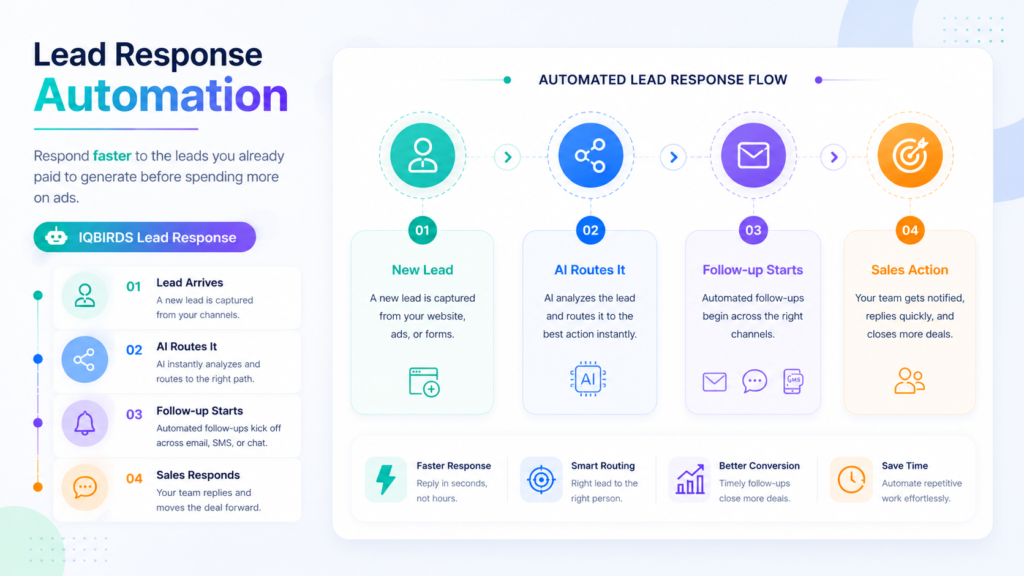
Lead response automation helps businesses protect the value of the leads they already generate. It captures leads instantly, routes them to the right person, triggers alerts, drafts replies, creates tasks, and keeps follow-up moving.
This guide explains why response speed matters, where marketing budgets get wasted, and how lead response automation helps businesses convert more leads before spending more money on traffic.
Why More Leads Do Not Always Mean More Revenue
More leads can help a business grow, but only if the business can respond and follow up properly.
If the sales process is slow, more leads may only create more missed opportunities. The team becomes busier, the CRM becomes messier, follow-ups become harder to track, and managers still wonder why revenue is not growing at the same pace as marketing spend.
The problem is not always lead quality. Sometimes the problem is lead handling.
A good lead can be wasted when it sits in an inbox. A strong inquiry can cool down when nobody replies for hours. A high-intent prospect can be lost if the wrong person receives the notification.
The hidden leak in marketing performance
Many businesses look at marketing performance only through traffic, clicks, impressions, form submissions, and cost per lead.
Those numbers are important, but they do not show the full picture.
The real question is what happens after the lead arrives.
Was the lead captured in the CRM? Was it assigned to the right person? Was the first response sent quickly? Was a follow-up task created? Did anyone track whether the lead became a booked call or qualified opportunity?
If the answer is unclear, the business may not need a bigger marketing budget yet. It may need a faster response system.
What Lead Response Automation Actually Does
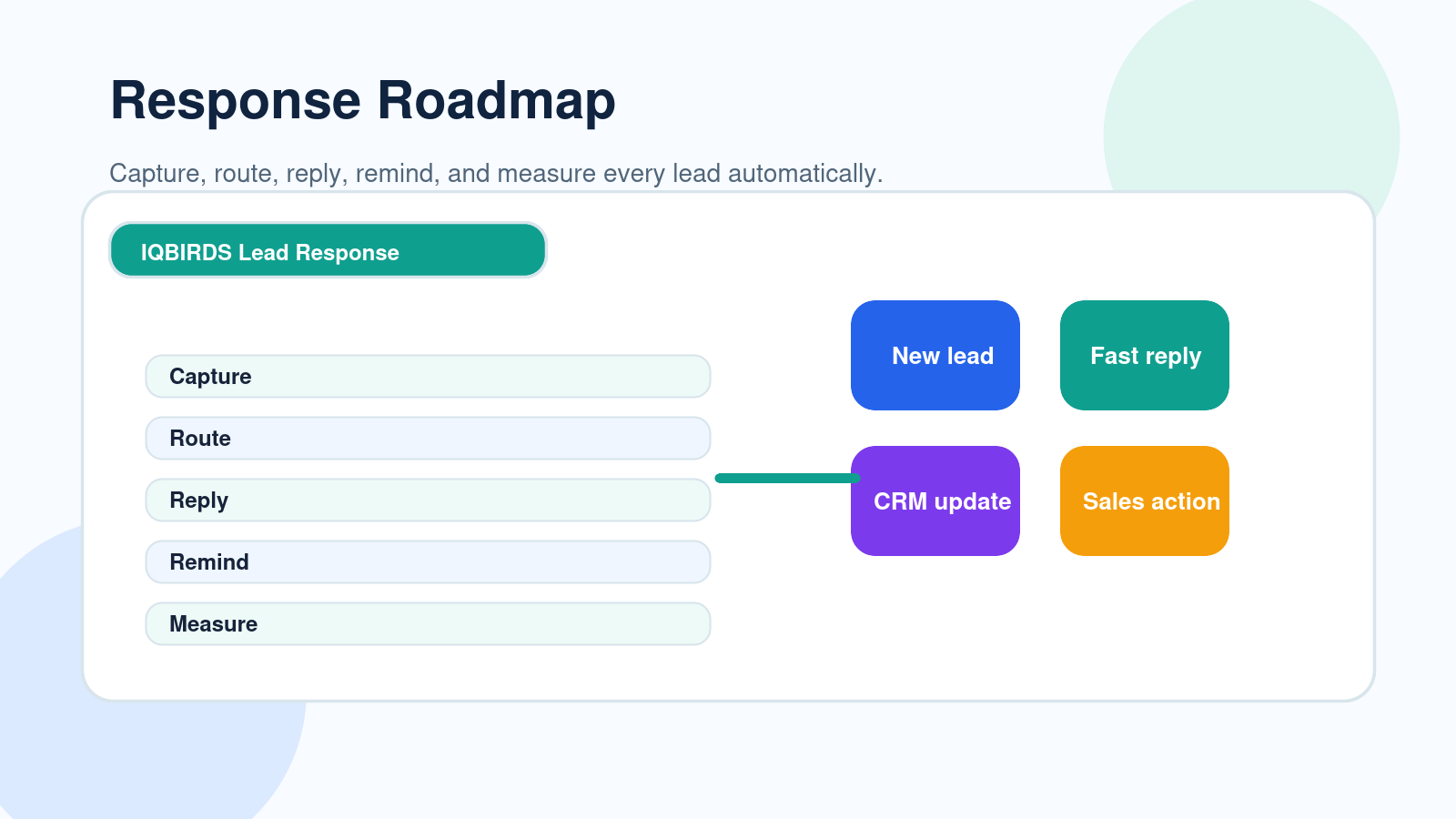
Lead response automation uses connected workflows, CRM rules, AI, and integrations to move a new lead from inquiry to follow-up with less manual effort.
It can start when someone fills out a website form, clicks a landing page offer, sends an email, submits a chat message, books a call, or contacts the business through another channel.
From there, the workflow can create or update the CRM record, identify the lead source, summarize the request, assign the lead, notify the right person, draft a reply, and schedule follow-up tasks.
That means the business is not waiting for someone to manually check the inbox or copy details into a spreadsheet.
Practical example
A roofing company runs ads for emergency repair services. A homeowner submits a form after a storm.
Without automation, the lead may sit in an email inbox until someone checks it. With lead response automation, the request can be flagged as urgent, routed to the right sales rep, added to the CRM, and followed by an immediate reply or call task.
The business does not need more ad spend to improve that opportunity. It needs faster action.
Why Slow Lead Response Wastes Marketing Budget
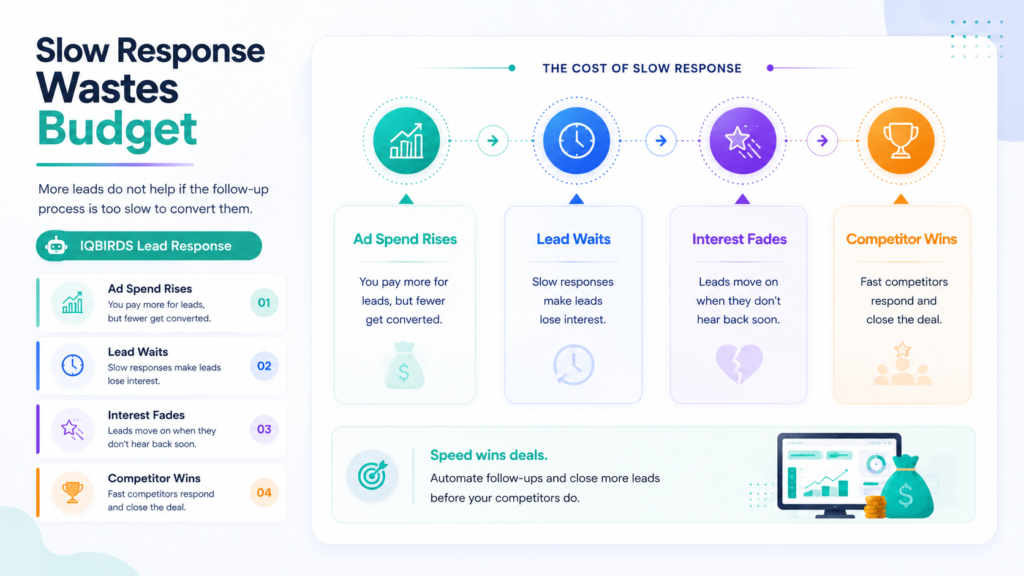
Marketing budget is wasted when the business pays to create demand but fails to handle that demand quickly.
This happens in many ways.
A lead is generated by paid ads, but no one responds for a full day. A website form is submitted, but it goes to a general inbox. A social media inquiry is seen by marketing, but sales never receives it. A lead is entered into the CRM, but no follow-up task is created.
Each gap reduces the chance of conversion.
Speed is important because interest is highest when the prospect first reaches out. The longer they wait, the more likely they are to search again, contact another provider, forget the reason they reached out, or assume your business is not responsive.
More budget can make the leak worse
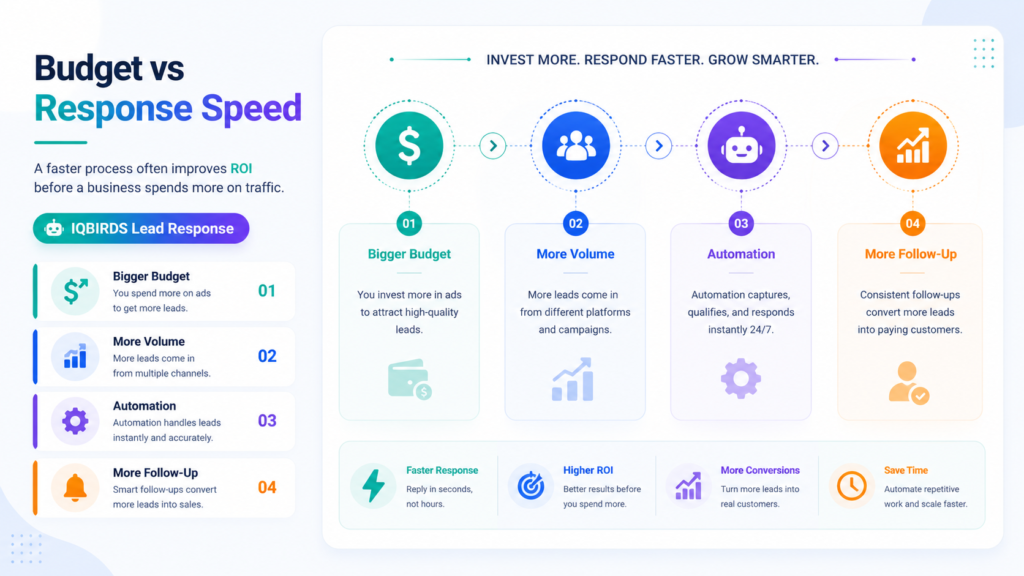
If the response process is broken, increasing marketing spend can make the problem larger.
More campaigns create more leads. More leads create more manual work. More manual work creates more delays. The business may blame marketing quality when the real issue is response speed and follow-up discipline.
Before increasing spend, businesses should check whether every lead is being handled quickly and consistently.
Bigger Marketing Budget vs Lead Response Automation
| Growth Area | Bigger Marketing Budget | Lead Response Automation |
|---|---|---|
| Main goal | Generate more traffic and inquiries | Convert more existing inquiries |
| Response speed | Does not fix slow follow-up | Triggers instant alerts, tasks, and replies |
| Lead handling | Can increase manual workload | Routes and organizes leads automatically |
| CRM quality | May create more messy records | Updates fields and source data more consistently |
| Sales focus | More volume can distract the team | Helps sales focus on the right next action |
| Cost control | Requires ongoing spend | Improves value from current lead sources |
| Best use | When the follow-up process already works | When leads are delayed, missed, or poorly routed |
The table shows why bigger marketing budgets should not be the first answer to every growth problem. More budget can help when the lead management process is already strong. But if leads are slow to receive a response, lead response automation often creates better value by improving the conversion potential of the leads already coming in.
Useful Research and Related IQBIRDS Reading
Lead management platforms and CRM systems are increasingly built around speed, automation, and connected customer data. HubSpot and Salesforce both focus on lead management workflows, Microsoft Dynamics 365 Sales supports sales process automation, and Google Analytics helps businesses measure important events that show how prospects interact with a website.
For related IQBIRDS reading, see How Businesses Waste Leads Without AI Automation, AI CRM vs Traditional CRM: What’s Actually Different?, and Is Your CRM Costing You More Than It Saves?.
If your business wants help improving lead response, explore AI Automation Services, AI CRM Development, and AI Integration Services.
Useful external references include HubSpot Lead Management, Salesforce Lead Management, Microsoft Dynamics 365 Sales, and Google Analytics Events.
Where Fast Lead Response Wins
High-intent website forms
When someone fills out a contact form, they are asking for help now.
Lead response automation can make sure the form submission creates a CRM record, assigns an owner, triggers an alert, and starts a follow-up workflow immediately.
Paid ad inquiries
Paid leads are especially important because the business already spent money to attract them.
If ad leads are slow to receive a response, the campaign may look worse than it really is. Faster follow-up can improve results without increasing ad spend.
Service requests
For service businesses, speed often affects trust.
If a customer needs a quote, repair, consultation, or appointment, the first business to respond professionally often has an advantage.
Multi-channel leads
Leads may arrive from forms, phone calls, chat, email, Facebook, LinkedIn, Google Business Profile, or referrals.
Automation helps bring these channels into one workflow so leads do not disappear in different inboxes.
Step-by-Step Guide to Improve Lead Response
Step 1: Map every lead source
List every place where leads enter the business.
This may include website forms, landing pages, ads, social messages, chatbots, phone calls, email, referrals, directories, webinars, and offline events.
Step 2: Measure current response time
Find out how long it takes for the first meaningful response to happen.
Do not guess. Check timestamps in forms, email, CRM activity, call logs, and messages.
Step 3: Define ownership rules
Every lead should have a clear owner.
Use rules based on location, service type, budget, urgency, source, company size, or sales territory.
Step 4: Automate capture and routing
Connect lead sources to your CRM or lead management system.
The workflow should create or update the contact, add the source, summarize the inquiry, assign the owner, and trigger the first action.
Step 5: Add first-response workflows
Create email drafts, SMS alerts, call tasks, internal notifications, and calendar reminders.
For important or sensitive leads, let AI prepare the response and let a human approve it.
Step 6: Build follow-up reminders
Fast first response is important, but follow-up still matters.
Use automation to create follow-up tasks if the lead does not respond, misses a call, opens an email, or reaches a certain pipeline stage.
Step 7: Measure conversion quality
Track response time, contact rate, booked calls, qualified opportunities, follow-up completion, cost per qualified lead, and conversion rate.
This shows whether lead response automation is improving the value of your marketing budget.
Key Benefits of Lead Response Automation
- Faster response to new inquiries
- Fewer leads lost in inboxes or spreadsheets
- Better use of existing marketing spend
- More consistent CRM updates and source tracking
- Improved lead routing to the right salesperson
- More reliable follow-up tasks and reminders
- Higher visibility into lead handling performance
- Less manual admin work for sales teams
- Better customer experience from the first interaction
- More confidence before increasing marketing budget
The biggest benefit is not only speed. It is control. Lead response automation gives the business a repeatable system for handling every inquiry instead of relying on memory and inbox checks.
Common Mistakes to Avoid
Spending more before fixing follow-up
If leads are already being missed, more marketing spend will not solve the root issue.
Fix response time and follow-up first.
Sending the same automatic message to everyone
Speed matters, but relevance still matters too.
Use automation to personalize based on source, service, urgency, and customer details.
Not connecting the CRM
If the CRM is updated manually later, the process is still fragile.
Connect lead sources directly to the CRM so records are created immediately.
Forgetting human review
Some leads need careful handling.
Use human approval for high-value leads, unusual requests, pricing questions, sensitive messages, and complex customer situations.
Measuring only lead volume
Lead volume is not enough.
Measure response time, contact rate, follow-up completion, booked calls, qualified opportunities, and revenue quality.
How IQBIRDS Helps Your Business
IQBIRDS helps businesses build lead response automation that improves speed without making the process feel robotic.
The process starts by mapping your lead journey. Where do leads come from? How fast are they answered? Who owns each lead? Which tools are disconnected? Which follow-ups are missed? Which messages need human review?
From there, IQBIRDS can help connect website forms, CRM systems, email, Google Sheets, calendars, chat tools, ad platforms, and reporting dashboards.
This can include automated lead capture, AI lead summaries, lead routing, CRM updates, email drafts, call tasks, follow-up reminders, nurture workflows, and pipeline reporting.
The goal is simple: help your business convert more of the leads you already generate before spending more money to replace missed opportunities.
FAQs
What is lead response automation?
Lead response automation uses workflows, CRM rules, AI, and integrations to respond to new leads faster through instant capture, routing, alerts, email drafts, task creation, and follow-up reminders.
Why does fast lead response matter?
Fast lead response matters because prospects are usually most interested when they first contact your business. Delayed follow-up gives competitors time to respond first and can make warm leads go cold.
Can lead response automation improve marketing ROI?
Yes. Lead response automation can improve marketing ROI by helping businesses convert more of the leads they already generate instead of spending more money to replace missed opportunities.
Is a bigger marketing budget always the answer?
No. A bigger marketing budget can create more leads, but it will not fix slow response, poor routing, missed follow-ups, or weak CRM processes. The response system should be improved first.
What should be automated in lead response?
Businesses can automate lead capture, CRM updates, lead routing, internal alerts, email drafts, follow-up reminders, lead scoring, source tracking, and nurture workflows.
Does automation replace salespeople?
Lead response automation does not replace salespeople. It helps sales teams respond faster, stay organized, and spend less time on manual admin work.
How can IQBIRDS help my business?
IQBIRDS can help your business map the lead journey, find response delays, connect your CRM and marketing tools, build lead response automation, and improve follow-up speed.
Conclusion
Bigger marketing budgets can help a business grow, but only when the lead response process is ready.
If leads are slow to receive a response, poorly routed, manually entered, or forgotten after the first touch, more budget may only create more waste.
Fast lead response gives your business a better foundation. It helps protect every inquiry, improve follow-up, strengthen CRM data, and increase the value of the marketing you already do.
Lead response automation makes that speed easier to maintain as volume grows.
Ready to Respond Faster to Every Lead?
If your business wants to stop wasting marketing budget and improve lead follow-up, IQBIRDS can help. Contact IQBIRDS for a free consultation and build lead response automation that helps your team act faster, stay organized, and convert more opportunities.
Need AI Automation?
Discover how IQBirds helps businesses automate workflows and build custom digital products.