
AI Automation
How AI Creates a 24/7 Sales Pipeline
Sales does not only happen during office hours anymore.
Customers search at night. Leads fill out forms on weekends. Prospects compare providers before your team opens the next morning. Someone may visit your website, read a service page, ask a question, and be ready for a next step while your sales team is offline.
If your sales process depends on someone manually checking an inbox, copying a lead into the CRM, assigning a task, and remembering to follow up, your pipeline has hours where it is not really working.
AI sales automation changes that.
It helps create a 24/7 sales pipeline by capturing leads instantly, updating CRM records, routing opportunities, drafting replies, sending alerts, triggering reminders, and nurturing prospects automatically.
This does not mean AI replaces your sales team. It means AI keeps the pipeline moving until the right person can step in.
This guide explains how AI creates a 24/7 sales pipeline, which sales tasks should be automated, where human review still matters, and how businesses can build a smarter sales process without making it feel robotic.
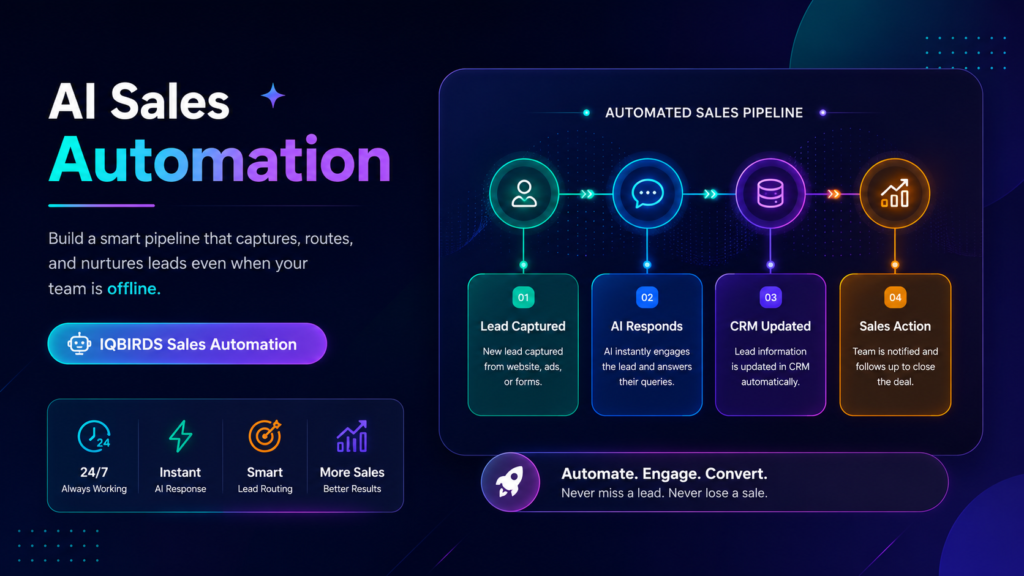
What a 24/7 Sales Pipeline Really Means
A 24/7 sales pipeline does not mean your team must be awake all night answering every message.
It means the sales process does not stop when the team is offline.
When a lead arrives, the system captures it. When a prospect asks a question, the workflow records it. When a form is submitted, the CRM updates. When a lead looks urgent, the right person gets notified. When follow-up is needed, the task is created automatically.
The pipeline keeps moving even when a salesperson is not manually pushing every step forward.
Why this matters
Speed and consistency are two of the biggest advantages in sales.
A lead is usually warmest when they first reach out. If your business waits too long, the prospect may contact another provider, lose interest, or forget the reason they submitted the form.
AI sales automation helps protect those moments. It makes sure every lead has a record, an owner, a next step, and a follow-up path.
How AI Sales Automation Works
AI sales automation connects sales tasks across your CRM, website forms, email, chat, calendar, spreadsheets, and reporting tools.
It starts with a trigger. A trigger could be a new form submission, a chat message, an email inquiry, a booked call, a proposal view, a CRM stage change, or a prospect replying to a follow-up.
Once the trigger happens, AI and workflow rules can move the process forward.
For example, a new lead submits a contact form. AI can summarize the request, identify the service needed, check urgency, create or update the CRM record, assign the owner, draft a reply, and create a follow-up task.
The salesperson arrives with context already prepared.
AI is strongest around repeated sales tasks
AI sales automation is not best used for every sales decision.
It is strongest when the task is repeated, time-sensitive, and easy to check. This includes routing leads, drafting first replies, updating CRM fields, summarizing messages, creating reminders, and preparing reports.
People should still handle trust, negotiation, strategy, pricing exceptions, and closing conversations.
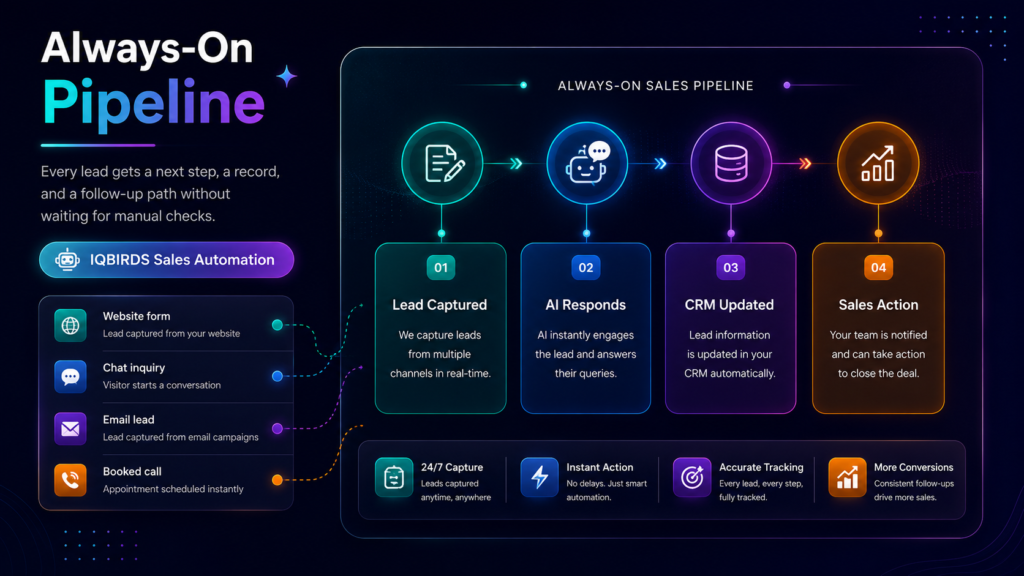
Where AI Creates an Always-On Sales Pipeline
Instant lead capture
The first step is making sure every lead is captured immediately.
AI sales automation can connect website forms, landing pages, email inboxes, chat tools, and ad campaign sources to the CRM.
This prevents leads from sitting in inboxes or spreadsheets until someone has time to check them.
Lead qualification and scoring
Not every lead needs the same response.
AI can help identify urgency, service interest, company size, location, source, message intent, and potential fit. This helps the sales team prioritize stronger opportunities.
The goal is not to let AI make every sales decision. The goal is to help the team see which leads need fast attention.
Automated routing
A lead should not wait because nobody knows who owns it.
AI sales automation can route leads based on service type, region, industry, deal size, urgency, or sales territory.
This helps prevent delays and confusion between marketing, sales, and operations.
First-response workflows
Fast first response matters.
AI can draft a personalized email, create a call task, trigger an internal alert, or send a helpful acknowledgment. For high-value or sensitive leads, a human can review the message before it goes out.
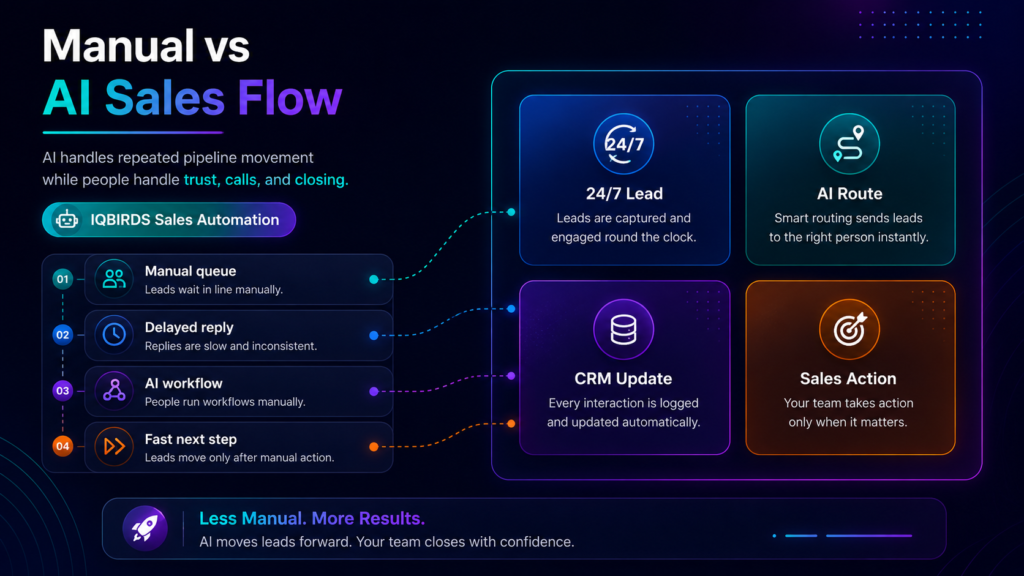
Manual Sales Pipeline vs AI Sales Automation
| Sales Pipeline Area | Manual Sales Process | AI Sales Automation |
|---|---|---|
| Lead capture | Lead waits in inbox, form tool, or spreadsheet | Lead is captured and logged instantly |
| Response time | Depends on team availability | Alerts, drafts, and tasks trigger immediately |
| CRM updates | Sales team updates records by hand | Fields, notes, and summaries update more consistently |
| Lead routing | Assigned manually or delayed | Routed by rules, source, service, or urgency |
| Follow-up | Can be forgotten after the first touch | Reminders and nurture steps trigger automatically |
| After-hours leads | Wait until the next working day | Captured, organized, and prepared for sales review |
| Sales focus | Team spends time on admin work | Team spends more time on conversations and closing |
The table shows why AI sales automation is not only about speed. It also creates structure. A manual pipeline depends on people remembering every small step. An automated pipeline makes sure leads are captured, routed, followed up, and measured more consistently.
Useful Research and Related IQBIRDS Reading
Sales and CRM platforms are increasingly focused on automation, AI support, and connected customer workflows. Salesforce, HubSpot, and Microsoft Dynamics 365 all include sales automation and CRM workflow features, while Microsoft Power Automate helps connect business processes across apps and services.
For related IQBIRDS reading, see Why Fast Lead Response Beats Bigger Marketing Budgets, AI CRM vs Traditional CRM: What’s Actually Different?, and Is Your CRM Costing You More Than It Saves?.
If your business wants help building a smarter sales pipeline, explore AI Automation Services, AI CRM Development, and AI Integration Services.
Useful external references include Salesforce Sales Automation, HubSpot Sales Hub, Microsoft Dynamics 365 Sales, and Microsoft Power Automate.
What AI Can Do While Your Team Is Offline
Capture website and landing page leads
AI sales automation can make sure every form submission creates a CRM record and a clear next step.
This is especially useful for businesses running ads, SEO campaigns, local service pages, or lead magnets that generate inquiries outside normal hours.
Prepare lead summaries
AI can summarize the lead’s message, service request, urgency, and possible fit.
This helps the sales team understand the opportunity quickly when they return.
Trigger reminders and tasks
Every lead should have a follow-up task.
Automation can create call reminders, email follow-up tasks, meeting preparation notes, and pipeline updates without manual setup.
Nurture prospects automatically
Some leads are not ready to buy immediately.
AI sales automation can start nurture workflows that send helpful information, reminders, case studies, booking links, or follow-up prompts based on the lead’s behavior and stage.
Where Human Sales Teams Still Matter
A 24/7 sales pipeline should not mean customers only interact with automation.
AI can keep the process moving, but people still matter for trust, discovery, objection handling, pricing, negotiation, relationship building, and closing.
High-value leads should often receive human review. Sensitive requests should not be handled by fully automatic messages. Complex sales conversations should stay with trained salespeople.
The strongest model is simple: AI handles the repeated pipeline movement, and people handle the moments where judgment and relationship matter.
Step-by-Step Guide to Build a 24/7 Sales Pipeline
Step 1: Map every lead source
List where your leads come from.
This may include website forms, landing pages, ads, chat, email, phone calls, social messages, referrals, webinars, directories, and booked calls.
Step 2: Define what happens first
Every lead source needs a first action.
Should the lead be added to the CRM, assigned to sales, scored, sent a reply, or placed into a nurture workflow?
Step 3: Connect your CRM
Your CRM should be the center of the pipeline.
Connect lead sources so records are created or updated automatically. Add source tracking so marketing and sales can see where opportunities come from.
Step 4: Add AI summaries and scoring
Use AI to summarize lead messages, identify urgency, and highlight buying signals.
This helps the sales team respond with better context.
Step 5: Automate routing and alerts
Set rules for ownership.
Leads can be routed by location, service type, industry, deal size, source, or urgency. Alerts should go to the right person immediately.
Step 6: Build follow-up workflows
Create follow-up tasks, email drafts, nurture sequences, and reminders.
This prevents leads from disappearing after the first response.
Step 7: Review and improve
Track response time, booked calls, follow-up completion, qualified opportunities, pipeline movement, and conversion rate.
Use the results to improve the workflow before expanding automation.
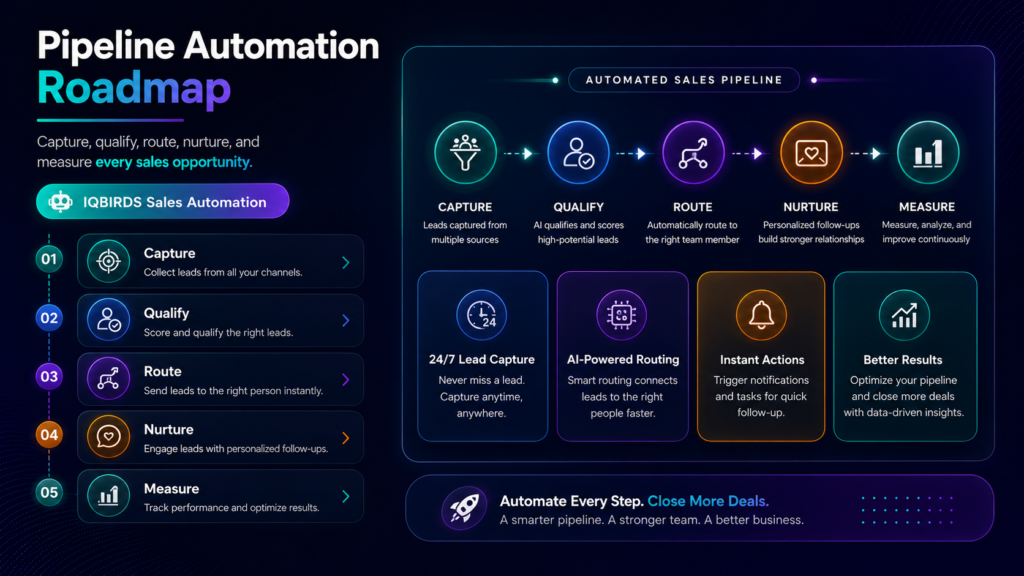
Key Benefits of AI Sales Automation
- Faster response to new leads
- Better handling of after-hours inquiries
- Cleaner CRM records and lead summaries
- More consistent follow-up reminders
- Smarter lead routing and prioritization
- Less manual sales admin work
- Better visibility into pipeline activity
- Improved lead nurturing for prospects not ready to buy
- More time for salespeople to focus on conversations
- A sales pipeline that keeps moving even when the team is offline
The biggest benefit is consistency. AI sales automation helps the business create a repeatable sales process instead of depending on memory, inbox checks, and manual CRM updates.
Common Mistakes to Avoid
Automating before mapping the sales process
If the pipeline is unclear, automation will create confusion.
Map the sales journey first. Then decide which steps should be automated.
Sending generic messages to every lead
Fast does not mean careless.
Use AI to personalize based on service interest, source, urgency, and customer details.
Ignoring CRM data quality
AI sales automation depends on usable data.
Clean key fields such as lead source, owner, service interest, stage, last contact date, and next step.
Removing human review from important leads
High-value leads and complex sales conversations need people.
Let AI prepare the work, but keep humans involved where trust and judgment matter.
Measuring only lead volume
Lead volume is not enough.
Measure speed, follow-up, booked calls, qualified opportunities, and pipeline conversion.
How IQBIRDS Helps Your Business
IQBIRDS helps businesses build AI sales automation that turns scattered leads into a more reliable 24/7 sales pipeline.
The process starts by mapping your current sales workflow. Where do leads come from? How fast are they answered? Which tools are disconnected? Where are follow-ups missed? Which tasks are repeated every day? Which leads need human review?
From there, IQBIRDS can help connect your CRM, website forms, email, Google Sheets, calendars, chat tools, ad platforms, and reporting dashboards.
This can include AI lead summaries, automated routing, CRM updates, first-response drafts, call tasks, follow-up reminders, nurture workflows, sales reporting, and human approval steps.
The goal is simple: keep your sales pipeline moving around the clock while your team focuses on the conversations that actually close deals.
FAQs
What is AI sales automation?
AI sales automation uses artificial intelligence, CRM workflows, and integrations to automate repeated sales tasks such as lead capture, routing, scoring, email drafts, follow-up reminders, CRM updates, and pipeline reporting.
How does AI create a 24/7 sales pipeline?
AI creates a 24/7 sales pipeline by capturing leads instantly, responding or drafting replies, updating the CRM, routing leads, triggering follow-ups, and nurturing prospects even outside normal business hours.
Can AI sales automation replace salespeople?
AI sales automation usually replaces repetitive sales admin tasks, not salespeople. It helps sales teams spend less time updating systems and more time building trust, handling objections, and closing deals.
What sales tasks should be automated first?
Start with lead capture, CRM updates, lead routing, follow-up reminders, first-response drafts, lead scoring, meeting reminders, and pipeline reporting.
Is AI sales automation useful for small businesses?
Yes. Small businesses can use AI sales automation to respond faster, manage more leads, keep CRM data cleaner, and follow up consistently without adding more admin work.
Does a 24/7 sales pipeline mean customers only talk to AI?
No. A 24/7 sales pipeline means AI keeps the process moving. People should still handle high-value conversations, complex questions, pricing, negotiation, and closing.
How can IQBIRDS help my business?
IQBIRDS can help your business map the sales pipeline, connect CRM and lead sources, build AI sales automation, add human review, and create a 24/7 workflow that supports your sales team.
Conclusion
A strong sales pipeline should not stop when the office closes.
AI sales automation helps businesses capture leads, update CRM records, route opportunities, draft replies, trigger reminders, and nurture prospects around the clock.
That does not remove the need for salespeople. It gives them a cleaner, faster, better-prepared pipeline to work from.
The best approach is to automate repeated tasks, keep human review where trust matters, and measure the result as the process improves.
Ready to Build a 24/7 Sales Pipeline?
If your business wants to respond faster, follow up better, and keep sales opportunities moving around the clock, IQBIRDS can help. Contact IQBIRDS for a free consultation and build AI sales automation that supports your sales team and improves pipeline performance.
Need AI Automation?
Discover how IQBirds helps businesses automate workflows and build custom digital products.