
AI Automation
AI Document Workflows Beyond Simple OCR
Many businesses still think document automation begins and ends with OCR. OCR is useful because it turns scanned pages, PDFs, and images into readable text. However, modern document work usually needs much more than text extraction. Intelligent document processing helps businesses classify documents, understand context, extract the right fields, validate information, trigger approvals, and move data into the systems where work happens.
That difference matters. A company may receive invoices, contracts, applications, intake forms, purchase orders, reports, IDs, receipts, and service documents every day. If the team only has raw OCR text, someone still has to read it, check it, copy values, update records, and send the next task. Intelligent document processing turns those documents into structured, reviewable, and connected workflows.

What Intelligent Document Processing Means
Intelligent document processing, often called IDP, combines document capture, OCR, machine learning, natural language processing, validation rules, workflow automation, and system integration. Instead of simply reading a page, the workflow tries to understand what kind of document it is and what should happen next.
For example, OCR may read text from an invoice. Intelligent document processing can identify that the document is an invoice, find the vendor name, invoice number, due date, tax amount, purchase order number, and total, then compare those fields with business rules. After that, it can send the invoice for approval or push the data into accounting software.
In practice, this makes document work less dependent on manual reading and copying. It also helps teams standardize how documents are handled across departments. Therefore, IDP is not just a data extraction tool. It is a document workflow strategy.
Why Simple OCR Is No Longer Enough
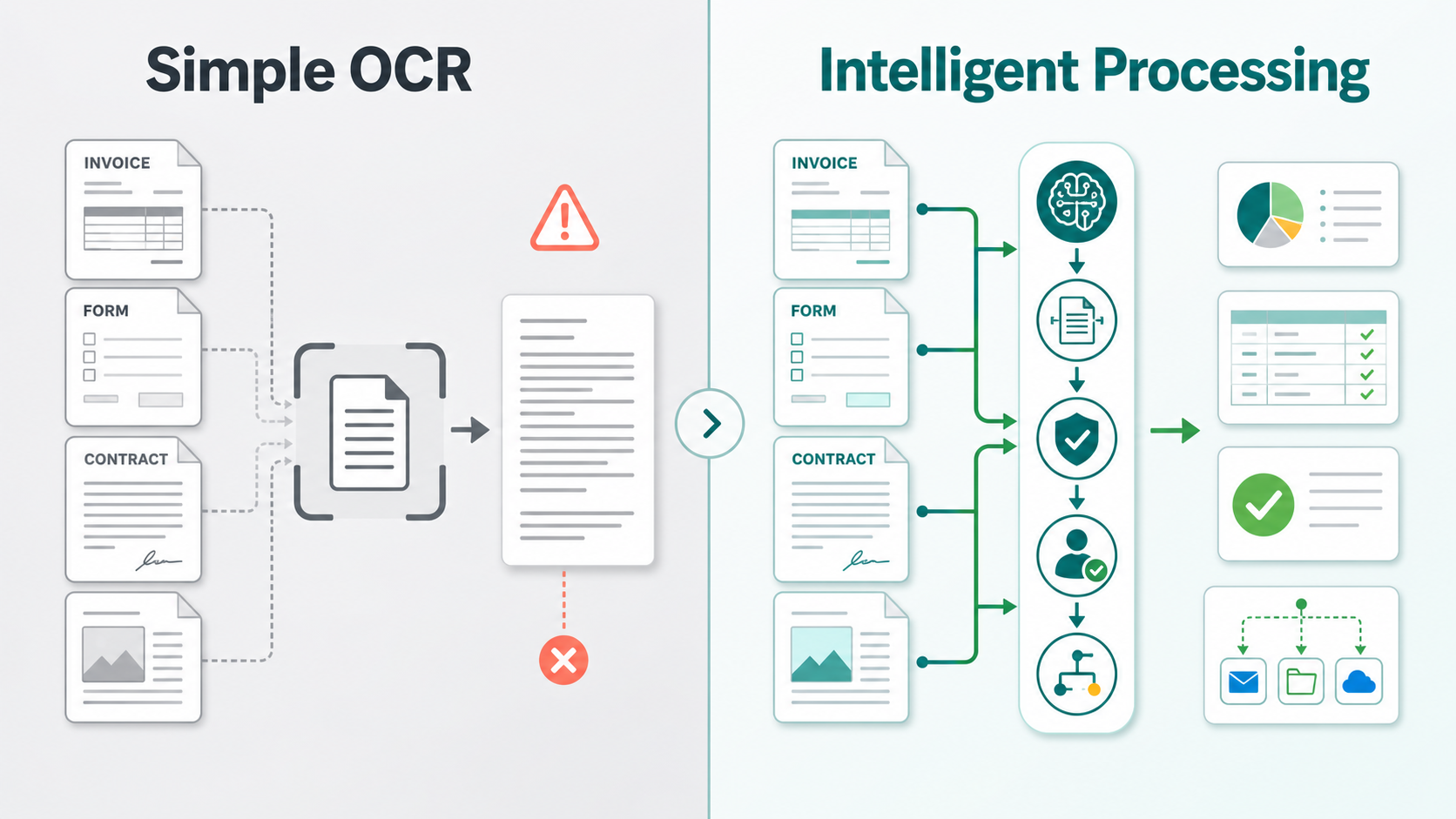
Simple OCR is helpful when the goal is to make a scanned page searchable. However, most business document workflows require decisions, checks, and follow-up actions. A PDF may contain text, but the business still needs to know which fields matter, whether the values are correct, who should approve the document, and where the data should go.
For example, a customer onboarding form may include contact details, service preferences, signatures, uploaded files, and notes. OCR can read the words, but it may not know which fields should update the CRM, which missing details require follow-up, or which account manager should be notified. Because of that, OCR alone often leaves the hardest part of the workflow with the human team.
As document volume grows, this gap becomes expensive. Staff spend time checking documents, fixing formatting issues, copying data into systems, and chasing approvals. Meanwhile, customers wait longer and managers lack real-time visibility into document status.
Core Parts of an AI Document Workflow
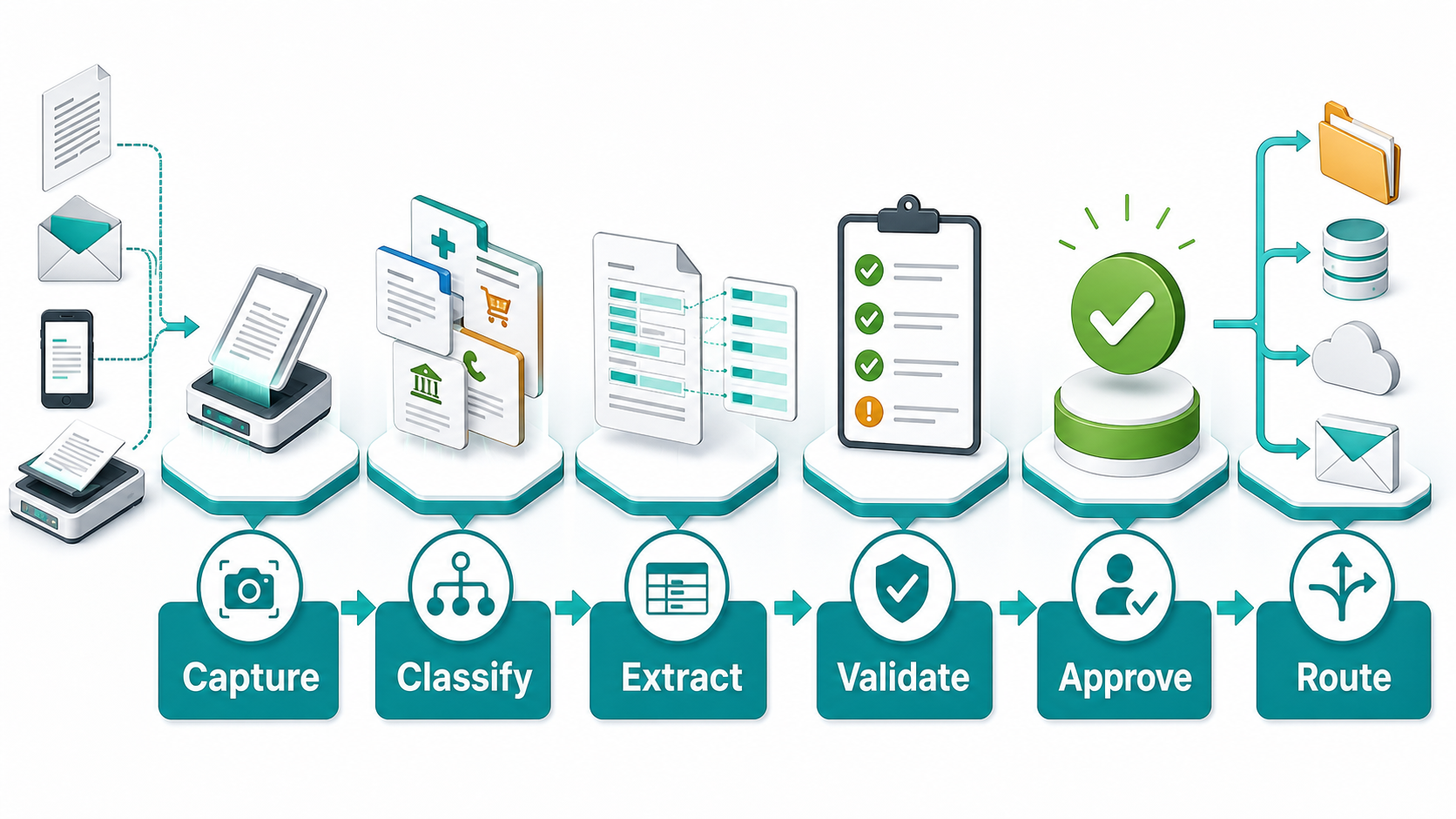
Document Capture
First, the workflow needs a reliable way to receive documents. That may include email attachments, website uploads, scanned files, shared folders, mobile photos, CRM uploads, or customer portals. Also, the capture step should record where the document came from and which business process it belongs to.
Classification
Next, the system identifies the document type. Is it an invoice, contract, claim, intake form, purchase order, ID document, or support attachment? Classification matters because each document type needs different fields, rules, approvals, and destinations.
Field Extraction
After classification, the workflow extracts the right information. For an invoice, that may be vendor, amount, tax, due date, and line items. For a contract, it may be party names, dates, obligations, renewal terms, and signature status. The goal is structured data, not a block of raw text.
Validation
Then, the workflow checks whether extracted data makes sense. For example, totals can be compared with line items, required fields can be checked, dates can be validated, and customer records can be matched. If confidence is low, the document should be sent to a person for review.
Approval and Routing
Finally, the document should move to the right next step. It may need approval, CRM update, accounting entry, ticket creation, document storage, customer follow-up, or reporting. This is where intelligent document processing becomes a business workflow instead of a scanning project.
Simple OCR vs Intelligent Document Processing
| Area | Simple OCR | Intelligent Document Processing |
|---|---|---|
| Purpose | Converts images or scans into text | Turns documents into structured data and workflow actions |
| Document type | Usually treats documents as text pages | Classifies invoices, forms, contracts, claims, and other types |
| Data output | Produces raw text that still needs review | Extracts named fields that can update business systems |
| Validation | Limited or manual | Checks confidence, required fields, business rules, and exceptions |
| Workflow | Often stops after text recognition | Routes documents to approvals, CRM, accounting, storage, or tasks |
| Business value | Makes documents searchable | Reduces manual work and speeds up document-driven processes |
The table shows the key difference. OCR reads what is on the page. Intelligent document processing helps the business decide what the page means and what should happen next. This is why IDP is useful for teams that handle high-volume or high-stakes documents.
How IDP Connects with Business Systems
Major cloud platforms now treat document AI as part of broader workflow automation. Microsoft Azure AI Document Intelligence focuses on extracting text, tables, structures, and key-value pairs from documents. Meanwhile, Google Cloud Document AI supports document processing for classification and extraction use cases.
Other providers describe the same shift. AWS explains intelligent document processing as using machine learning to process information from documents, while IBM describes IDP as a way to automate data extraction and document workflows.
For businesses, the practical question is not which tool sounds most advanced. The question is how document data connects with real systems. IQBIRDS can help connect document workflows with AI automation services, AI integration services, and AI CRM development. Related guides like scaling operations with connected AI workflows and AI automation checklist before deployment can also help teams plan safe rollouts.
Step-by-Step Guide to Building Better Document Workflows
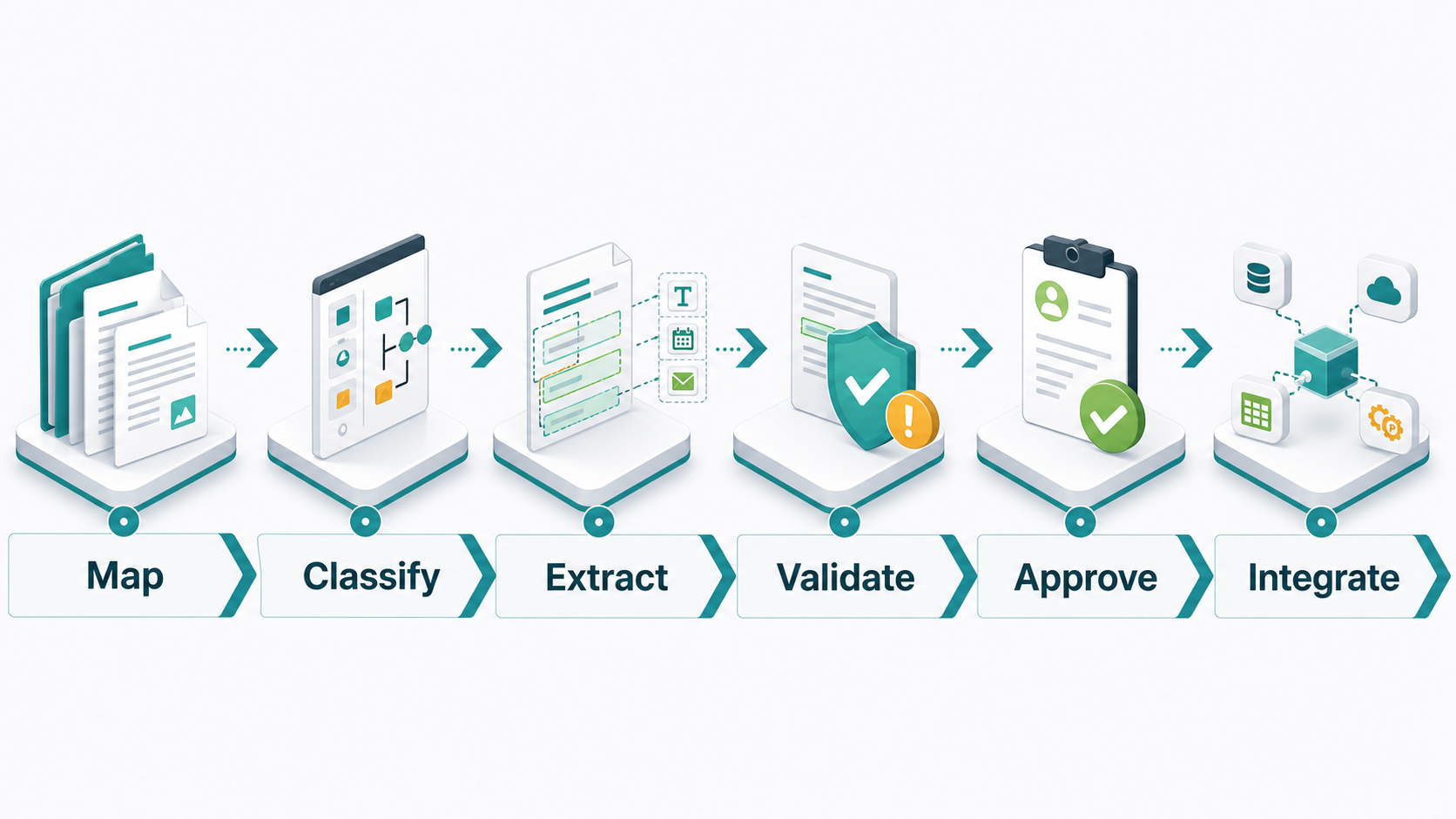
1. Map the Documents You Receive
Start by listing the document types your business receives most often. Include invoices, contracts, forms, customer uploads, receipts, claims, purchase orders, reports, or HR files. Also, write down where each document comes from and who currently handles it.
2. Identify the Data Fields That Matter
Next, define the fields that must be extracted from each document type. Keep this focused. For example, an invoice workflow may need vendor, invoice number, due date, total, tax, and purchase order number. Extra fields can be added later.
3. Define Validation Rules
Then, decide how the workflow should check the data. Required fields, confidence scores, duplicate checks, date rules, amount limits, and customer matching can all help catch issues before data enters another system.
4. Add Human Review for Exceptions
After that, decide when a human should review the document. Use review for low-confidence extraction, missing fields, unusual amounts, sensitive customer records, contracts, financial documents, and anything that may affect compliance or customer trust.
5. Connect the Workflow to Business Tools
Once the document data is validated, connect it to the right tools. That may include CRM, accounting software, shared drives, project management tools, help desks, email, approvals, or dashboards. This step turns extracted data into useful action.
6. Test with Real Documents
Finally, test the workflow with real examples. Use clear documents, messy scans, mobile photos, unusual formats, missing fields, and duplicate files. Because document quality varies, testing only perfect examples can create false confidence.
Key Benefits of Intelligent Document Processing
- Less manual data entry from invoices, forms, contracts, and uploads
- Faster document routing to the right team or system
- Cleaner structured data for CRM, accounting, support, and reporting
- Fewer missed approvals and fewer lost documents
- Better visibility into document status and bottlenecks
- More consistent validation rules across departments
- Safer handling of exceptions through human review
- More scalable document operations as volume grows
Common Mistakes to Avoid
Avoid treating OCR as the full solution. If the workflow still depends on people reading raw text and copying fields manually, the business has not solved the bigger document problem. Also, do not start with every document type at once. Choose one high-value workflow and improve it first.
Another mistake is skipping validation. Document workflows need rules for missing fields, low-confidence extraction, duplicate files, and unusual values. In addition, avoid sending every document straight into another system without review. Human approval is important when documents affect money, compliance, customer trust, or legal commitments.
Finally, do not forget integration. Extracted data is only useful when it reaches the right system and triggers the right next step. Without integration, IDP can become another isolated tool instead of a better workflow.
How IQBIRDS Helps Your Business
IQBIRDS helps businesses move beyond simple OCR by designing intelligent document processing workflows around real operations. The work starts by mapping document types, fields, approvals, exceptions, and system destinations. Then, IQBIRDS helps connect document AI with the tools your team already uses.
The team can support invoice workflows, customer intake forms, contract routing, CRM updates, support attachments, reporting dashboards, and approval processes. Also, IQBIRDS can add human review steps where document accuracy and business risk matter most.
This approach keeps intelligent document processing practical. Instead of only extracting text, the goal is to reduce manual work, improve data quality, speed up approvals, and help documents move through the business with more control.
Frequently Asked Questions
What is intelligent document processing?
Intelligent document processing uses AI, OCR, machine learning, and workflow automation to classify documents, extract fields, validate data, route approvals, and connect document information with business systems.
How is intelligent document processing different from OCR?
OCR mainly converts scanned images into text. Intelligent document processing goes further by understanding document type, extracting structured fields, checking data, triggering review, and sending information to the right system.
Which documents can be automated with IDP?
Common examples include invoices, contracts, purchase orders, receipts, claims, onboarding forms, customer intake forms, IDs, HR documents, support attachments, and compliance files.
Does IDP need human review?
Yes, especially for exceptions, low-confidence extraction, financial documents, contracts, missing fields, sensitive information, or workflows where mistakes could create business risk.
How can businesses measure document workflow success?
Measure processing time, manual hours saved, extraction accuracy, exception rate, approval speed, duplicate reduction, cost per document, and how quickly data reaches CRM, accounting, or reporting systems.
Should small businesses use intelligent document processing?
Yes, if they handle repeated document tasks. A small business can start with one workflow, such as invoice processing or intake forms, and expand after the process proves value.
How can IQBIRDS help my business?
IQBIRDS can help your business map document workflows, choose the right automation approach, connect tools, add validation rules, build approval steps, integrate data with CRM or accounting, and measure results.
Conclusion
AI document workflows have moved far beyond simple OCR. Reading text is useful, but businesses need documents to become structured data, verified decisions, approvals, updates, and actions. Intelligent document processing makes that possible.
Start with one document process. Map the document types, define the important fields, add validation, include human review, and connect the workflow to the systems your team already uses. Then, measure the results and expand carefully.
If your business wants to reduce manual document work and build smarter document workflows, contact IQBIRDS. The right intelligent document processing setup can help your team move faster, improve accuracy, and turn documents into real business action.
How to Decide Which Documents Need Review
Not every document needs the same level of human review. A simple receipt may only need a confidence check and basic validation. However, a contract, insurance claim, financial approval, or compliance document should usually have a stronger review path. The review rule should match the business risk.
A helpful approach is to create confidence bands. High-confidence, low-risk documents can move automatically. Medium-confidence documents can be sent to a queue for quick review. Low-confidence or high-risk documents should go to a trained person with the original file, extracted fields, and reason for review shown clearly.
This makes intelligent document processing easier to trust. The team does not need to approve everything, but it also does not need to let risky documents move without oversight. Over time, review data can show which document types are ready for more automation and which ones still need tighter control.
Need AI Automation?
Discover how IQBirds helps businesses automate workflows and build custom digital products.