
AI Automation
The Rise of AI-Native Business Operations
AI business operations are changing how companies organize work, make decisions, serve customers, and scale teams. In the past, many businesses used AI as an extra tool inside one department. Now the shift is bigger. AI is becoming part of the operating model itself.
An AI-native business does not simply add a chatbot to a website or use AI to write faster emails. It designs workflows so AI can help with intake, routing, decisions, summaries, follow-up, reporting, and improvement. People still lead the business, but AI supports the daily movement of work across departments. As a result, operations become faster, more connected, and easier to measure.

What AI-Native Business Operations Mean
AI-native operations mean building business processes with AI in mind from the start. Instead of asking, “Where can we add AI?” the better question becomes, “How should this workflow run if AI can help read, summarize, route, predict, draft, and update information?” That is a different way to think about operations.
For example, a traditional sales process may depend on someone checking a form inbox, copying lead details into a CRM, deciding who should follow up, and remembering to send the next message. An AI-native workflow can read the form, summarize the request, score the lead, update the CRM, assign the right person, draft a response, and create a follow-up task. Then a human reviews the important parts and manages the relationship.
This is why AI-native operations are not only about automation. They are about better coordination. The goal is to reduce delays, remove repetitive handoffs, improve visibility, and help people focus on work that requires judgment.
Why AI Business Operations Are Rising Now
AI Is Moving From Tools to Operating Models
Businesses used to adopt software one system at a time. CRM handled sales. Help desks handled support. Accounting tools handled invoices. Project tools handled delivery. However, AI works best when it can connect context across systems and support the whole workflow.
Microsoft’s Work Trend Index describes the rise of the Frontier Firm, where human-led teams work with AI agents and digital labor. The message is clear: companies are no longer thinking only about individual productivity. They are rethinking how work is structured.
AI Agents Are Creating New Workflow Possibilities
AI agents can complete multi-step tasks when the workflow is designed carefully. For example, an agent can classify a customer request, check CRM history, prepare a reply, create a ticket, notify a manager, and log the outcome. Because agents can move across steps, businesses need clearer rules, permissions, and approval points.
This is where many companies are still learning. AI agents can be powerful, but they are not magic. They need clean data, connected tools, defined responsibilities, and human review. Therefore, AI-native operations require better process design, not just stronger AI models.

Leaders Want Better Decisions, Not More Dashboards
Many companies already have dashboards, reports, and software subscriptions. Still, leaders often struggle to see what is really happening. Data may be spread across emails, spreadsheets, CRMs, forms, documents, and disconnected apps. AI-native operations help by turning scattered activity into clearer summaries, alerts, recommendations, and next steps.
IBM’s CEO research points to the same direction: executives expect AI to change decisions, operating models, and business performance. In practice, this means AI should support faster action, not just prettier reporting.
What Research Shows About AI-Native Operations
Several current reports show that businesses are moving from experimentation toward operational redesign. McKinsey’s State of AI research shows AI adoption continuing to expand across business functions. However, it also shows that the biggest value comes when companies redesign workflows, governance, talent, and measurement around AI.
Deloitte’s State of AI in the Enterprise research makes a similar point. Companies are moving more AI projects into production, but many still need stronger governance, operating model change, and business ownership. In short, AI-native operations are not built by buying tools alone. They are built by changing how work is designed and managed.
For growing businesses, this creates an opportunity. Smaller companies may not have complex legacy systems or layers of approval. Because of that, they can often build AI-native workflows faster than larger organizations if they start with the right operational priorities.
Traditional Operations vs AI-Native Operations
| Business area | Traditional operations | AI-native operations |
|---|---|---|
| Workflow design | Manual steps depend on people remembering what to do | AI helps trigger, route, summarize, and update work automatically |
| Data | Information sits in separate tools and spreadsheets | Connected systems create cleaner context for teams and AI agents |
| Decision-making | Managers wait for reports or ask teams for updates | AI surfaces insights, exceptions, and recommended next actions |
| Customer response | Follow-up depends on staff availability | AI-assisted intake and routing reduce delays and missed opportunities |
| Team capacity | Growth often requires more manual admin work | Routine tasks are automated so people focus on judgment and relationships |
| Governance | Rules are often informal or hidden in team habits | Approvals, permissions, and review points are designed into the workflow |
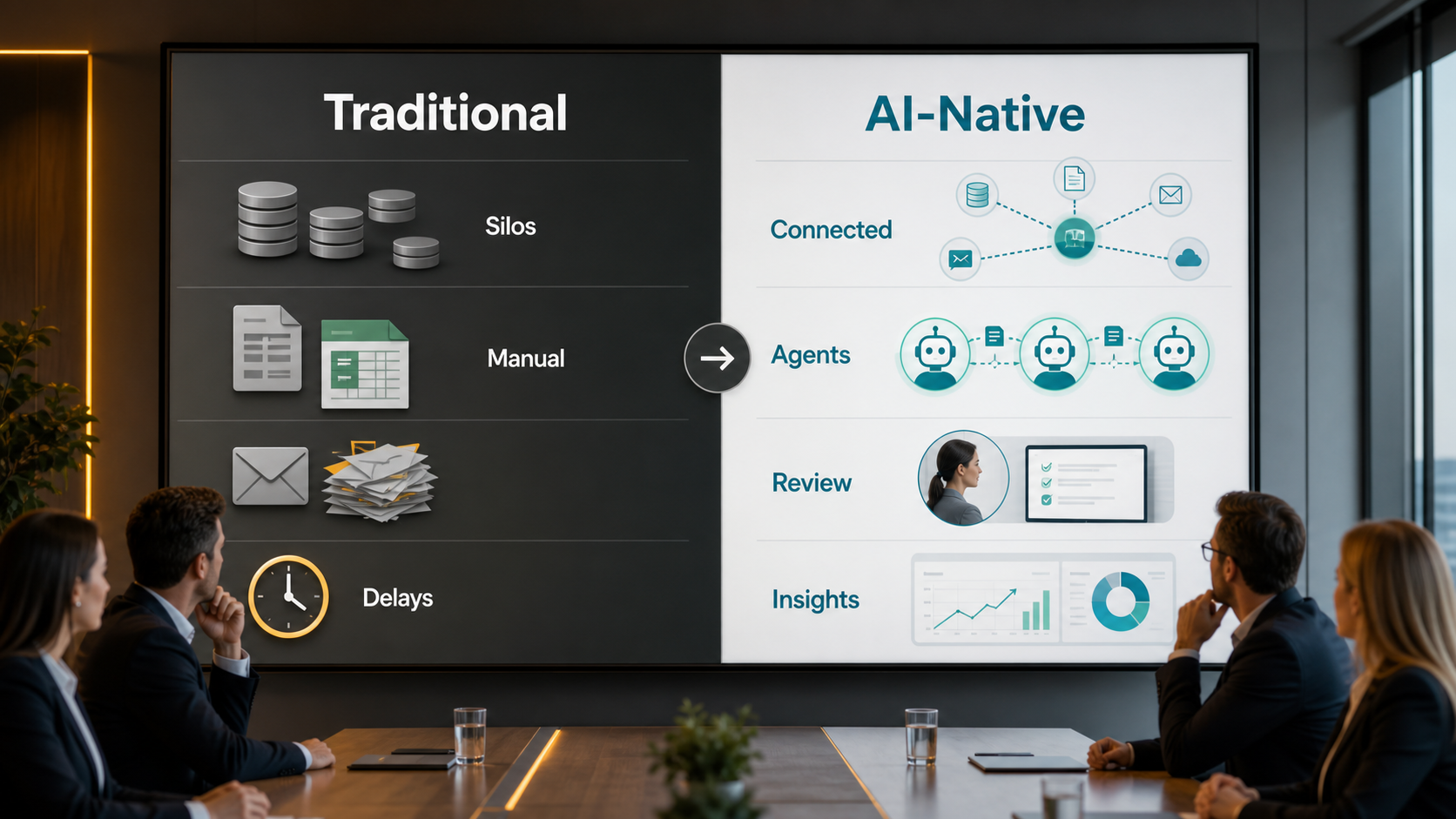
This table shows the real difference. Traditional operations often rely on manual coordination and disconnected information. AI-native operations use connected systems, automation, and human review to make work move more reliably. The goal is not to remove people from the business. The goal is to give people better systems around them.
Where Businesses Should Start
The best starting point is a workflow that already affects revenue, customer experience, or team workload. Lead intake, CRM updates, support routing, proposal creation, invoice reminders, customer onboarding, and management reporting are strong candidates. These workflows usually involve repeated steps, clear triggers, and measurable outcomes.
Services like AI automation services, AI integration services, and AI CRM development help businesses move from scattered tools to connected operations. For example, a form submission can become a qualified CRM record, an assigned task, a draft response, a calendar reminder, and a reporting event without manual copy-paste work.
Related workflows also matter. A business that improves contact form to customer automation can reduce response gaps. A team that understands AI agents vs AI assistants can choose the right level of automation for each process. At the same time, every workflow should include human review where judgment, risk, pricing, or customer trust matters.
How AI-Native Operations Change Team Roles
AI-native operations also change how teams think about their roles. Employees spend less time moving information from one place to another and more time reviewing exceptions, improving customer conversations, and making judgment-based decisions. This can make teams more valuable, not less valuable, when the change is handled clearly.
Managers also need to shift from checking every small task to designing better systems. They define rules, monitor quality, review edge cases, and decide which workflows are ready to scale. Meanwhile, business owners get a clearer view of where work slows down, where customers wait, and where automation can safely remove friction.
Step-by-Step Guide to Build AI-Native Business Operations
Step 1: Map the Current Workflow
Start by mapping how the work happens today. List the trigger, the people involved, the tools used, the decisions made, and the final outcome. This makes hidden delays and duplicate work easier to see.
Step 2: Identify Repeated Decisions and Tasks
Next, look for steps that happen again and again. These may include classifying requests, updating records, assigning tasks, sending reminders, summarizing conversations, creating reports, or drafting follow-ups. Repeated work is usually the best place to begin.
Step 3: Clean the Data Foundation
AI-native operations need useful data. Therefore, review your CRM fields, forms, customer records, product or service lists, team ownership, and reporting categories. Clean data helps AI produce better summaries, routing, and recommendations.

Step 4: Connect the Right Tools
After the data is clearer, connect the systems that hold the workflow together. This may include your website, CRM, email, calendar, support desk, project tool, accounting platform, and reporting dashboard. Integrations reduce handoffs and give AI more useful context.
Step 5: Add AI Assistance With Human Review
Use AI first for summaries, routing, drafts, alerts, and recommendations. Then add human approval points for sensitive decisions, customer-facing messages, pricing, refunds, legal issues, or strategic choices. This keeps speed and control in balance.
Step 6: Measure the Workflow
Finally, track response time, completion time, error rate, missed follow-ups, customer satisfaction, team workload, and revenue impact. AI-native operations should improve measurable outcomes, not just create more activity.
Key Benefits of AI-Native Operations
- Faster response times across sales, service, and support
- Less manual data entry and fewer missed follow-ups
- Cleaner CRM records and better reporting visibility
- More consistent workflows across teams and locations
- Better use of employee time for judgment and relationship work
- Clearer decision ownership, approvals, and governance
These benefits build on each other. When workflows are connected, data becomes clearer. When data is clearer, AI can support better actions. Meanwhile, people can spend more time on customers, strategy, quality, and improvement.
Common Mistakes to Avoid
The first mistake is automating a broken process. If roles, data, and handoffs are unclear, AI may only make the confusion faster. Map and simplify the workflow first.
The second mistake is choosing tools before defining outcomes. A business should know what it wants to improve, such as response speed, lead quality, reporting accuracy, or customer onboarding, before selecting platforms.
The third mistake is ignoring governance. AI-native operations need rules for permissions, approvals, data access, audit trails, and exception handling. Without those rules, successful automation can create new risk.
The fourth mistake is leaving employees out. Teams need to understand what AI will handle, what they still own, and how success will be measured. Otherwise, adoption slows and old habits return.
The fifth mistake is measuring only activity. More AI-generated messages or automated tasks do not always mean better operations. Measure quality, speed, customer impact, and business results.
How IQBIRDS Helps Your Business
IQBIRDS helps businesses design AI-native operations in a practical way. We start by understanding your workflows, tools, customer journey, CRM setup, and reporting needs. Then we identify where AI automation can reduce delays, improve visibility, and support your team without adding unnecessary complexity.
IQBIRDS can help with workflow mapping, CRM automation, AI integration, lead management, customer journey automation, approval workflows, reporting dashboards, and practical implementation. We can connect forms, emails, CRMs, calendars, support tools, and business apps so information moves cleanly between systems.
The goal is simple: build operations that help your business respond faster, serve customers better, and make decisions with clearer information. AI becomes useful when it supports the way your business actually runs.
Frequently Asked Questions
What are AI business operations?
AI business operations use artificial intelligence to improve workflows, decisions, reporting, customer service, lead management, and team coordination across the business.
What does AI-native mean in business?
AI-native means the business designs workflows with AI support built in from the start, instead of adding AI as a separate tool after the process is already created.
Do AI-native operations replace employees?
No. The best AI-native operations support employees by handling repetitive steps, preparing context, and improving visibility so people can focus on judgment, relationships, and quality.
Which workflows should businesses automate first?
Start with repeated workflows that affect revenue, customer experience, or team workload, such as lead intake, CRM updates, support routing, onboarding, invoice reminders, and reporting.
What tools are needed for AI business operations?
The tools depend on the workflow, but many businesses use a CRM, automation platform, AI model, forms, email, calendar, support desk, database, and reporting dashboard.
How can small businesses start with AI-native operations?
Small businesses can start with one workflow, such as contact form follow-up or CRM updates. After measuring results, they can expand into support, reporting, onboarding, or billing workflows.
How can IQBIRDS help my business?
IQBIRDS can map your workflows, connect your tools, build AI automations, improve CRM processes, create approval workflows, and design reporting dashboards that support AI-native business operations.
Final Thoughts
The rise of AI-native business operations is about more than adopting new tools. It is about building smarter workflows, clearer data, better decisions, and stronger customer experiences. Businesses that redesign operations around AI can move faster without losing human judgment.
Start with one important workflow, map the process, connect the right systems, add AI assistance, include human review, and measure the results. IQBIRDS can help you turn AI business operations into a practical system that supports real growth.
Need AI Automation?
Discover how IQBirds helps businesses automate workflows and build custom digital products.