
AI Automation
AI Automation Ideas for Professional Service Firms
Professional service firms grow through trust, expertise, and consistent client delivery. However, the daily work behind that trust can become heavy. Teams manage client intake, proposals, contracts, meetings, documents, approvals, billing, reports, and follow-ups. As a result, even strong firms can feel stretched before they are truly ready to hire.
AI professional services automation can help firms handle more client work without making the team feel buried in admin tasks. Instead of replacing expert judgment, AI can support the repeatable parts of the work: organizing requests, summarizing notes, preparing drafts, routing tasks, checking missing information, and reminding people when action is needed.
For this reason, the best starting point is not a random AI tool. It is a clear workflow. Once a firm understands where time is being lost, AI can improve the process in a practical and controlled way.

Why Professional Service Firms Need AI Automation
Professional service firms are different from simple transaction-based businesses. Clients are not only buying a product. They are buying knowledge, advice, accuracy, responsiveness, and confidence. That means every missed detail can affect the relationship.
At the same time, many firms still run important work through email threads, spreadsheets, shared folders, manual reminders, and personal memory. A consultant may track client notes in one tool. An accountant may collect documents through email. A legal office may rely on staff to chase signatures. Meanwhile, managers may pull reports from several disconnected systems.
Because of that, growth often creates operational pressure. More clients mean more details to remember. In addition, more projects mean more handoffs. As a result, more documents mean more risk of missing something. AI automation helps by creating structure around the work people already do.
What AI Professional Services Automation Can Do
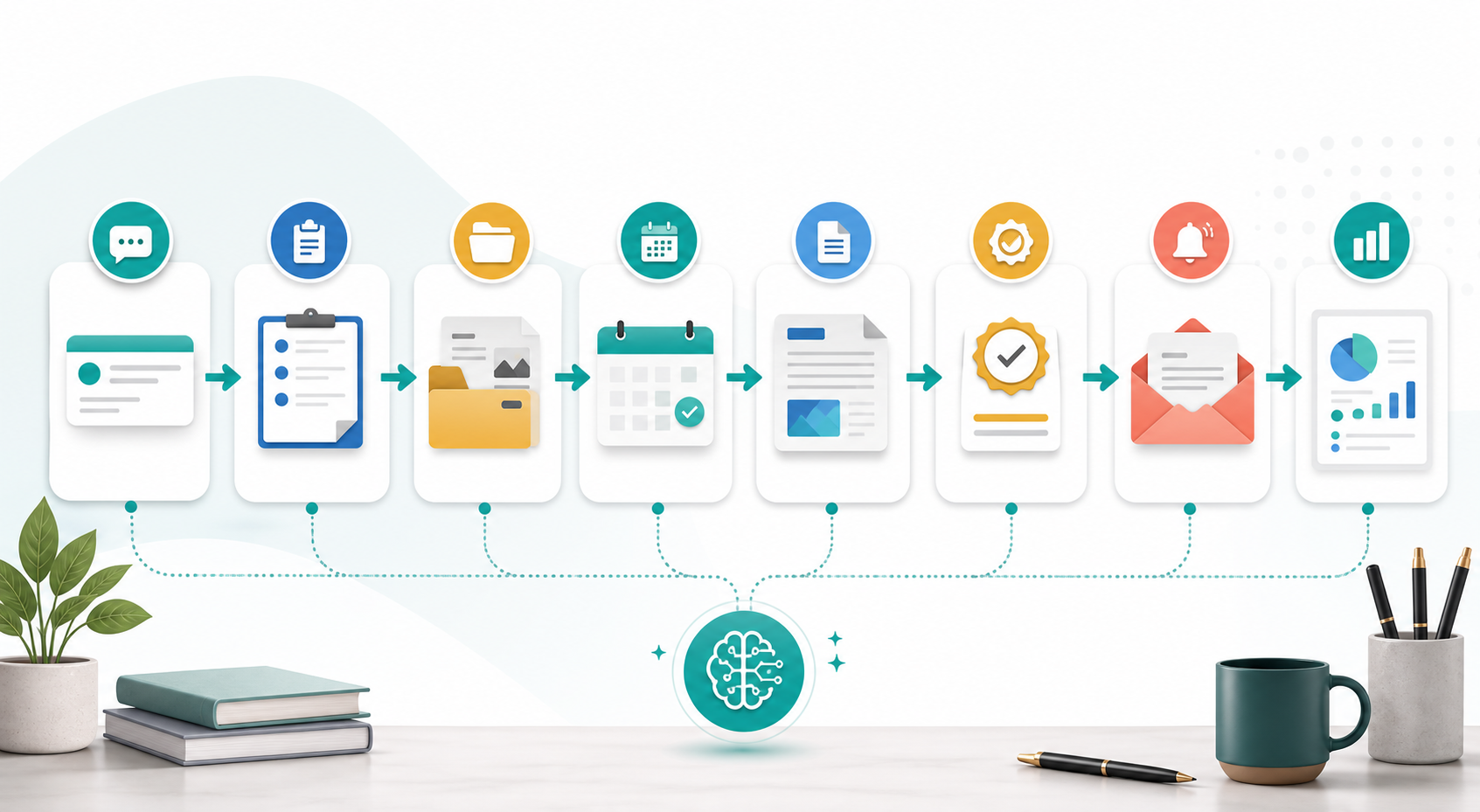
AI automation can support the full client journey, from first inquiry to ongoing account management. In practice, it can read incoming requests, identify the service need, create a CRM record, collect missing details, draft a reply, assign a task, summarize meetings, prepare document checklists, and generate simple reporting notes.
However, the goal is not to remove professionals from the process. A firm still needs experts to advise clients, review sensitive details, approve deliverables, and make final decisions. AI works best when it handles the repeatable coordination around expert work.
For example, an advisory firm can use AI to summarize discovery calls and create next-step tasks. For example, a bookkeeping firm can automate document reminders and missing-item lists. Meanwhile, a consulting firm can turn notes into proposal outlines. In addition, a legal support office can route intake forms to the right person for review.
Practical AI Automation Ideas for Professional Service Firms
Client intake and qualification
First, AI can help organize new inquiries. It can review a form submission, identify the service category, flag urgent requests, add the contact to the CRM, and notify the right team member. In addition, it can ask for missing information before the first meeting.
Appointment scheduling and reminders
Next, AI can support scheduling workflows. It can send reminders, confirm meetings, prepare agendas, and alert staff when a client has not completed a required step. As a result, fewer appointments start with confusion or missing context.
Document collection and review preparation
Many firms spend hours chasing documents. AI can send document checklists, track what has arrived, flag missing files, and organize materials before review. Meanwhile, professionals can focus on analysis rather than inbox cleanup.
Meeting notes and action summaries
After a meeting, AI can summarize key points, decisions, risks, and next steps. Then it can create tasks for staff, update the CRM, and prepare a client-friendly recap for review. This keeps client work moving even when the team is busy.
Proposal and engagement letter drafts
Professional firms often repeat similar proposal structures. AI can draft a first version based on service type, client goals, scope, timeline, and pricing rules. However, a person should review every proposal before it reaches the client.
Billing reminders and payment follow-up
In addition, AI can help with billing workflows. It can remind clients about unpaid invoices, notify staff before a payment becomes overdue, and summarize billing status by account. This reduces awkward last-minute chasing.
Client reporting and account reviews
Finally, AI can prepare client reporting notes by pulling data from CRM, spreadsheets, project tools, and dashboards. Account managers can then focus on interpretation, recommendations, and relationship-building.
Manual Professional Services vs AI-Assisted Workflows
| Area | Manual Process | AI-Assisted Process |
|---|---|---|
| Client intake | Staff reads every inquiry and creates records manually | AI sorts requests, creates CRM records, and flags missing details |
| Scheduling | Reminders depend on individual follow-up | Confirmations, reminders, and agendas can trigger automatically |
| Documents | Files are chased through email and tracked by hand | Document checklists and missing-item reminders keep work organized |
| Meeting notes | Action items may stay in personal notes | Summaries and tasks can be created for review after each meeting |
| Billing | Payment follow-up happens late or inconsistently | Billing reminders and account alerts run on clear rules |
| Reporting | Managers gather updates from several tools | AI can summarize activity, outcomes, and next steps in one place |
This table shows the real value of AI professional services automation. The improvement is not only speed. Most importantly, it is consistency. When every client moves through a clear process, the firm reduces missed details and gives professionals more time for thoughtful work.

Where These Ideas Fit in Your Current Tools
Professional service firms usually already have useful tools. They may use a CRM, shared documents, calendar software, email, spreadsheets, e-signature tools, billing platforms, and reporting dashboards. Therefore, the best AI plan often connects existing tools instead of replacing everything at once.
If your firm needs a connected setup, IQBIRDS can help with AI Automation Services, AI CRM Development, and AI Integration Services. These services are useful when client information, documents, reminders, and reports are spread across too many disconnected tools.
For more context, the IQBIRDS posts on AI for service businesses, automating Google Sheets, CRM, and email workflows, and removing repetitive business bottlenecks explain related workflows. External resources from IBM on intelligent automation, Microsoft Power Automate, Salesforce sales automation, and NIST AI risk management guidance also show why automation should be useful, connected, and governed carefully.
Why Data Quality and Permissions Come First
Before a professional service firm automates client work, it should review the quality of its data and the permissions around that data. AI can only organize, summarize, and route information well when the underlying records are clear. If client names, service types, deadlines, documents, and account stages are inconsistent, automation may create confusion instead of clarity.
In addition, professional firms should decide who can view, edit, approve, and export sensitive information. A simple permission plan protects client trust and helps staff understand which tasks AI can support safely. Therefore, data cleanup and access rules should be part of the first phase, not something the firm fixes after launch.
Step-by-Step Guide to Start With AI Automation
1. Map the client journey
First, document how a client moves from inquiry to onboarding, service delivery, billing, reporting, and renewal. Include every handoff, document, meeting, approval, and follow-up.
2. Identify repeated admin tasks
Next, list tasks your team repeats every week. Look for reminders, summaries, file requests, CRM updates, meeting notes, proposal drafts, and status reports.
3. Choose one high-value workflow
After that, choose one workflow that is easy to measure. Client intake, document collection, meeting summaries, and billing reminders are often strong starting points.
4. Organize your client data
AI works better when names, service types, client stages, deadlines, and required fields are clear. For this reason, clean up your CRM and define the information every workflow needs.
5. Add human review rules
Because professional services involve trust and risk, do not automate sensitive decisions without review. Keep people involved in advice, pricing, legal language, financial details, complaints, and final deliverables.
6. Test with real examples
Then test the workflow with real client scenarios. Check whether the automation uses the right context, sends the right reminders, creates the right tasks, and escalates the right exceptions.
7. Measure and improve
Finally, measure response time, document completion, meeting follow-up speed, billing delays, client satisfaction, and staff workload. Use those results to improve the first workflow before expanding.

Key Benefits for Professional Service Firms
- Faster response to new client inquiries
- Cleaner intake and better client records
- Fewer missed documents, reminders, and approvals
- More consistent meeting summaries and task creation
- Less manual billing follow-up
- Better reporting for partners and managers
- More time for expert advice and client relationships
- Stronger visibility across active client work
In short, AI automation helps professional service teams spend less energy managing the process and more energy delivering the expertise clients actually value.
Common Mistakes to Avoid
Automating before mapping the workflow
If the workflow is unclear, AI will repeat confusion faster. Instead, define the process, owners, required fields, and review steps before adding automation.
Using AI without client context
Generic automation can feel careless. Therefore, use client history, service type, preferences, deadlines, and account notes to guide every workflow.
Removing human review too early
AI can draft and organize, but professionals should review advice, claims, pricing, compliance-sensitive details, and client-facing deliverables.
Ignoring data security and permissions
Professional service firms often handle sensitive information. As a result, access rules, permissions, audit trails, and tool selection matter from the start.
Measuring activity instead of outcomes
Do not measure automation only by how many messages or tasks it creates. Measure whether it improves response time, accuracy, client satisfaction, and staff capacity.
How IQBIRDS Helps Your Business
IQBIRDS helps professional service firms turn scattered workflows into practical AI automation systems. The work often starts with mapping the client journey and identifying where staff spend too much time on repeated coordination.
From there, IQBIRDS can help with CRM automation, AI automation, tool integration, lead management, customer journey automation, human approval workflows, reporting dashboards, and practical implementation. The goal is to create automation that supports professionals rather than interrupting how they serve clients.
If your firm is ready to reduce admin work, improve follow-up, and keep client delivery consistent, AI professional services automation can be a strong next step.
Frequently Asked Questions
What does AI professional services automation mean?
It means using AI and connected workflows to support client intake, scheduling, document collection, meeting notes, task creation, billing reminders, reporting, and follow-up.
Which professional service firms can use AI automation?
Consulting firms, accounting firms, advisory firms, legal support offices, agencies, financial service teams, and other client-service businesses can use AI automation when workflows are repeatable and review rules are clear.
What should a firm automate first?
Start with a workflow that happens often and affects client experience, such as intake, document reminders, meeting summaries, proposal drafts, or billing follow-up.
Can AI replace professional judgment?
No. AI should support professionals with organization, summaries, drafts, and reminders. People should still review advice, strategy, sensitive details, and final deliverables.
How does AI improve client follow-up?
AI can monitor client stages, trigger reminders, draft follow-up messages, flag missing information, and alert staff when a client needs attention.
Is AI automation safe for sensitive client information?
It can be safe when the firm uses the right tools, access controls, review rules, and data policies. Sensitive workflows should be planned carefully before launch.
How can IQBIRDS help my business?
IQBIRDS can map your workflows, connect your tools, build AI automation systems, improve CRM processes, add human approval rules, and create dashboards that help your firm manage client work more consistently.
Conclusion
AI automation ideas for professional service firms should begin with practical workflows, not hype. Client intake, document collection, scheduling, meeting summaries, billing reminders, reporting, and follow-up are strong places to start.
The best systems keep expert judgment in the process while reducing repeated admin work around it. Start with one workflow, define the rules, connect the right tools, test with real examples, and measure the result.
If your professional service firm wants a clear and practical AI automation plan, contact IQBIRDS. We can help you build workflows that improve client experience, reduce manual work, and support sustainable growth.
Need AI Automation?
Discover how IQBirds helps businesses automate workflows and build custom digital products.